
FUTRConnect Panels: Agentic Knowledge Platform with Shared Generation
The board-native AI assistant is a convincing demo and a hard product. FUTRConnect was built to be both. SaaStoAgent delivered an agentic knowledge platform where scheduled generation, shared retrieval corpora, and a tool-using LangGraph ReAct agent are unified into one system — operating over generated panel artifacts, not raw documents, grounded in the user’s active board context on every turn.
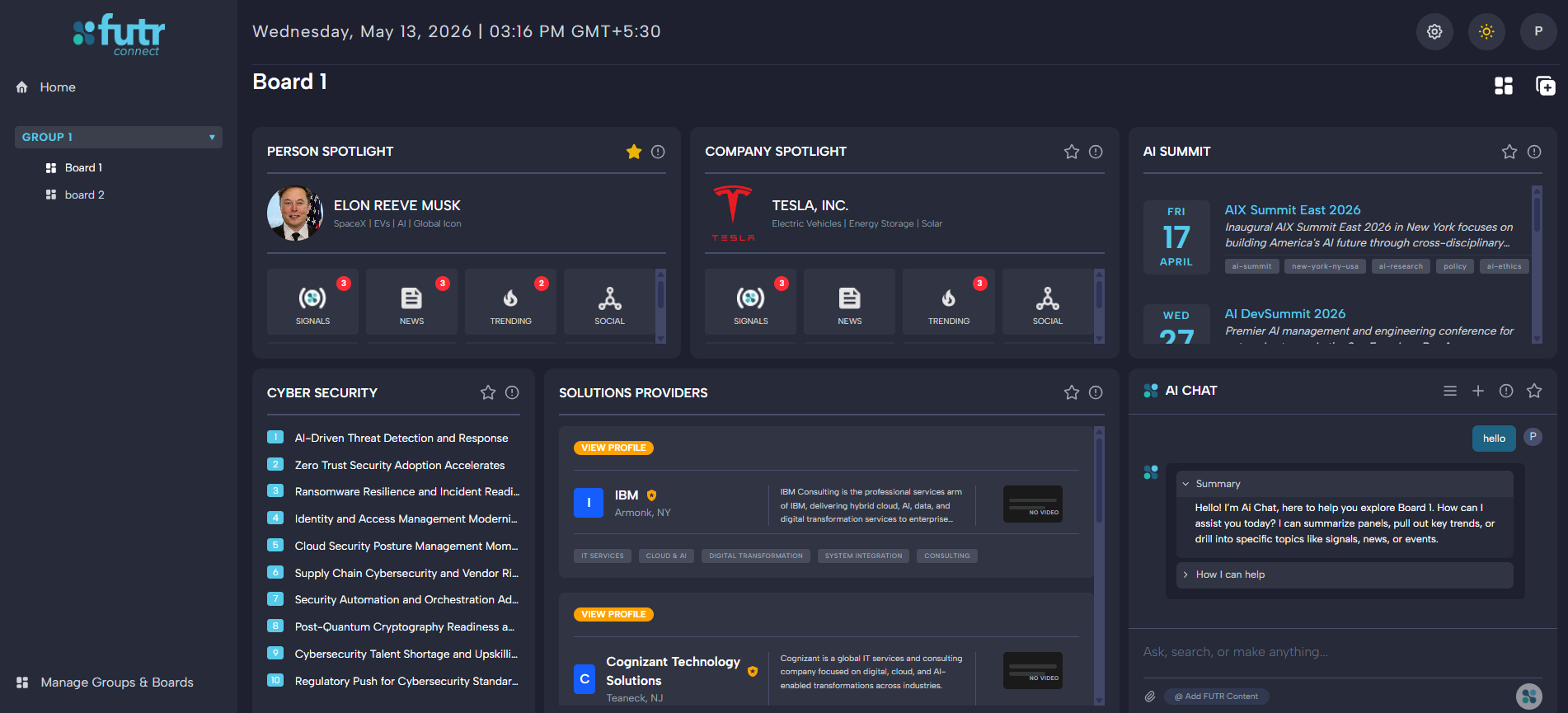
The Problem
A board-native AI assistant is a convincing demo and a hard product. The agent has to stay grounded in the user’s board context, retrieve across both shared knowledge and personal uploads, and return structured answers that the surrounding UI can render — without regenerating expensive content for every user, and without conflating corpora that have different ingestion strategies.
What the knowledge worker needs
- One coherent conversation that resolves references like “this board” or “that panel” to the active context
- Retrieval that reaches both shared panel knowledge and their own uploaded attachments
- Freshness without waiting on per-user regeneration of common content
- Structured, render-ready answers — not raw transcripts
What the platform must own
- Canonical generation of panel artifacts, deduplicated across users
- Embedding reuse so shared content is indexed once, not per user
- Async refresh discipline with distributed locks and adoption cadence
- Attachment ingestion with MIME-aware extraction and structure-aware chunking
- An audit and analytics surface that admins can review
System Boundary
The stack splits cleanly into a Next.js frontend and admin app, a FastAPI backend that owns generation, chat, and retrieval, and a Celery worker tier that drives scheduled work behind Redis. MongoDB is the system of record; Pinecone is the retrieval layer; OpenAI provides both generation and embeddings.
flowchart LR
    U[End Users] --> F[Frontend App\nNext.js + MST]
    A[Admins] --> AF[Admin App\nNext.js + TanStack]
    F --> API[FastAPI Backend]
    AF --> API
    API --> MDB[(MongoDB\nBeanie ODM)]
    API --> PC[(Pinecone\nVector Index)]
    API --> OAI[OpenAI\nLLM + Embeddings]
    API --> REDIS[(Redis)]
    REDIS --> CELERY[Celery Worker + Beat]
    CELERY --> API
What each layer owns
- Frontend app — board UX, chat UX, vault, inbox, insights, SSE consumption, MST state orchestration
- Admin app — operational visibility into chats and generated insights
- FastAPI backend — panel generation, chat runtime, retrieval tools, attachment ingestion, task orchestration
- MongoDB — schemas, panel versions, chat threads, attachments, task locks, interaction analytics
- Pinecone — shared panel vectors and per-user attachment vectors
- OpenAI — structured content generation, chat execution, embeddings
- Redis + Celery — scheduled generation, refresh application, background processing
Canonical Data Model — Shared vs. User-Owned
The most important architectural move is the separation between PanelSchema and PanelData as shared knowledge objects, versus UserPanel as user-owned presentation and refresh state. That split lets scheduled generation run once for shared content while per-user refresh logic selectively adopts the latest data later.
flowchart TD
    PS[PanelSchema\nsubject + type + prompt] --> PD[PanelData\nversioned generated output]
    PD --> POD[PanelObjectData\ndrawer-level objects]
    PD --> VEC[Shared Pinecone vectors\npanel_data namespace]
    PD --> SUM[Panel summaries]
    UP[UserPanel\nboard placement + refresh state] --> PD
    UPO[UserPanelObjects\nread state] --> POD
    CT[ChatThread] --> CM[ChatMessage]
    ATT[Attachment] --> ATTCH[AttachmentChunk]
    ATTCH --> AVEC[Attachment vectors\nuser namespace]
    CM --> IR[InteractionRecord]
Architectural consequence
The system generates knowledge once, embeds it once, and lets multiple UserPanel records consume it at different refresh cadences. That is the central cost and freshness optimization: shared generation produces artifacts that every user adopts, while personal attachments stay isolated in per-user namespaces.
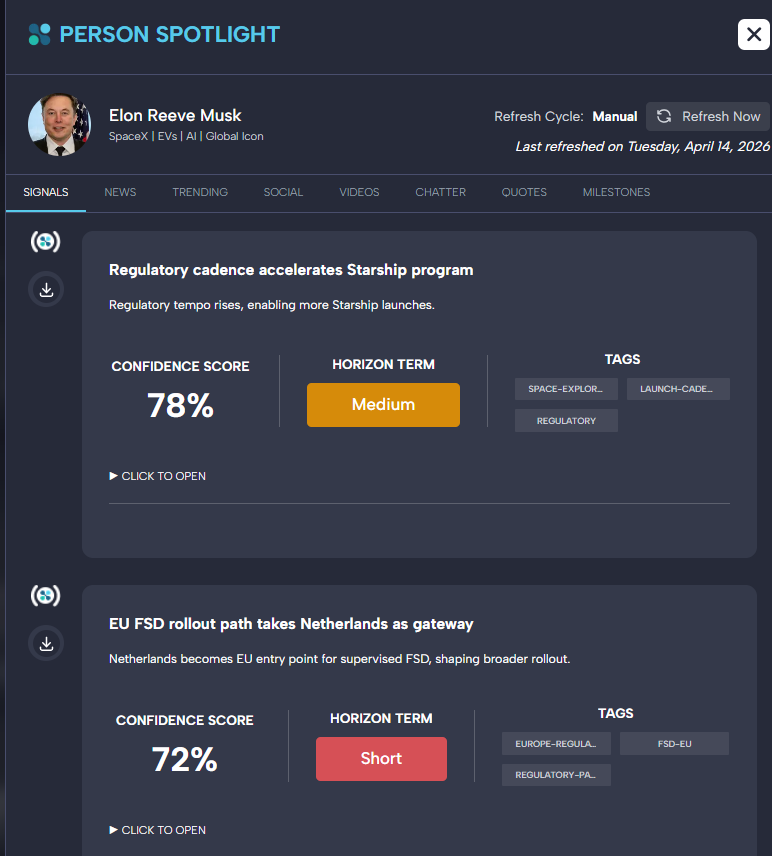
PanelObjectData rendered as drawer-level items — structured signals carry confidence scores, horizon terms, and tags inherited from the canonical artifact, not re-derived per user.Agent Runtime
The live agent is a LangGraph ReAct agent — tool-using, streaming, and context-aware — rather than a single fixed retrieval chain. Tool sets are mode-specific: home chat uses a wider toolset than panel-scoped chat, and the current user selection is grounded before execution so references like “this” and “it” resolve to the active board, panel, or attachment.
sequenceDiagram
    participant UI as Frontend Chat UI
    participant API as FastAPI Chat Endpoint
    participant AG as ChatAgentGraph
    participant TOOLS as Runtime Tools
    participant VDB as Pinecone
    participant MDB as MongoDB
    participant LLM as OpenAI Chat Model

    UI->>API: Send message + selected context + attachments
    API->>AG: Build runtime ChatContext
    AG->>AG: Ground user input with active selection
    AG->>LLM: Create ReAct run with prompt + tools
    LLM->>TOOLS: Invoke search / detail tools as needed
    TOOLS->>MDB: Load board, panel, thread, or summary state
    TOOLS->>VDB: Run vector search when retrieval is needed
    TOOLS-->>LLM: Return structured tool results
    LLM-->>AG: Stream text and tool events
    AG-->>API: Emit SSE event stream + final metadata
    API-->>UI: Render streamed tokens and final structured content
Runtime tools
search_futr_database— vector search across shared panel knowledgeget_board_overview— assemble the current board’s structured contextget_user_overview— surface user-level state for cross-board reasoningget_panel_details— inspect a specific panel’s generated contentget_drawer_content— drill into drawer-level structured objectssearch_attachments— vector search over the user’s attachment corpusget_attachment_details— fetch attachment metadata and chunks
Context and memory surfaces
- Runtime context is shaped by
ChatContextin the agent state module - Reference parsing resolves selection IDs into materialized board/panel/attachment state
- Conversation persistence sits in
ChatThread+ChatMessage, with assistant output normalized through the response parser
Dual RAG Pipelines
The retrieval layer is deliberately split between shared panel knowledge and per-user attachment knowledge. Panel content is highly structured and benefits from drawer-aware chunking; attachments are arbitrary files that need MIME-aware extraction and semantic chunking. The agent queries both corpora through tools, without conflating their ingestion strategies.
flowchart LR
    PS[PanelSchema] --> PD[PanelData Reconstruction]
    PD --> CH[Panel Chunking]
    CH --> EMB[OpenAI Embeddings]
    EMB --> PNV[Shared Pinecone Namespace]

    ATT[Attachment Upload] --> EX[Text Extraction]
    EX --> TS[Two-Stage Chunking]
    TS --> AEMB[OpenAI Embeddings]
    AEMB --> ANS[User Attachment Namespace]

    Q[Agent Query] --> RET[Tool Invocation]
    RET --> PNV
    RET --> ANS
    PNV --> RES[Retrieved Results + Metadata]
    ANS --> RES
Shared panel retrieval
- Shared ingestion orchestrated by the Pinecone pipeline service
- Namespace constant
panel_dataallows panel vectors to be reused across all users - Chunk generation is panel-aware:
panel_data_id,panel_type,drawer_type, and item-level positioning are preserved as metadata
Attachment retrieval
- File extraction handled by the text-extraction service with MIME-aware processing
- Two-stage chunking applies structure-aware splitting followed by semantic refinement
- Attachment chunks are persisted to MongoDB and indexed into a per-user Pinecone namespace, isolating personal corpora from shared knowledge
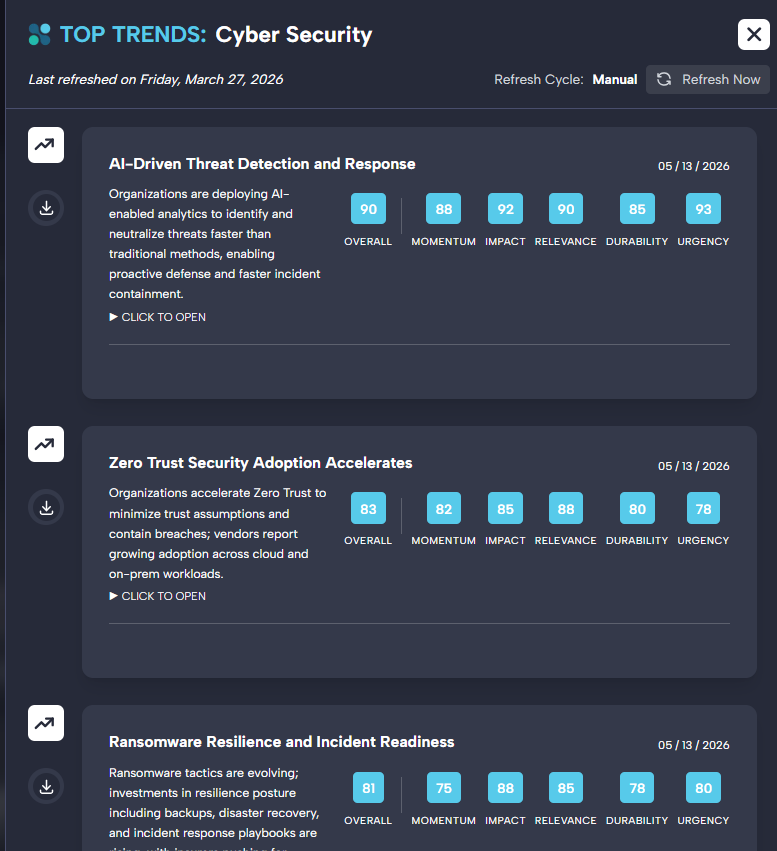
panel_data namespace — the same scored, structured trends are served to every user that adopts the panel, ranked from a single canonical artifact.Scheduled Generation and Freshness
The async pipeline is what turns this from a reactive chat feature into a continuously refreshed agentic platform. Celery Beat drives daily generation and due-refresh application; UserPanel create and update events fan out to a per-panel processing task. Each task acquires a distributed TaskLock before running.
flowchart TD
    BEAT[Celery Beat] --> DGEN[daily_generate_panel_data_task]
    BEAT --> DUE[apply_due_user_panel_refreshes_task]
    API[UserPanel create/update] --> PROC[process_user_panel_task]

    DGEN --> LOCK1[TaskLock acquire]
    DUE --> LOCK2[TaskLock acquire]
    PROC --> LOCK3[TaskLock acquire]

    LOCK1 --> SCHED[panel_scheduling.generate_all_panel_data]
    SCHED --> GEN[Generate PanelData + summaries + embeddings]

    LOCK2 --> APPLY[panel_scheduling.apply_due_refreshes]
    APPLY --> SWAP[Switch UserPanels to latest shared data]

    LOCK3 --> PPROC[panel_processing_service]
    PPROC --> UPSERT[Create or update user-facing panel state]
How the pipeline runs
Daily generation
Celery Beat fires the daily task. A TaskLock is acquired, then the panel scheduling service generates fresh PanelData, summaries, and embeddings for all shared panels.
Due-refresh application
A second Beat task identifies UserPanel records whose refresh cadence has elapsed and swaps them to the latest shared PanelData.
Per-panel processing
UserPanel create or update events trigger the processing service, which creates or updates user-facing panel state under its own distributed lock.
Enforcement notes
- Each task creates a fresh event loop and re-initializes the database binding — a deliberate choice to avoid loop-crossing errors in async Celery execution
- Distributed locks are implemented through a Mongo-backed
TaskLockmodel and task-lock service - Shared content generation and user-refresh application are separated, so a single expensive generation can be adopted by many users on their own cadence
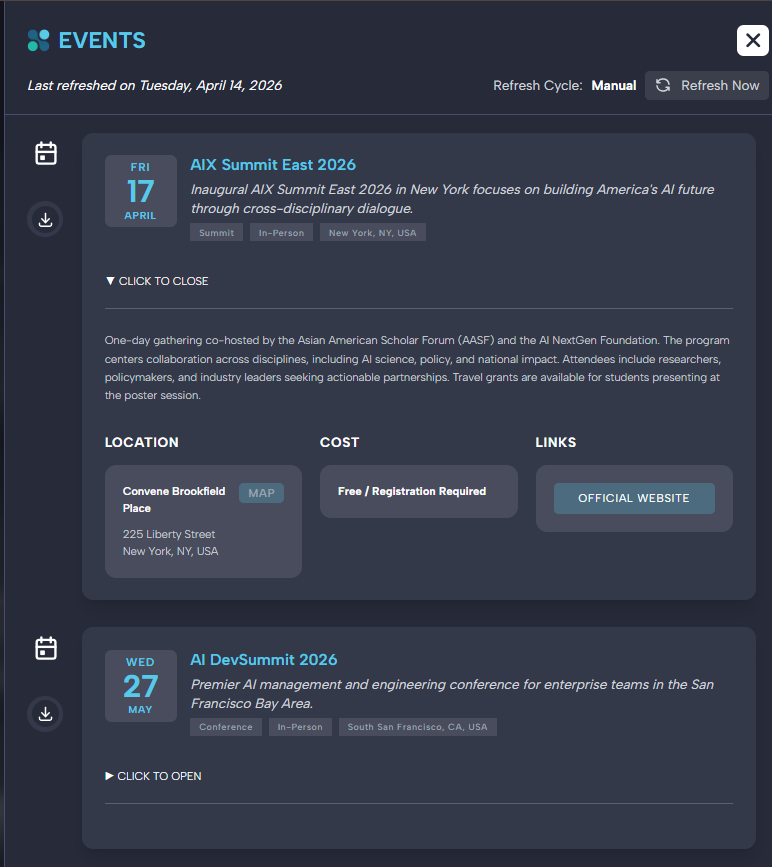
Last refreshed and Refresh Cycle are the user-facing surface of the generate-once / adopt-many pipeline.Prompting, Parsing, and Observability
The system distinguishes between structured content generation and chat-time agent prompting. Each has its own prompt surface, its own parsing path, and its own observability footprint.
Structured generation layer
Prompt registry and fallback handling live in the prompt template service. Panel-generation prompts are organized under a dedicated core/prompts directory, and generation services wrap OpenAI with typed output contracts.
Chat prompting layer
System prompt construction lives in the agent’s system_prompt module. Mode-specific prompts split between home chat and panel-scoped chat. Preset behavior is configurable via the AIChatPreset model.
Analytics and tracing
Assistant output is normalized into structured content by the response parser. Interaction-level analytics are recorded per turn via the analytics service and InteractionRecord. LangSmith tracing is wired into all execution paths.
AIChatPreset model allows per-context behavior tuning without prompt edits.Frontend and Admin Surfaces
The frontend is not a thin shell over chat. It is the user-facing operating layer over generated knowledge, retrieval, and notification flows — with a parallel admin app for operational visibility into chats and insights.
flowchart TD
    SIDEBAR[Sidebar Shell] --> AGENT[FutrAgent\nthread-based chat]
    BOARD[Board View] --> CHATP[ChatPanel\nboard-native AI chat]
    HOME[Dashboard] --> INS[InsightsDrawer]
    SIDEBAR --> INBOX[FutrInbox]
    SIDEBAR --> VAULT[FutrVault]
    AGENT --> STORE[BoardStore]
    CHATP --> STORE
    INBOX --> STORE
    VAULT --> STORE
    INS --> STORE
    STORE --> API[FastAPI APIs + SSE]
    ADMIN[Admin App] --> ACHAT[Chats Page]
    ADMIN --> AINS[Insights Page]
    ACHAT --> API
    AINS --> API
User-facing surfaces
- FutrAgent — global, thread-based chat in the sidebar shell
- ChatPanel — board-native AI chat scoped to the active board
- SSE streaming client — handles token and tool event streams
- AIMessageContent — renders structured assistant output
- FutrVault and FutrInbox — attachment and notification surfaces
- InsightsDrawer — drilldown for generated insights
Admin surfaces
- Chats page — chat-thread review and per-message inspection
- Insights page — generated insight monitoring and regeneration controls
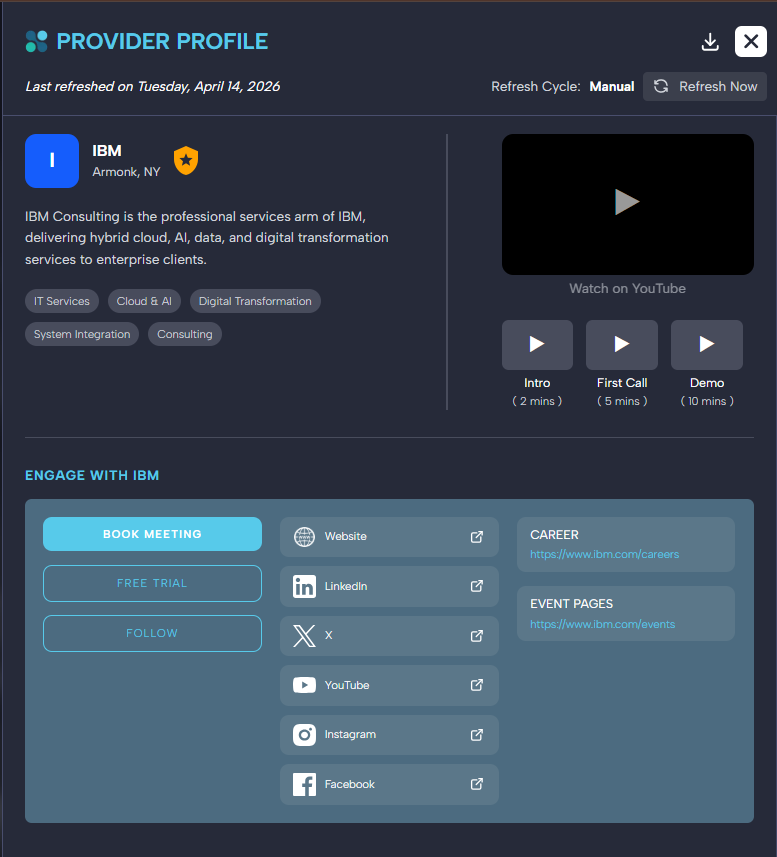
PanelObjectData — description, tags, media links, and engagement actions are inherited from the canonical artifact, not improvised per user.Technology Stack
The stack was chosen for what it allows the team to enforce — shared generation, dual-corpus retrieval, replayable async work — not just for what it allows the agent to do.
Outcome
FUTRConnect Panels behaves as one platform: scheduled generation produces shared artifacts once, the dual RAG layer keeps personal and shared knowledge cleanly separated, and the chat runtime grounds every turn in the active board context. The architecture is ready to expand — vault, inbox, insights — without rebuilding the agent.
For end users
- Grounded answers: structured, render-ready responses grounded in their board and active panels
- Attachments as knowledge: personal uploads treated as first-class retrievable knowledge alongside shared content
- Continuous freshness: fresh panel content without waiting on per-user regeneration
For the platform
- Generate-once / adopt-many: single expensive generation serves the entire user base at their own refresh cadence
- Separated corpora: dual-corpus retrieval without conflating shared and personal knowledge
- Full observability: per-turn analytics and LangSmith traces that admins can review end-to-end
- Expandable by design: vault, inbox, and insights surfaces extend the system without rebuilding the agent
Build an agentic knowledge platform that scales.
SaaStoAgent delivers agentic systems with shared generation, dual-corpus RAG, and tool-using chat — architected to be maintainable, observable, and ready to expand from the first release.