
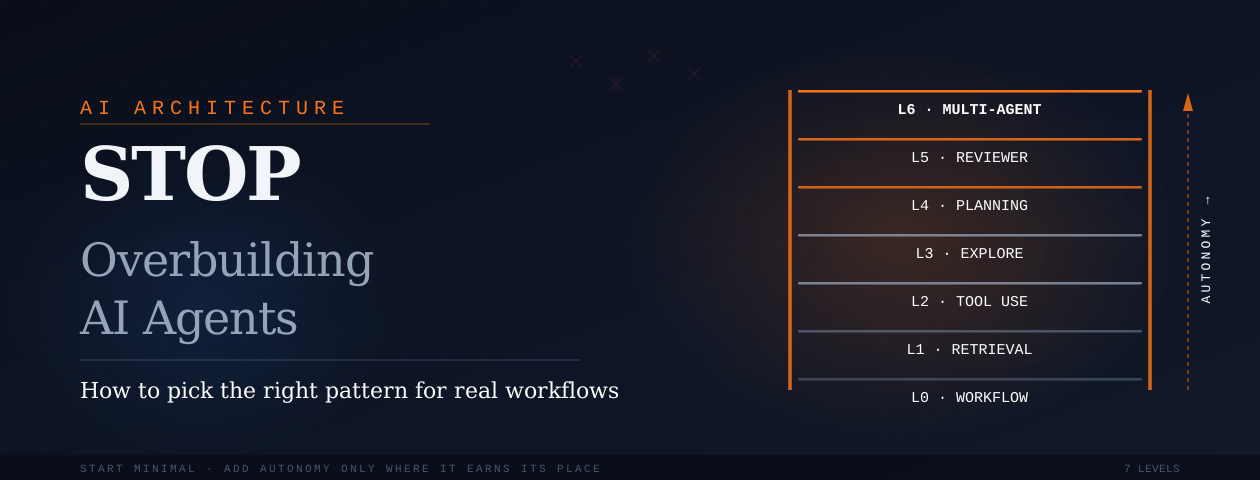
Stop Overbuilding AI Agents: How to Pick the Right Agent Pattern for Real Workflows
Most AI agent projects do not fail because the model is weak.
They fail because the system gives the model the wrong amount of freedom.
Sometimes a task only needs a clean workflow, but the team adds an agent. Sometimes one agent with three well-defined tools would work, but the team builds five specialist agents and a router. Sometimes the workflow needs a human approval step, but the system is allowed to act on its own.
That is where agentic design patterns become useful.
Not because they sound advanced.
Because they help teams answer a more practical question:
How much autonomy should this system actually have?
Google Cloud defines agent design patterns as architectural approaches for organizing system components, integrating the model, and orchestrating one or more agents to complete a workflow. Its guidance also frames agentic systems as useful when tasks need goal-focused behavior, external information, and some level of autonomy. (Google Cloud)
The important phrase is some level.
Not every AI feature needs a full agent. Not every agent needs tools. Not every tool-using agent needs planning. Not every planning agent needs multiple agents.
A good agent architecture should feel boring in the right places. The predictable parts should stay predictable. The flexible parts should be agentic.
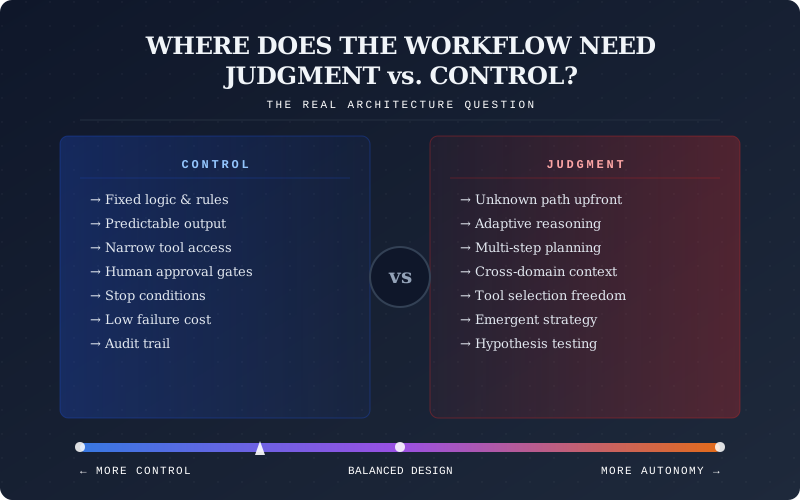
The Real Choice Is Not "Which Pattern Is Best?"
The better question is:
Where does the workflow need judgment, and where does it need control?
That one question changes how you design the system.
A support assistant that answers from product documentation does not need the same architecture as a DevOps agent that investigates failed deployments. A healthcare appointment assistant should not have the same freedom as a research agent preparing a market landscape. A sales ops assistant that updates CRM records needs stronger approval rules than a content assistant drafting a LinkedIn post.
Microsoft's orchestration guidance presents agent architectures as a spectrum of complexity and recommends using the lowest level of complexity that reliably meets the requirement. That matters because every added layer can introduce more coordination overhead, cost, latency, and failure points. (Microsoft Learn)
Databricks makes a similar point in its agent system design guidance. It describes a continuum that starts with simple LLM calls and deterministic chains, then moves toward single-agent and multi-agent systems only when the use case needs more model-driven decisions. (Databricks)
So instead of starting with:
"Should we use ReAct, planning, reflection, or multi-agent?"
Start with:
"What is the smallest system that can complete this task safely and reliably?"
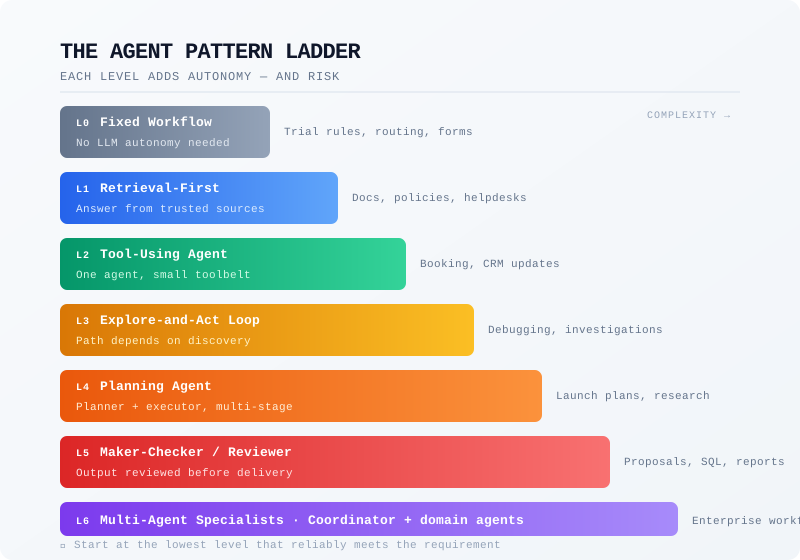
The Agent Pattern Ladder
Think of agent design as a ladder.
Each level adds more autonomy.
Each level also adds more risk, testing effort, cost, and debugging complexity.
The mistake many teams make is jumping too high too early.
Level 0: Keep It as a Workflow
Use this when the process is already known.
The system does not need to "think through" the next step. The business logic already defines what should happen.
Example:
A SaaS user requests a trial extension.
The system can follow fixed steps:
- Check whether the user has already used an extension.
- Check account type.
- Apply the extension rule.
- Notify the user.
- Log the action.
There is no need for an autonomous agent here. A normal backend workflow with a small LLM step for message generation may be enough.
Use this level for:
| Use Case | Why a Workflow Is Enough |
|---|---|
| Trial extension rules | The decision logic is already known |
| Basic account status checks | The system only needs to fetch and display data |
| Form validation | The rules are fixed |
| Static policy-based routing | The next step is already defined |
| Simple ticket categorization | The task is narrow and repeatable |
| Standard notification flows | The system only needs to trigger a message |
This is where many teams should start.
If the system already knows what to do, do not ask an agent to decide.
Level 1: Add Retrieval Before Autonomy
Use this when the user is asking questions, but the answer should come from trusted content.
Example:
"Does our current plan include API access?"
The assistant should search pricing docs, product policy, contract terms, or an internal knowledge base. It does not need to take action. It does not need to plan. It does not need multiple agents.
It needs good retrieval.
This is usually a retrieval-first assistant, not a full agent.
Use this level for:
| Use Case | What the System Should Do |
|---|---|
| Product documentation assistant | Find the right product answer |
| Internal knowledge search | Retrieve trusted internal information |
| Policy lookup | Ground the answer in approved policy |
| Sales enablement assistant | Pull messaging, case studies, or battlecards |
| Customer onboarding help | Explain setup steps from official docs |
| HR policy search | Answer from internal policy documents |
The system's job is not to be creative. Its job is to find the right source and explain it clearly.
This level is often enough for website chatbots, internal helpdesks, and product knowledge assistants.
Level 2: Give One Agent a Small Toolbelt
Use this when the assistant must do more than answer.
It needs to check something, update something, fetch live information, or call an API.
Anthropic's guidance makes a useful point: many agent systems are not mysterious. At their core, they are LLMs using tools, reading feedback from the environment, and continuing until the task is complete or a stop condition is reached. Anthropic also separates workflows, where code defines the path, from agents, where the model has more control over how the task gets completed. (Anthropic)
Example:
"I want to book a cardiology consultation for next week."
The agent may need to:
- Understand the patient's request
- Check doctor availability
- Match location or department
- Confirm available slots
- Book the appointment
- Send confirmation
This is no longer just retrieval. The assistant is interacting with real systems.
Use this level for:
| Use Case | Example Tool |
|---|---|
| Appointment booking | Check doctor availability |
| Order status checks | Fetch latest shipment status |
| CRM updates | Add lead notes or update lifecycle stage |
| Calendar scheduling | Find and reserve available slots |
| Refund eligibility checks | Check order, payment, and policy status |
| Lead qualification | Score and route inbound leads |
| Internal operations tasks | Create tickets or update records |
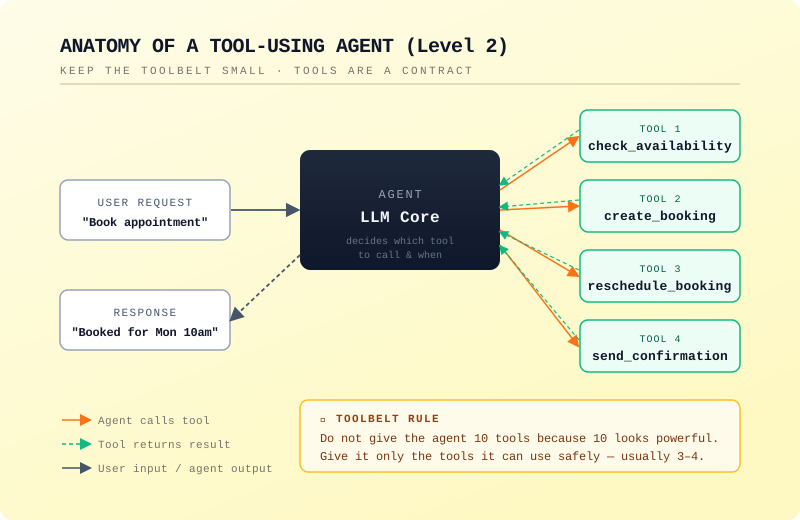
The key is to keep the toolbelt small.
A good first version may only need three or four tools:
check_availabilitycreate_bookingreschedule_bookingsend_confirmation
Anthropic's tool-use guidance frames tools as a contract between deterministic systems and non-deterministic agents. That is a useful way to think about it: the tool should be predictable, while the agent decides when and how to use it within clear limits. (Anthropic)
Do not give the agent ten tools because ten tools look powerful.
Give it the few tools it can use safely.
Level 3: Add an Explore-and-Act Loop
Use this when the agent cannot know the full path upfront.
The next step depends on what it discovers.
Example:
"Find out why yesterday's deployment caused payment failures."
The agent may need to:
- Check deployment history
- Inspect logs
- Compare error rates
- Look at payment gateway responses
- Review recent environment changes
- Identify a likely cause
- Suggest a rollback or fix
The path is not fixed. The agent has to investigate.
This is where an explore-and-act loop makes sense. The agent looks at something, learns from it, chooses the next action, and continues until it has enough evidence.
Use this level for:
| Use Case | Why Exploration Helps |
|---|---|
| Debugging production issues | The cause is not known upfront |
| Investigating support escalations | The agent may need several sources |
| Exploring analytics data | The next query depends on the previous result |
| Searching across logs and tickets | Evidence may be scattered |
| Technical root-cause analysis | The agent needs to test hypotheses |
| Open-ended research | The useful path emerges during search |
But this level needs limits.
Without limits, the agent may keep searching, repeat tool calls, or spend too many tokens. OpenAI's agent guide describes agents as systems with a model, tools, and instructions, and notes that orchestration often runs in a loop until a stop condition is reached. (OpenAI)
A practical setup should include:
- Maximum number of steps
- Maximum tool calls
- Clear stop conditions
- Tool-call logging
- Confidence threshold
- Human escalation path
The agent should explore, but not wander.
Level 4: Split Planning from Doing
Use this when the work has multiple stages and the agent should organize the job before starting.
Example:
"Create a launch readiness plan for our new AI support agent."
A useful system should not immediately write the final plan. It should first break the job into stages:
- Product readiness
- Knowledge base readiness
- Integration readiness
- QA and evaluation
- Support team handover
- Launch communication
- Post-launch monitoring
Then it can work through each stage.
LangChain's planning-agent guidance describes plan-and-execute systems as separating the planner from the executor. The planner creates a multi-step plan, and execution happens step by step, often with more focused context for each subtask. (LangChain)
Use this level for:
| Use Case | Why Planning Helps |
|---|---|
| Product launch plans | The work has several known stages |
| Research reports | The agent should structure the investigation |
| Migration planning | Dependencies matter |
| Content campaign planning | Strategy comes before execution |
| Implementation roadmaps | The output needs sequencing |
| Market research | The agent should define comparison areas |
| Technical architecture drafts | The system needs organized reasoning |
Planning is useful when the work has a natural shape.
It is not useful when the task is tiny.
Do not use a planner to answer:
"What is our refund policy?"
Do use a planner for:
"Build a 30-day rollout plan for a new refund automation workflow across support, billing, and success teams."
Level 5: Add a Reviewer Before the Output Leaves
Use this when the first answer should not be trusted automatically.
Some outputs need a second pass before they reach a user, customer, or production system.
Example:
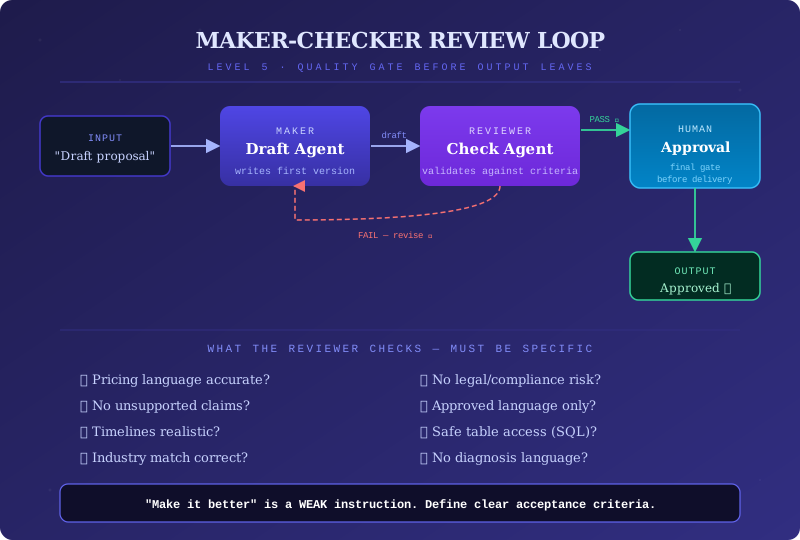
A sales proposal assistant drafts a proposal for an enterprise prospect.
The first agent writes the proposal.
A second reviewer checks:
- Is the pricing language accurate?
- Are unsupported claims removed?
- Are the promised timelines realistic?
- Does the proposal match the prospect's industry?
- Does it avoid legal or compliance risk?
This does not always require a full multi-agent system. Sometimes it can be a simple maker-checker loop.
Microsoft's orchestration guidance describes a maker-checker loop where one agent proposes an output and another checks it against defined acceptance criteria. (Microsoft Learn)
Use this level for:
| Use Case | What the Reviewer Should Check |
|---|---|
| Sales proposals | Claims, pricing, and commitments |
| Client-facing reports | Accuracy and tone |
| SQL generation | Schema, filters, and safe table access |
| Release notes | Accuracy against shipped changes |
| Compliance-sensitive answers | Approved language and policy alignment |
| Medical intake summaries | No diagnosis language or unsafe advice |
| Security recommendations | Scope, severity, and remediation accuracy |
| Financial explanations | Accuracy and risk wording |
The reviewer must have clear criteria.
"Make it better" is weak.
Better:
- Check whether the answer uses approved claims only.
- Check whether the SQL query touches only allowed tables.
- Check whether the medical summary avoids diagnosis language.
- Check whether the pricing terms match the latest contract.
Review loops are useful when quality can be measured.
If the reviewer is vague, it just adds delay.
Level 6: Use Specialists Only When One Agent Becomes a Mess
Use this when one agent has too many jobs, too much context, or too many permissions.
This is where multi-agent architecture starts to make sense.
Example:
An enterprise onboarding assistant for a SaaS platform may need separate capabilities:
- One agent understands product setup.
- One agent handles billing questions.
- One agent checks security requirements.
- One agent prepares training material.
- One coordinator decides what should happen next.
This can work well because each specialist has a clearer job.
But multi-agent architecture should not be the default. LangChain's multi-agent architecture guidance says many tasks are still best handled by a single agent first. It frames multi-agent systems as useful when context management, domain specialization, distributed development, or complex workflows make a single-agent setup hard to manage. (LangChain)
OpenAI's agent guide also separates multi-agent setups into patterns such as a manager coordinating specialist agents and decentralized handoffs where agents pass work to one another based on specialization. (OpenAI)
Use this level for:
| Use Case | Why Specialists May Help |
|---|---|
| Enterprise onboarding | Product, billing, security, and training need different context |
| Complex customer support | Different issues need different tools and permissions |
| Large research workflows | Parallel work can reduce overload |
| DevOps incident coordination | Infra, app, logs, and release history may need separate handling |
| Healthcare workflow orchestration | Intake, routing, booking, and escalation need boundaries |
| Procurement and vendor evaluation | Finance, compliance, and product fit may need separate checks |
| Cross-functional internal assistants | Different teams own different decisions |
Avoid it when:
- One agent can still do the job
- The workflow has only one domain
- Tool access is simple
- The system is not yet well evaluated
- The routing logic is unclear
Multi-agent systems can make hard problems easier.
They can also make simple problems harder.
A Better Pattern Picker Table
This table focuses on workflow behavior, starting architecture, warning signs, and when to upgrade.
| What the Workflow Feels Like | Best Starting Architecture | Warning Sign | Upgrade Only When |
|---|---|---|---|
| The steps are always the same | Fixed workflow with optional LLM step | The agent is making decisions the backend already knows | Rules become too complex for fixed logic |
| The user needs answers from trusted content | Retrieval-first assistant | The model answers without grounding | The user also needs actions, not just answers |
| The user needs something done in another system | One agent with a small toolbelt | The agent has too many tools or chooses the wrong one | Tool use becomes multi-step and adaptive |
| The agent must investigate before answering | Explore-and-act loop | The agent repeats searches or never stops | The task needs planning or stronger stop rules |
| The work has many known stages | Planner plus executor | The plan becomes outdated after the first step | Replanning is needed after tool results |
| The output needs careful checking | Maker-checker or reviewer loop | The reviewer gives vague feedback | You can define clear approval criteria |
| The task crosses domains or permissions | Coordinator with specialists | Routing becomes unpredictable | One agent cannot safely hold all context |
| The action can affect money, data, access, or compliance | Guardrails plus human approval | The system acts before review | The risk is low enough to automate safely |
What This Looks Like in Real Product Work
Example 1: SaaS Support Assistant
A user asks:
"Why can't I invite more teammates?"
Start with retrieval. The answer may be in plan limits or account settings documentation.
If the assistant also needs to check the user's plan, add one account lookup tool.
If it needs to upgrade the plan, add approval or checkout flow.
Do not start with a multi-agent system.
A simple path works:
Retrieval assistant -> account lookup tool -> upgrade handoff or human approval
Example 2: Healthcare Booking Assistant
A patient asks:
"I need to see a doctor for chest discomfort."
This is not just scheduling. The assistant may need safety boundaries, triage rules, escalation language, doctor availability, and appointment booking.
A good architecture may look like:
Controlled intake flow -> triage guardrails -> availability tool -> booking tool -> human escalation for risk signals
The agent should not freely improvise medical advice. It should guide, route, and escalate.
This is a case where autonomy should be narrow, even if the conversation feels natural.
Example 3: GitHub PR Review Agent
A developer opens a pull request.
The system needs to:
- Read changed files
- Understand the codebase context
- Check for security issues
- Identify risky logic changes
- Suggest improvements
- Avoid noisy comments
This is not a basic chatbot.
A useful setup may be:
Code context retrieval -> tool-using review agent -> checklist-based reviewer -> final comment generator
A reviewer loop matters here because bad comments create friction for developers.
The goal is not to make the agent sound smart. The goal is to make comments accurate, specific, and worth reading.
Example 4: Sales Proposal Assistant
A salesperson asks:
"Create a proposal for this prospect based on our last call."
The assistant may need CRM notes, product information, pricing rules, case studies, and approved messaging.
A safe architecture may be:
Retrieval from CRM and sales assets -> proposal generator -> claim checker -> human approval
This is a good example of why "agentic" does not mean fully autonomous.
The system can draft.
The human should approve.
The final proposal should not go out unchecked.
OpenAI's guardrails guidance separates automatic validation from human approval. Guardrails check inputs, outputs, or tool behavior automatically, while human review can pause sensitive actions until a person or policy approves them. (OpenAI)
Example 5: Product Analytics Agent
A product manager asks:
"Why did activation drop last week?"
The agent needs to explore.
It may check:
- Event tracking changes
- Funnel conversion
- Signup sources
- Feature release dates
- Error spikes
- Segment-level behavior
This is a good fit for an explore-and-act loop.
But the agent should not change dashboards, modify tracking, or message users without approval.
A practical architecture:
Analytics tools -> investigation loop -> evidence summary -> recommendation -> human action
The agent investigates.
The team decides.
The Most Useful Rule: Add Autonomy Only Where It Earns Its Place
This is the simplest way to avoid overbuilding.
- Use a fixed workflow when the path is known.
- Use retrieval when the system needs trusted knowledge.
- Use tools when the agent must act.
- Use an exploration loop when the next step depends on what the agent finds.
- Use planning when the work has many stages.
- Use review when mistakes are costly.
- Use multiple agents when one agent becomes too broad, too risky, or too hard to manage.
That is the real architecture decision.
Not:
"Which pattern is most advanced?"
But:
"Where does autonomy improve the outcome, and where does it create unnecessary risk?"
What to Check Before You Ship
Pattern selection is only the first part.
A production agent also needs control.
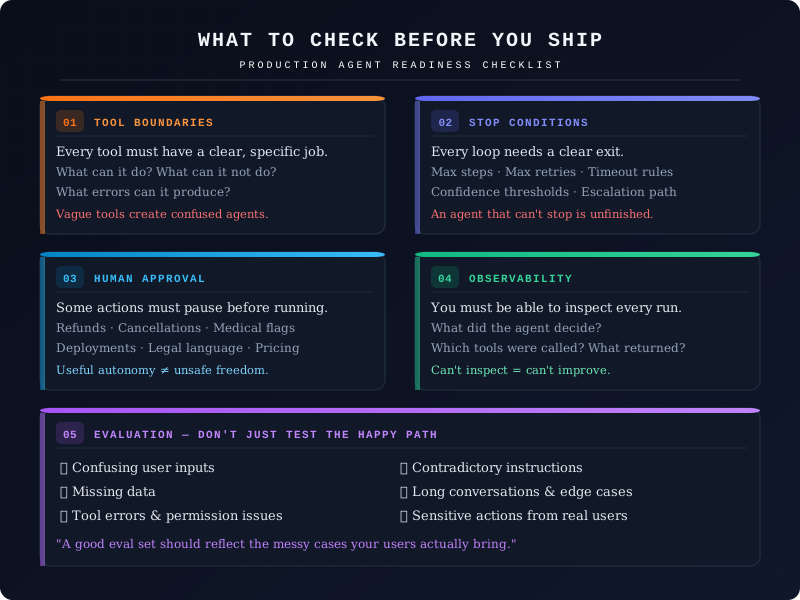
1. Tool Boundaries
Every tool should have a clear job.
Bad tool design creates confused agents. Anthropic's guidance on tool design says teams need to rethink tools for non-deterministic agents, not just write them like normal developer-facing APIs. (Anthropic)
Ask:
- What can this tool do?
- What can it not do?
- What input does it require?
- What should it return?
- What errors can it produce?
- Can the agent misuse it?
If the tool description is vague, the agent will eventually find a way to misunderstand it.
2. Stop Conditions
Every loop needs an exit.
This matters for explore-and-act agents, planning agents, and multi-agent systems.
Define:
- Maximum steps
- Maximum retries
- Maximum tool calls
- Timeout rules
- Escalation rules
- Confidence thresholds
An agent that cannot stop is not autonomous.
It is unfinished.
3. Human Approval
Some actions should pause before execution.
Use approval for:
- Refunds
- Cancellations
- Account changes
- Medical escalations
- Legal language
- Production deployments
- Security changes
- Pricing commitments
OpenAI's guardrails documentation supports this pattern by separating automatic checks from human review for sensitive actions and tool behavior. (OpenAI)
This is how teams make agents useful without giving them unsafe freedom.
4. Observability
You should be able to answer:
- What did the agent decide?
- Which tools did it call?
- What did each tool return?
- Why did it stop?
- Where did it fail?
- What did the user see?
If you cannot inspect the run, you cannot improve the system.
This matters even more as you move up the autonomy ladder.
5. Evaluation
Do not test agents only with happy-path demos.
Test:
- Confusing user inputs
- Missing data
- Tool errors
- Permission issues
- Contradictory instructions
- Long conversations
- Sensitive actions
- Edge cases from real users
A good evaluation set should reflect the messy cases your users actually bring.
That is where agent design becomes real.
The Better Way to Think About Agentic Patterns
Agent patterns are not labels.
They are control choices.
- A tool-using agent gives the model controlled access to systems.
- An exploration loop gives it permission to investigate.
- A planning layer gives it structure.
- A reviewer gives it quality control.
- A multi-agent setup gives it specialization.
- A human approval step gives it accountability.
The best architecture is usually the one that gives the agent the smallest amount of freedom needed to complete the task well.
That may sound less exciting than a fully autonomous multi-agent system.
But it is how reliable agentic products are built.
Final Takeaway
The future of AI agents will not be won by teams that add the most agents.
It will be won by teams that know where agents are actually needed.
- Start with the workflow.
- Find the uncertain parts.
- Add tools only where action is required.
- Add planning only when the task needs structure.
- Add review only where quality matters.
- Add specialists only when one agent can no longer handle the work cleanly.
- Add human approval wherever the cost of a wrong action is too high.
That is how you choose the right agentic design pattern without copying the hype or overbuilding the system.