
Most SaaS teams start their agent journey by exposing a few APIs as tools. The agent receives a user request, selects a tool, passes arguments, waits for the result, and responds. That model works well for simple read operations and low-risk tasks, but it breaks down when the agent has to operate inside real product workflows.
A SaaS workflow is rarely a single API call. It may require checking the user's role, reading the current state of an object, validating business rules, deciding whether approval is needed, and choosing the safest execution path. In some cases, the action exists through an API. In others, it may only exist through an MCP server, a backend job, a legacy admin panel, or a browser workflow with no clean API.
The shift: SaaS agents need to move from direct tool calling to execution routing, where the model can propose intent but the system decides how the action should be validated, governed, executed, or blocked.
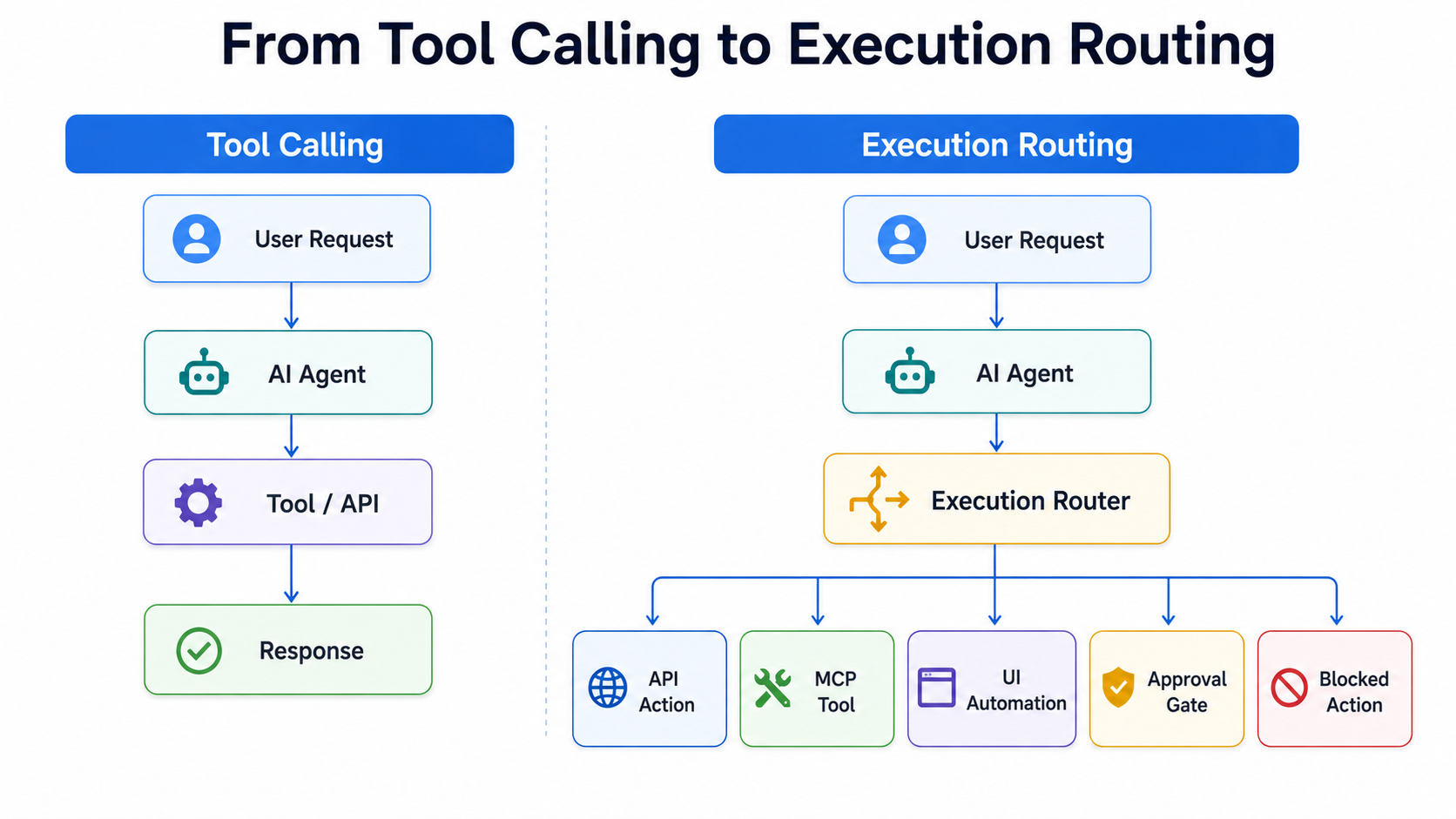
Why Tool Calling Is Too Narrow
Tool calling treats every action as a direct function call. The agent decides what function to use and sends structured input. That model is useful, but it assumes the agent already knows which action is valid, which system owns the action, and whether the action is safe to execute.
Production SaaS systems need more control than that. A refund action may be allowed for one customer but blocked for another. A plan change may be safe when the account is active but risky when billing is overdue. A data export may be harmless for an admin but restricted for a support user. The agent should not discover those boundaries by trial and error.
Execution routing adds a layer between the agent's intent and the final system action. The agent can propose what needs to happen, but the router decides how it should happen, whether it is allowed, and what evidence is needed before execution.
What Execution Routing Means
Execution routing is the technical layer that maps agent intent to the right execution path. It does not replace tools. It organizes them.
When a user asks an agent to cancel a subscription, the system should not immediately call a cancellation endpoint. The routing layer should first check the account state, subscription type, renewal date, user permission, cancellation policy, retention rules, and risk level. Only after that should it decide whether to call an API, create a draft action, ask for approval, escalate to a human, or stop the workflow.
This makes the agent less like a free-moving script and more like a controlled operator inside the SaaS product. The model still understands intent, but the system owns execution boundaries.
The Router as a SaaS Control Layer
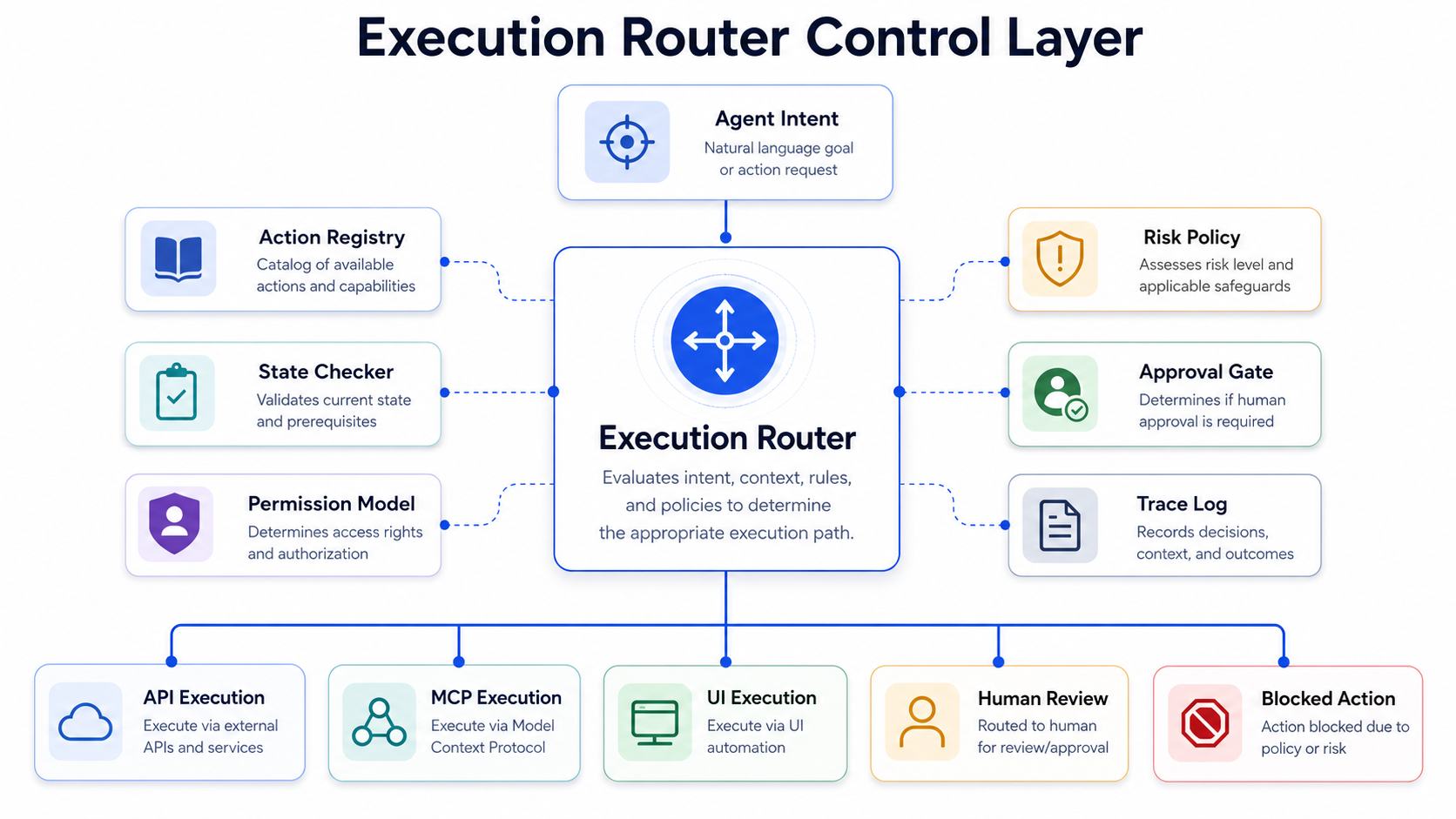
A practical execution router needs a clear set of control surfaces around every action:
- Action registry: defines what actions exist and how they can be executed across APIs, MCP servers, jobs, and interfaces.
- State checker: verifies whether the target object is in the right condition before any mutating step runs.
- Permission model: understands who is asking, which role applies, and which execution paths are allowed.
- Risk policy: classifies the task as read-only, draftable, approval-gated, human-reviewed, or blocked.
- Approval gate: pauses the route when a higher-trust actor must confirm the action.
- Trace log: records the request, policy result, execution method, and final outcome for debugging and auditability.
Observability matters as much as routing logic. Every routed action should create a trace that shows the user request, selected action, checked state, policy result, approval decision, execution method, and final output. Without that trace, teams cannot debug failed actions or prove that the agent behaved correctly.
APIs, MCP, and Computer Use Fit Together
The next agent stack will not depend on one execution method. APIs remain the cleanest path for structured backend actions. MCP is increasingly useful for connecting agents to external tools, business data, and system capabilities through a standard interface. Computer-use agents are useful when workflows still live inside websites, dashboards, or desktop tools that do not expose reliable APIs.
These methods should not compete with each other. They should sit behind the same routing layer. A support agent may use MCP to read ticket and customer context, an API to calculate refund eligibility, computer use to operate a legacy billing screen, and an approval gate before the final refund is submitted. The user experiences one agent, but the system executes through different paths depending on risk, availability, and workflow state.
The agent is not the execution layer. The agent is the reasoning and interaction layer. Execution needs its own governed route.
A Simple SaaS Example
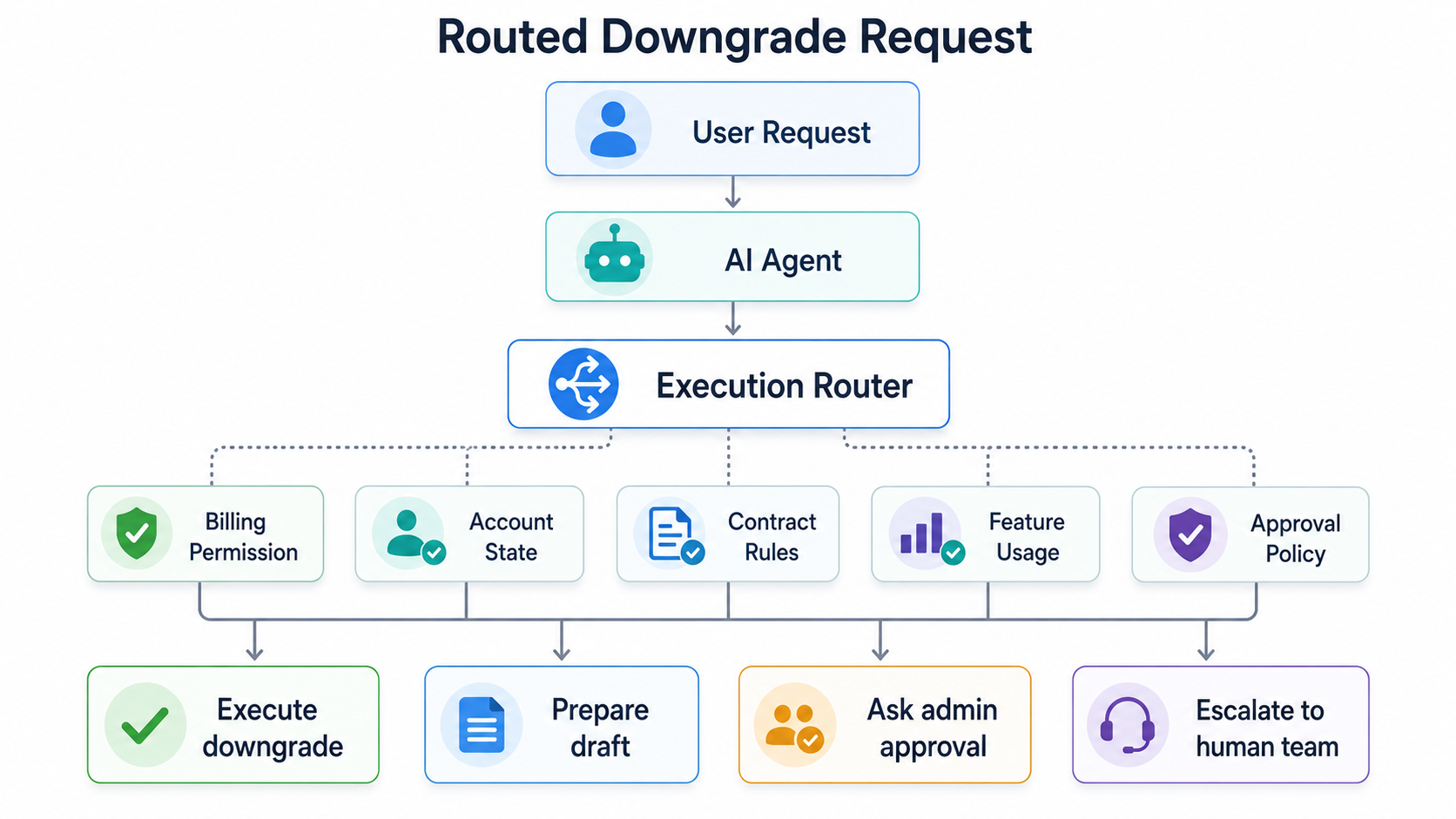
Consider an agent that handles account downgrade requests. A basic tool-calling setup may expose a function called downgradePlan. If the user asks to downgrade, the agent calls the function and returns the result.
An execution-routed setup behaves differently. The agent first identifies the intent as a plan downgrade. The router checks whether the requester has permission to change billing. It checks whether the account has active contracts, unpaid invoices, locked pricing, or enterprise terms. It checks whether downgrading will remove features used by active team members. It then decides whether the change can be executed immediately, prepared as a draft, sent to an admin for approval, or escalated to customer success.
The final action may still be a tool call, but it is no longer an isolated tool call. It is a routed decision with context, policy, and traceability around it.
Why SaaS Teams Should Build This Layer Early
Many agent projects become risky because execution is added before the product has clear action boundaries. Teams connect APIs to the model, test a few happy paths, and assume the system is ready. The harder problems appear later when edge cases, permissions, partial failures, and customer-specific rules enter the workflow.
Execution routing should be designed before broad agent autonomy is introduced. It gives teams a way to start with narrow workflows, control mutation, review high-risk actions, and expand autonomy based on evidence. It also makes the product easier to debug because the route is visible instead of hidden inside a model response.
For SaaS companies, this is the technical layer between a chatbot and an agentic product. A chatbot answers. A tool-calling agent acts. An execution-routed agent acts through product rules, system state, and controlled paths.
SaaSToAgent Take
The next phase of SaaS-to-agent transformation will not be defined only by better models or more connected tools. It will be defined by how safely agents can operate inside existing software.
SaaS products need a layer that can translate intent into valid action. That layer should know the workflow state, available execution paths, user permissions, business rules, approval requirements, and recovery options. Without it, agents remain useful assistants but unreliable operators.
Tool calling was the first step. Execution routing is what makes SaaS agents production-ready.