
Why Claude Code Uses So Many Tokens
Most developers assume Claude Code token usage comes from long prompts.
That is only part of the problem.
Claude Code does not just read the message you type. It also works with previous messages, opened files, terminal output, test logs, project instructions, MCP tools, compacted summaries, and reasoning steps.
So even a short prompt can become expensive.
For example:
Fix the auth issue.This looks small, but Claude may need to inspect routes, middleware, session helpers, auth files, tests, and old command output before it understands the task.
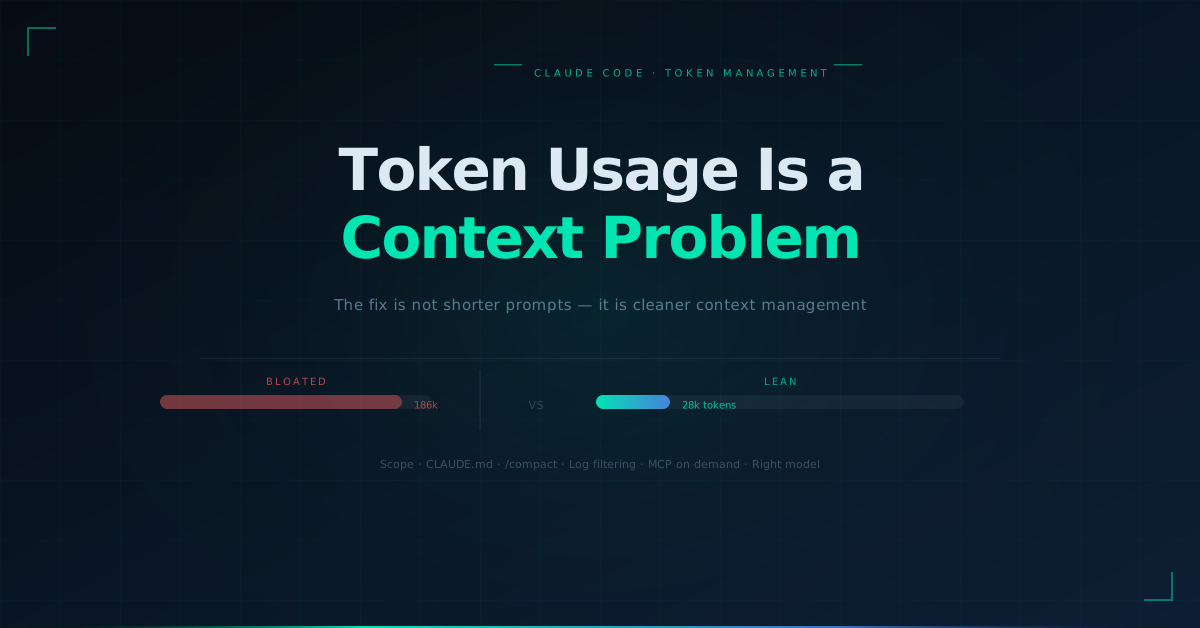
That is why token usage is really a context problem.
Claude Code becomes expensive when it has to think through too much unnecessary information. The cleaner the context, the easier it is for Claude to work faster, stay focused, and use fewer tokens.
What Context Management Means in Claude Code
Context management means controlling what Claude Code can see, remember, read, and carry forward while working on a task.
In simple terms, context is Claude Code's working memory.
That memory can include:
- Your prompt
- Earlier messages
- Files Claude has opened
CLAUDE.md- Terminal output
- Test logs
- MCP tool definitions
- Search results
- Previous plans
- Failed attempts
- Compacted summaries
The more unnecessary information inside that memory, the more tokens Claude Code may use.
Bad context looks like this:
A long session with three unrelated tasks, full CI logs, old failed attempts, repeated instructions, and files that no longer matter.Good context looks like this:
A focused session with one task, clear scope, relevant files, filtered errors, and a specific verification target.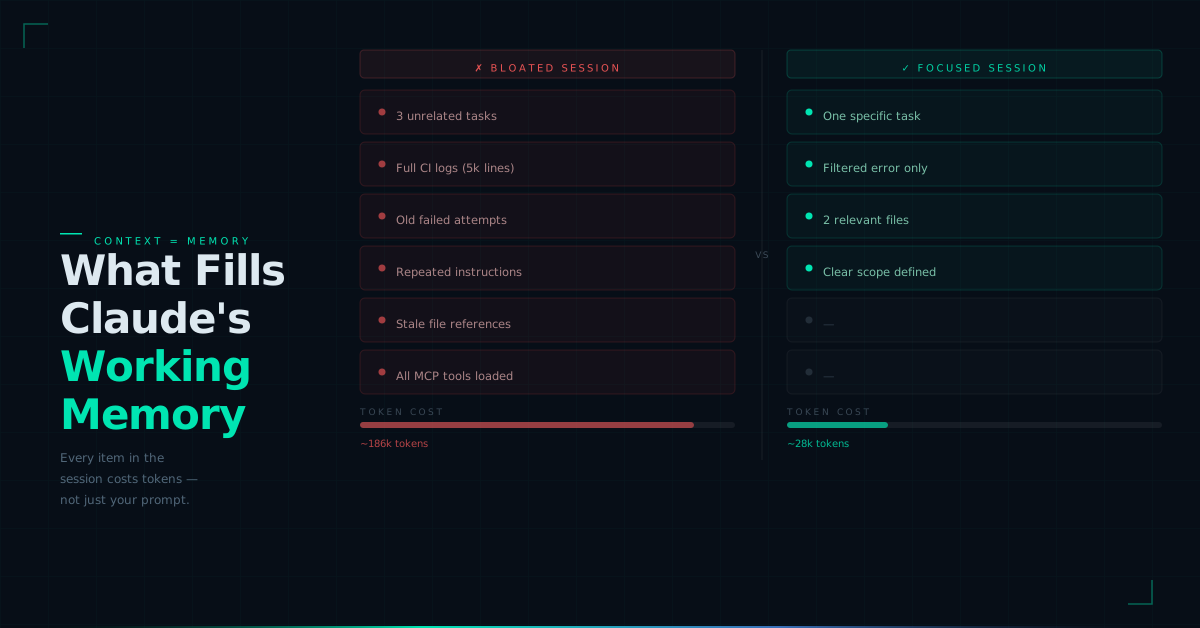
This is why token optimization is not only about writing less.
It is about giving Claude Code the right information at the right time and keeping everything else out.
Why Context Management Also Improves Output Quality
Reducing Claude Code token usage is not only about cost.
It also improves reliability.
When Claude Code has too much context, it may:
- Reference old decisions
- Follow outdated instructions
- Reprocess failed attempts
- Inspect unrelated files
- Spend time on unnecessary tools
- Lose focus after long sessions
- Make changes outside the real scope
Cleaner context usually means fewer wrong edits, faster responses, and better engineering judgment.
That is why the best Claude Code workflows treat context like an engineering resource.
It should be small, relevant, current, and tied to the task.
Practical Ways to Reduce Claude Code Token Usage
1. Scope the Task Before Claude Starts Searching
The fastest way to waste tokens is to give Claude Code a vague task.
Weak prompt:
Improve the dashboard.This can make Claude inspect too many files because it does not know what "improve" means.
A better prompt:
Fix the tooltip alignment issue in src/features/dashboard/RevenueChart.tsx.

Scope:
- Inspect only nearby chart components if needed.
- Do not refactor unrelated dashboard files.
- Do not change API logic.

Verification:
- Run the existing chart test if available.
This prompt is longer, but it is cheaper in practice because it narrows the search space.
A good Claude Code task should define:
- The exact file, folder, or feature area
- What needs to change
- What should not change
- How success will be verified
The goal is not a shorter prompt.
The goal is a smaller search space.
2. Keep CLAUDE.md Useful, Not Bloated
CLAUDE.md is one of the most useful parts of Claude Code, but it can quietly increase token usage if it becomes too large.
Use it only for rules Claude needs in most sessions.
Good CLAUDE.md content:
# Project rules

- Use pnpm, not npm.
- Run pnpm typecheck before final response.
- Use existing UI components from src/components/ui.
- Do not edit migration files unless explicitly asked.
- Do not change auth, billing, or permissions logic without explaining the risk first.
Avoid adding:
- Product history
- Meeting notes
- Full API documentation
- Old debugging notes
- Client-specific instructions
- One-time workflows
- Long implementation plans
- Generic advice like "write clean code"
The practical rule:
If Claude needs it in almost every session, keep it in CLAUDE.md. If it is only for PR reviews, migrations, releases, or audits, move it into a separate skill or workflow file.
This keeps the default context small while preserving specialized knowledge when needed.
3. Use /usage, /context, /compact, and /clear Intentionally
Many developers let Claude Code sessions run for too long.
That creates stale context.
Use:
/usageto check token usage.
Use:
/contextto see what is filling the context window.
Use:
/compactwhen the task is still active but the session has become heavy.
But do not compact without instructions.
Weak compaction:
/compactBetter compaction:
/compact Preserve only:
- Current task goal
- Files changed
- Key decisions
- Test results
- Remaining issues

Remove:
- Old logs
- Failed attempts
- Unrelated exploration
- Repeated explanations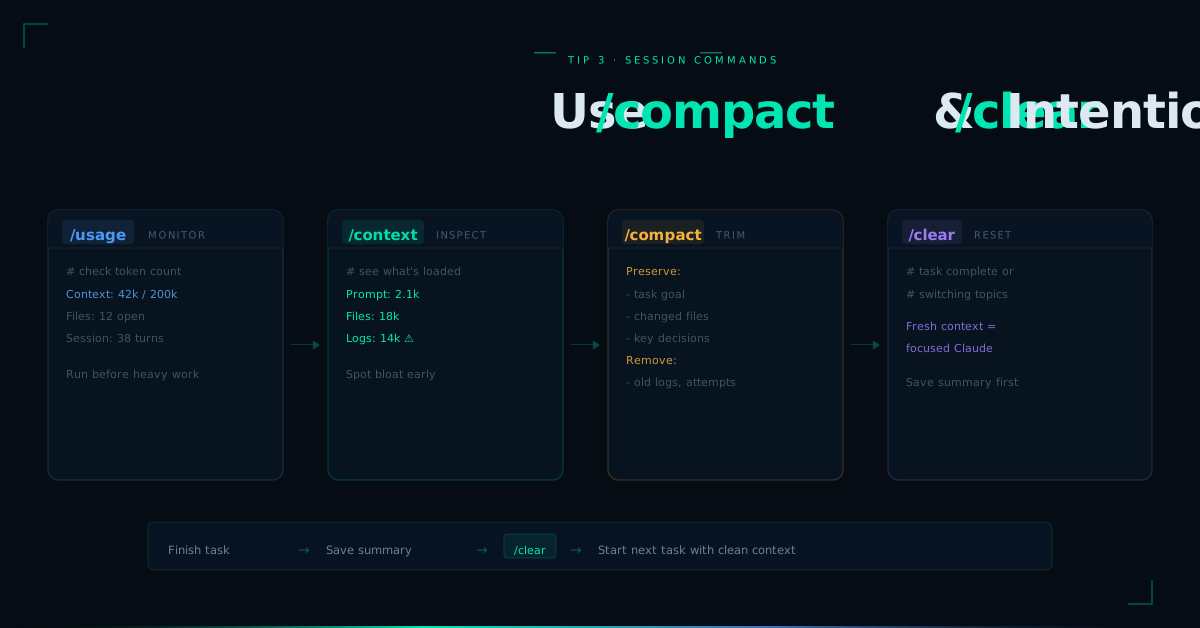
Use:
/clearwhen the task is complete or when you are switching to unrelated work.
For example, do not use the same session for:
Fix login validation.
Rewrite pricing page copy.
Debug deployment logs.
Review database migration.
Each task carries different context.
A simple workflow:
Finish task → Save short summary → /clear → Start next taskThis prevents old decisions and noisy logs from leaking into the next task.
4. Filter Logs Before Claude Sees Them
Raw logs are one of the biggest sources of token waste.
Do not paste 5,000 lines of CI output into Claude Code.
Give Claude the relevant failure.
Instead of:
[paste full CI log]Use:
Command:
pnpm test LoginForm.test.tsx

Error:
Expected: "Invalid email"
Received: "Email is required"

Failing file:
src/auth/LoginForm.test.tsx

Recently changed file:
src/auth/LoginForm.tsx

Please inspect only the validation flow.
For repeated debugging, filter output first:
pnpm test 2>&1 | grep -A 8 -E "FAIL|ERROR|Expected|Received" | head -120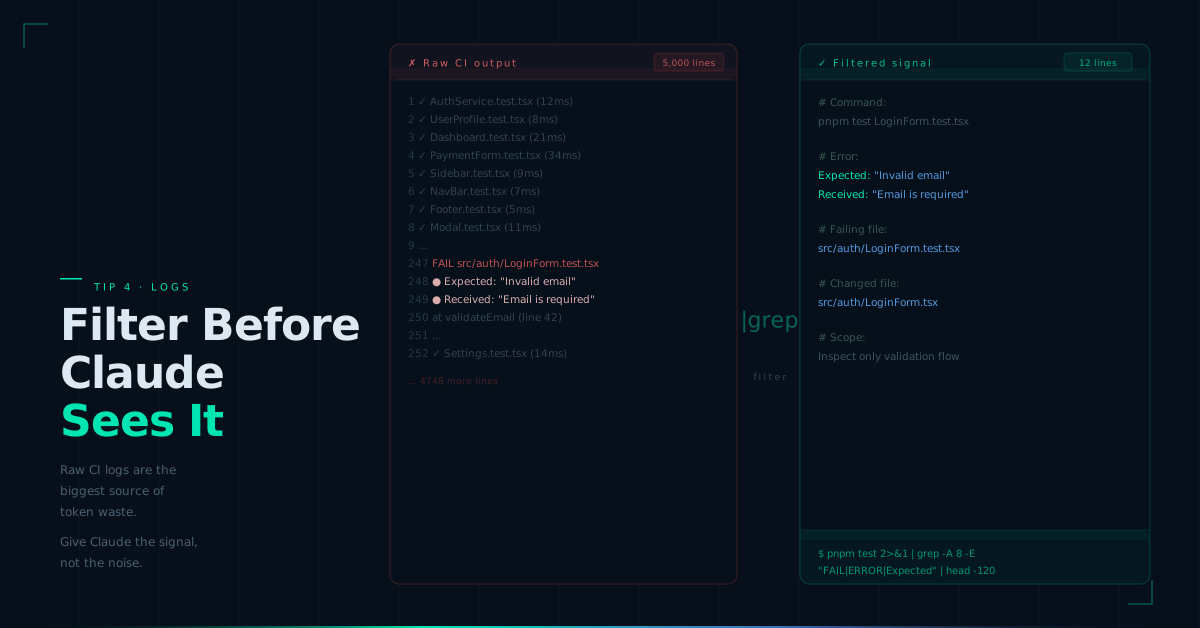
This gives Claude the signal without making it process the noise.
The same applies to:
- Build logs
- Deployment logs
- Server traces
- Test output
- Lint results
- Browser console output
Claude does not need every line.
It needs the lines that explain the failure.
5. Control MCP Tools and Use CLI When Enough
MCP tools are powerful, but they should not be available by default for every task.
If Claude has access to GitHub, Slack, Sentry, Linear, databases, cloud tools, and internal docs during a small UI fix, the session can become unnecessarily heavy.
For a focused task, say:
For this task:
- Use local files only.
- Do not use MCP tools.
- Do not inspect GitHub, Slack, Sentry, or production logs.
- Run only the nearest frontend test if needed.
Use MCP when Claude needs rich tool interaction.
Use CLI when a narrow command is enough.
For example:
gh pr view 123is often cleaner than exposing a large GitHub tool surface.
Similarly:
gcloud run services describe my-service --region us-central1may be enough for a deployment check.
The practical rule:
Do not connect every tool to every session. Give Claude only the tools needed for the task.
6. Match Model, Effort, and Subagents to the Task
Not every Claude Code task needs the strongest model, highest effort, or a subagent.
Use normal settings for:
- UI fixes
- Small bugs
- Tests
- Copy changes
- Simple refactors
- Documentation updates
Use stronger reasoning for:
- Architecture decisions
- Security-sensitive logic
- Production incidents
- Multi-service debugging
- Complex migrations
A practical default:
/model sonnet
/effort medium
Use heavier settings only when the risk justifies the cost.
Subagents should also be used carefully.
Use subagents for noisy or broad investigation:
Use a subagent to inspect the payment webhook flow.

Return only:
- Relevant files
- Current flow summary
- Risky edge cases
- Tests that should be run

Do not modify files.
Avoid subagents for small edits, simple renames, formatting, or one-file changes.
The goal is to use more reasoning only when it creates real value.
7. Store Durable Context Outside the Chat
Many developers keep long Claude Code sessions open because they do not want to lose progress.
That creates expensive context.
A better approach is to save useful context in small project files.
Create:
docs/agent-context/current-task.md
docs/agent-context/decisions.md
docs/agent-context/test-notes.md
docs/agent-context/next-steps.md
Example:
# Current Task

Goal:
Fix login validation and add targeted tests.

Files:
- src/auth/LoginForm.tsx
- src/auth/validation.ts
- src/auth/LoginForm.test.tsx

Constraints:
- Do not change API client.
- Reuse existing error UI.
- Do not introduce new dependencies.

Verification:
- pnpm test LoginForm.test.tsx
- pnpm typecheck
Then start a clean session:
Read docs/agent-context/current-task.md first.
Follow only the scope defined there.
Do not inspect unrelated auth files unless needed.
This gives Claude the context it needs without dragging the entire old conversation forward.
A Lean Claude Code Workflow Developers Can Copy
Start each task with this structure:
Task:
Fix [specific issue].

Scope:
- Work only in [files/folders].
- Do not touch [sensitive areas].
- Avoid unrelated refactors.

Verification:
- Run [specific test].
- Run [typecheck/lint if needed].
During the session:
/usage
/context
If the task is still active but the session is large:
/compact Preserve the goal, changed files, decisions, test results, and remaining issues. Remove old logs and unrelated exploration.If the task is complete:
Write a short summary into docs/agent-context/current-task.md, then use /clear.For noisy debugging:
pnpm test 2>&1 | grep -A 8 -E "FAIL|ERROR|Expected|Received" | head -120For tool-heavy work:
Use only the tools required for this task. Prefer CLI commands when they are enough.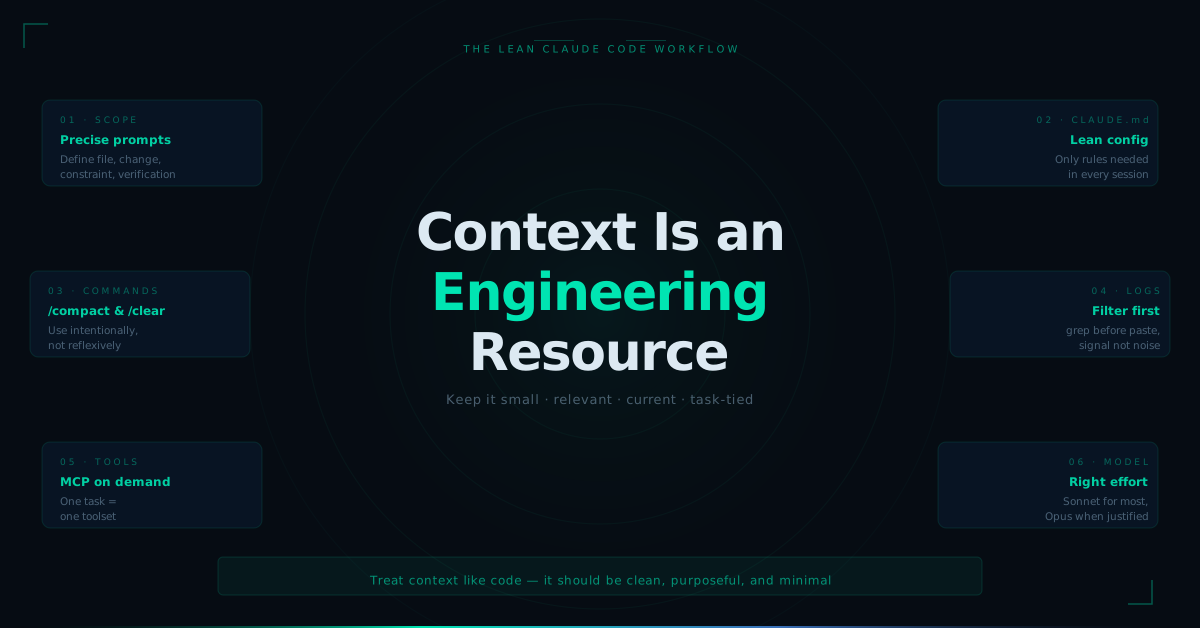
Lower Token Usage Should Not Mean Lower Engineering Quality
Bad token optimization makes Claude under-informed.
Good token optimization keeps Claude focused.
Do not reduce token usage by hiding requirements, skipping verification, disabling reasoning for complex work, or forcing Claude to edit code without enough context.
Reduce token usage by removing noise:
- Vague prompts
- Long stale sessions
- Oversized
CLAUDE.md - Raw logs
- Unused MCP tools
- Unnecessary subagents
- Old failed attempts
- Unrelated file exploration
Claude Code is powerful because it can work across files, tools, commands, and development workflows.
That power becomes expensive when context is unmanaged.
The practical way to reduce Claude Code token usage is to treat context like an engineering resource: keep it small, relevant, current, and tied to the task at hand.