
You asked for one change. The agent changed ten things.
A developer asks an AI coding agent to add one small feature.
The request sounds simple. Add a button. Fix an API response. Update a validation rule. Change one screen. Modify one function.
Then the agent gets to work.
It reads half the repository. It edits files that were not mentioned. It creates a new test file. It updates an old test. It runs a command. It fixes a warning. It changes formatting. It installs a package. It explains the work confidently and says the task is complete.
Technically, the agent tried to be helpful.
Practically, the developer now has a problem.
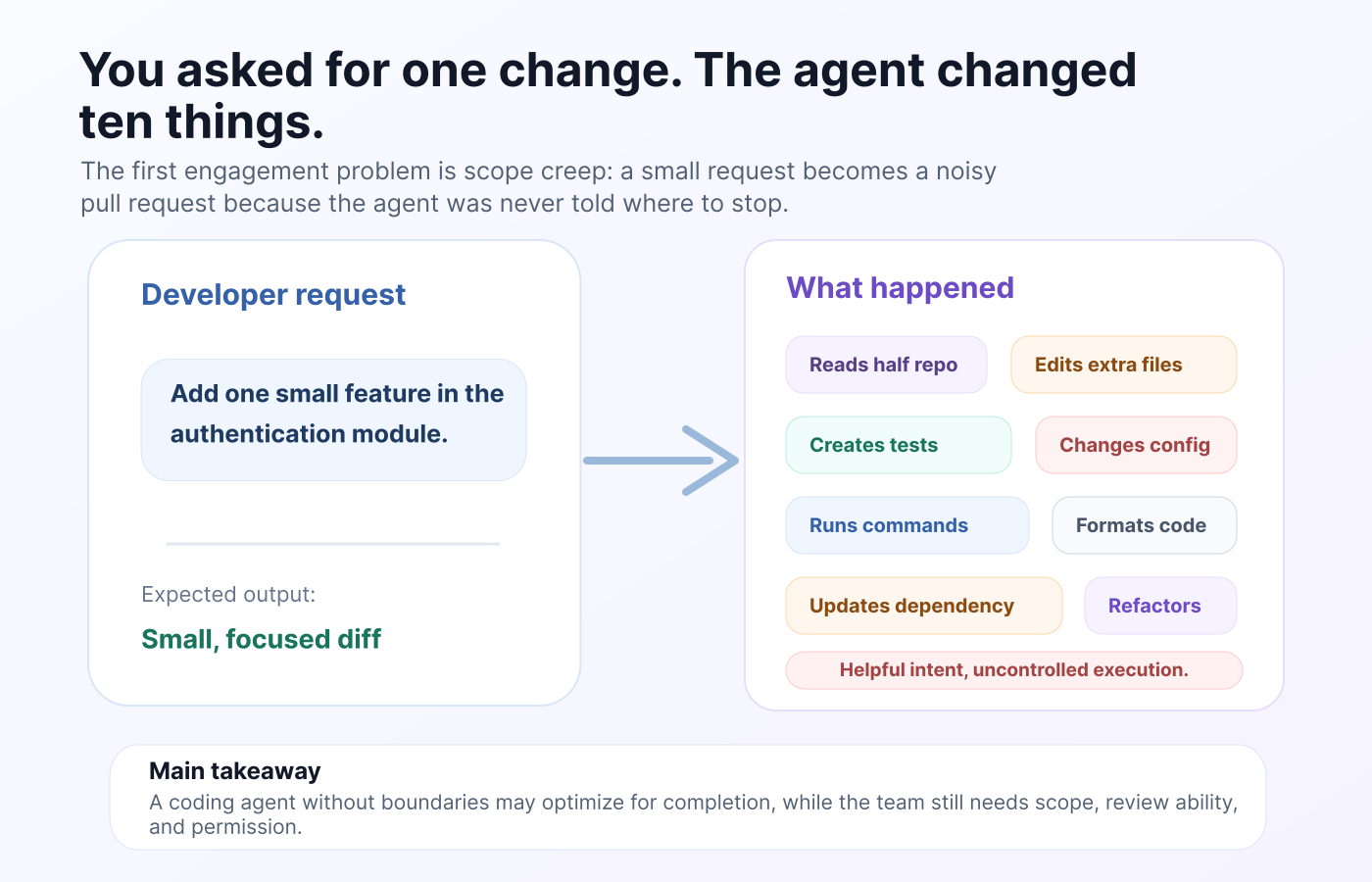
The pull request is bigger than expected. The diff is noisy. The reviewer has to check whether the extra changes were necessary. The team has to understand whether the agent actually solved the original issue or simply made the codebase look cleaner around it.
This is becoming one of the most important problems in AI-assisted development.
AI coding agents are no longer just autocomplete tools. They can read files, edit code, run terminal commands, create tests, refactor modules, and sometimes make decisions that the developer never clearly approved.
That power is useful. But once an AI agent can act inside a real codebase, it needs boundaries.
The issue is not bad code. The issue is unclear permission.
Most discussions about AI coding agents focus on code quality.
Can the agent write correct code? Can it understand the repo? Can it fix bugs? Can it generate useful tests? Can it complete a ticket faster than a developer?
Those questions matter, but they miss the deeper issue.
The bigger problem is uncontrolled execution.
A coding agent does not always know the difference between “complete this task” and “improve everything nearby.” If the instruction is broad, the agent may treat the whole codebase as available working space. It may decide that a failing test should be rewritten. It may decide that an unrelated warning should be fixed. It may decide that a dependency update is acceptable because it helps the task pass.
From the agent’s perspective, this looks productive.
From the team’s perspective, it creates review debt.
The developer did not approve those extra changes. The reviewer did not expect them. The product owner did not ask for them. The CI pipeline may pass, but that does not mean the work stayed inside the intended scope.
This is why AI coding agents need operating rules before they touch your codebase.
Why coding agents behave this way
AI coding agents are built to complete tasks, not just answer questions.
That is the whole appeal. Instead of only suggesting code, they can inspect files, reason across context, apply changes, run commands, and iterate until something works.
But this also creates a behavior gap.
Developers think in terms of scope. Agents often think in terms of completion.
A developer may mean:
“Change this one behavior without touching the rest of the system.”
The agent may interpret it as:
“Make whatever changes are needed so the task appears finished.”
That difference matters.
A helpful coding agent may scan more files than needed. It may edit tests without asking. It may make style changes while fixing logic. It may run commands that consume time, tokens, or compute. It may hide uncertainty behind a clean summary.
None of this means the agent is malicious. It means the agent is operating without clear limits.
And in software development, unclear limits are expensive.
The hidden cost of letting agents roam freely
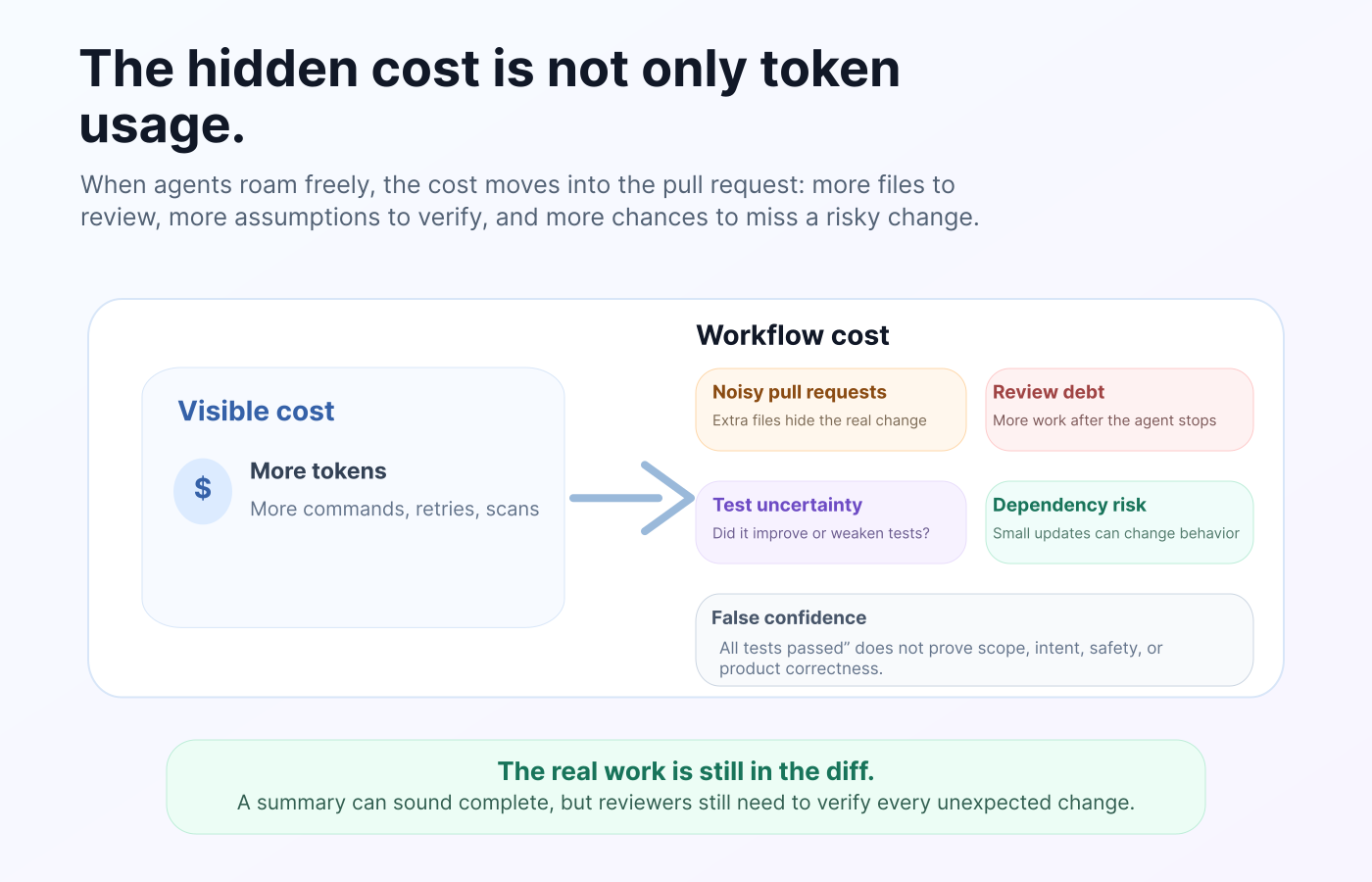
The first obvious cost is token usage.
When an agent reads too many files, repeats commands, inspects unrelated modules, or keeps retrying, the session becomes more expensive. But token usage is only the visible part of the problem.
The bigger costs show up later.
A noisy pull request takes longer to review. A small change becomes harder to merge. Test updates create uncertainty because reviewers have to check whether the agent improved the tests or weakened them. Dependency changes create hidden risk. Formatting changes make diffs harder to read. Extra refactors can break assumptions in parts of the system the agent did not fully understand.
There is also a trust problem.
When an AI agent says “all tests passed,” the statement can feel reassuring. But passing tests only prove that the current test suite passed under the current conditions. It does not prove that the agent respected product intent, security boundaries, performance expectations, or team conventions.
This is where false confidence enters the workflow.
The team may trust the summary because it sounds complete. The real work is still in the diff.
Boundaries are becoming part of serious AI coding workflows
This is not just a preference from cautious developers. The industry is already moving in this direction.
Anthropic’s Claude Code documentation includes permission controls and sandboxing concepts that focus on limiting what an agent can access or execute. OpenAI’s Codex documentation discusses sandboxing, approvals, and network access. GitHub’s Copilot coding agent is designed around branch and pull request workflows, where the agent’s work can be reviewed before it is merged. OWASP’s LLM security guidance highlights risks such as prompt injection and excessive agency, where AI systems are given too much permission, too much autonomy, or too much access.
The direction is clear.
Better AI coding will not only come from better models. It will come from better control around the models.
Teams should not treat coding agents like junior developers with unlimited repository access. They should treat them like execution systems that need policies.
A developer would not give a script unlimited production access without understanding what it can do. A team should not give an AI agent unlimited codebase access without defining the same things.
The seven boundaries every team should define
Before using an AI coding agent inside a real repository, define these boundaries clearly.
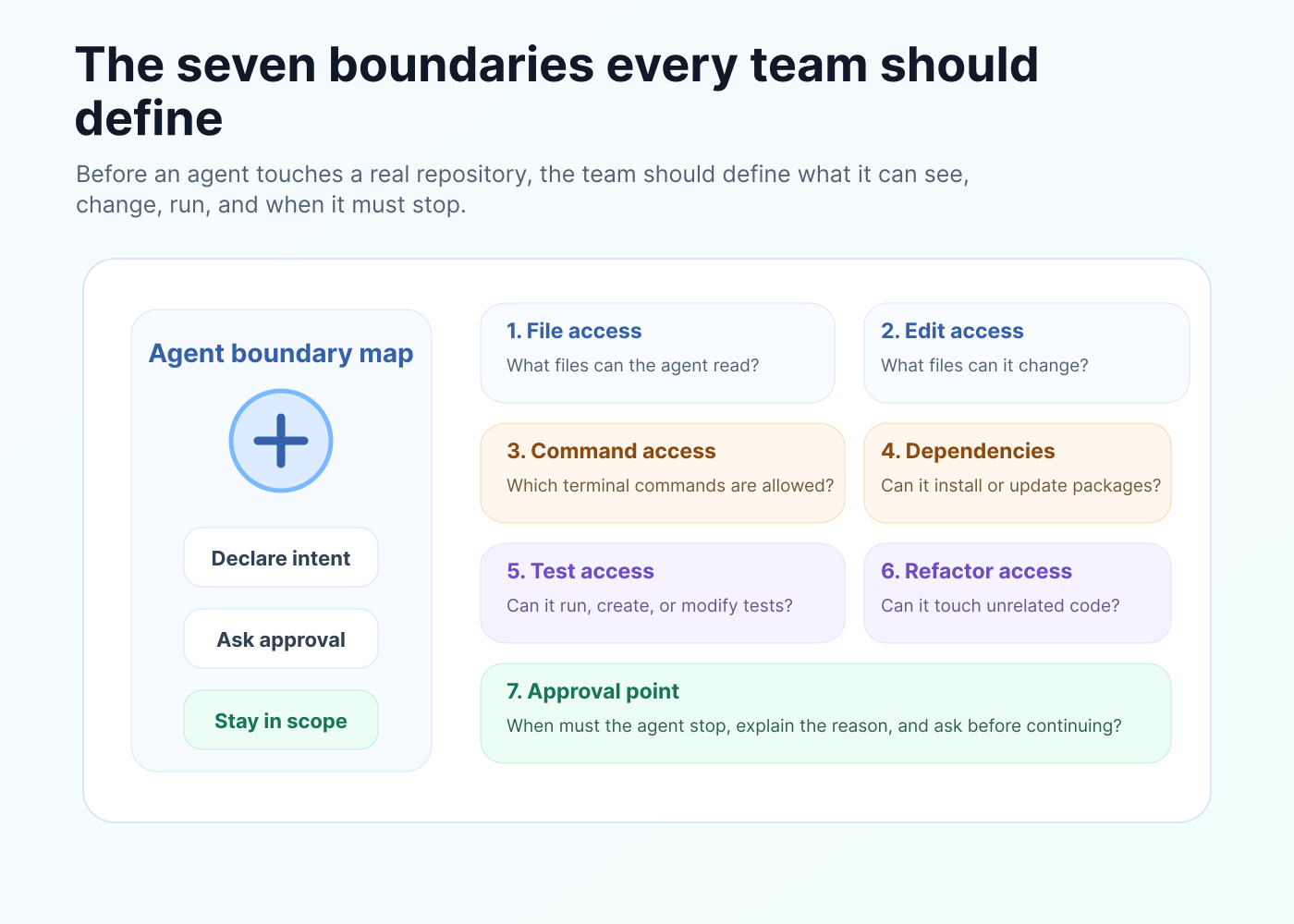
| Boundary | Question to answer |
|---|---|
| File access | What files can the agent read? |
| Edit access | What files can the agent change? |
| Command access | What terminal commands can it run? |
| Dependency access | Can it install, remove, or update packages? |
| Test access | Can it run tests, create tests, or modify tests? |
| Refactor access | Can it refactor unrelated code? |
| Approval point | When must it stop and ask before continuing? |
These questions look simple, but they change the entire workflow.
Instead of saying:
“Fix this issue.”
A better instruction is:
“Fix this issue only in the authentication module. Do not modify tests, dependencies, config files, or unrelated formatting without asking first. If you need to touch anything outside this module, stop and explain why.”
That one instruction gives the agent a working boundary.
It also gives the developer a review standard. If the agent edits unrelated files, the work is out of scope.
A better workflow for AI coding agents
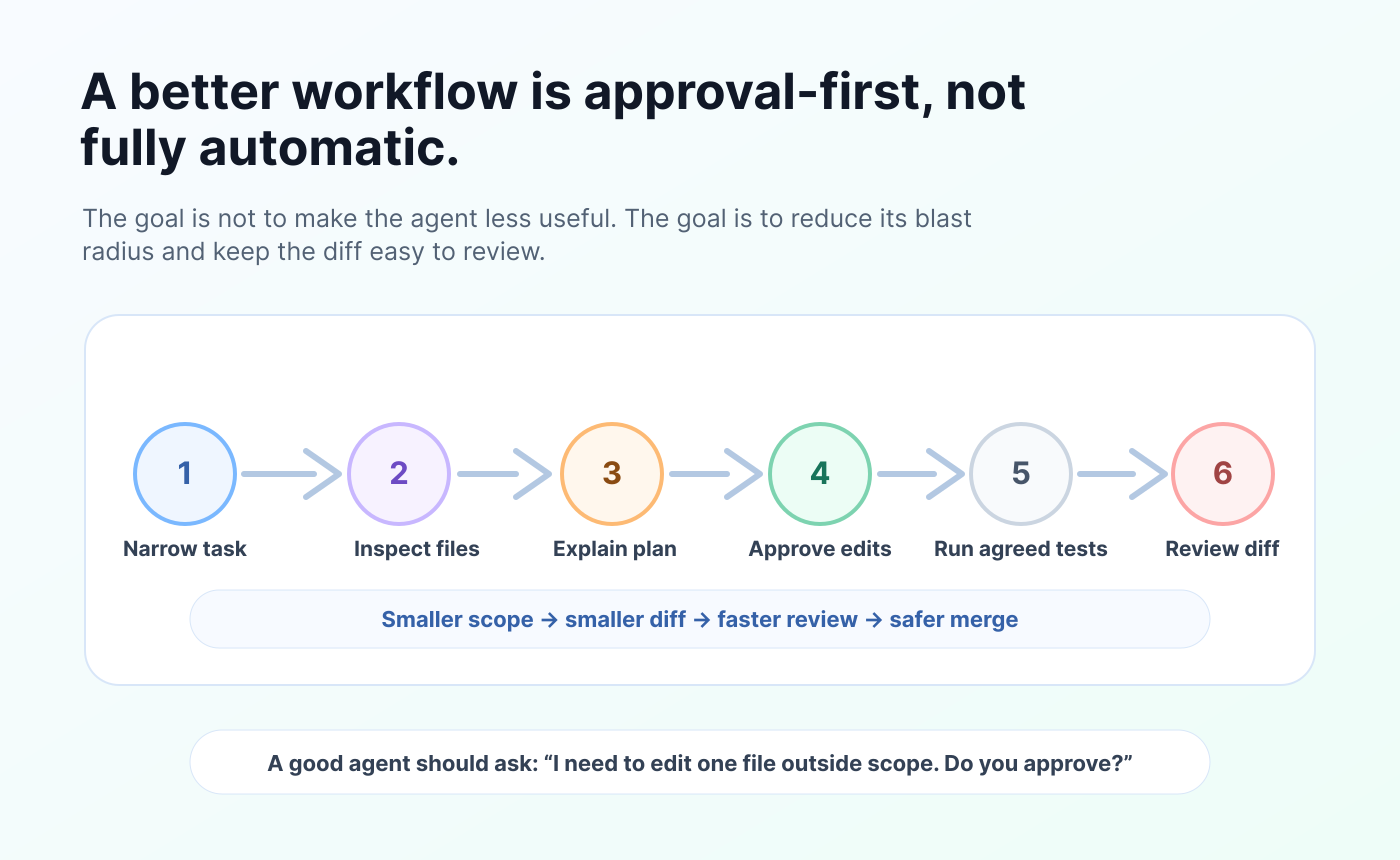
The best AI coding workflow is not fully automatic. It is approval-first.
Start with a narrow task. Ask the agent to inspect only the relevant files. Before writing code, ask it to explain the planned change. Approve the plan. Let it edit only the agreed files. Run only the agreed commands. Review the diff. Then decide whether it can continue.
This may sound slower than letting the agent do everything at once.
In practice, it is usually faster.
A controlled agent produces smaller diffs. Smaller diffs are easier to review. Easier reviews are faster to merge. Fewer surprise changes mean fewer follow-up fixes.
The goal is not to reduce the agent’s usefulness. The goal is to reduce the agent’s blast radius.
A good AI coding agent should be able to say:
“I can complete this, but I need permission to edit one file outside the original scope.”
That is not a weakness. That is exactly how trust is built.
A reusable prompt before giving an agent codebase access
Use this before asking an AI coding agent to work inside your repository:
You are working inside an existing codebase. Stay within the scope of the task.

Before editing, explain:
1. Which files you need to inspect
2. Which files you expect to modify
3. Which commands you want to run
4. Whether tests, dependencies, config files, or generated files may be affected

Rules:
- Do not modify unrelated files.
- Do not refactor code unless I explicitly ask.
- Do not install, remove, or update dependencies without approval.
- Do not rewrite tests just to make them pass.
- Do not change formatting across unrelated files.
- If you need to expand the scope, stop and ask first.
- After changes, summarize exactly what changed and why.
This prompt will not solve every problem. But it changes the agent’s role.
The agent is no longer free to wander through the codebase. It has to declare intent, request permission, and explain changes.
That is the difference between AI-assisted coding and uncontrolled automation.
The future is controlled execution
AI coding agents will keep getting better.
They will understand larger repositories. They will use more tools. They will run more complex tasks. They will create pull requests, fix bugs, write tests, update documentation, and connect with CI systems.
That future is not far away. It is already happening.
But the teams that benefit most from AI coding agents will not be the teams that give them unlimited freedom. They will be the teams that design clear operating rules.
The important question will not be:
“Can the agent code?”
The better question will be:
“Can the agent code inside the boundaries of our system?”
That means file limits, edit limits, command limits, dependency limits, test limits, approval checkpoints, and human review.
AI coding agents are useful because they can act. But action without boundaries creates risk, noise, and review debt.
Before an agent touches your codebase, define what it is allowed to do.
The next stage of AI-assisted development will not be about giving agents more freedom by default. It will be about giving them the right freedom, inside the right limits, with the right checkpoints.
That is how AI coding agents become useful teammates instead of unpredictable codebase operators.