
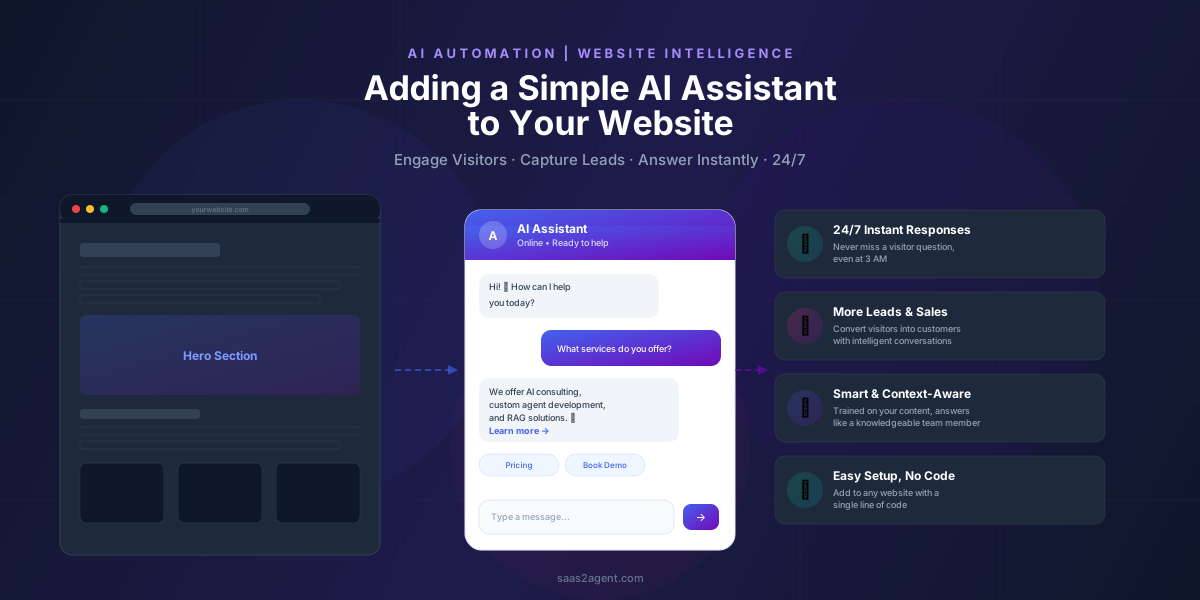
The Cost of an Unanswered Question
Imagine this: A potential customer visits your website at 11 PM on a Sunday. They have a question about your service. There is no one available to respond. They leave. You just lost a lead, and you will never know about it.
Now imagine something different: That same visitor lands on your site, and a small chat window greets them. They type their question. Within two seconds, they receive a clear, helpful answer, pulled directly from your own website content. They are impressed. They book a demo. You wake up Monday morning with a new lead in your inbox.
That is the difference an AI assistant makes.
This guide will walk you through exactly what an AI assistant is, why your website needs one, how it drives more leads and sales, and how to set one up, whether you are a business owner with zero technical skills or a developer looking for the architecture details.
Who is this guide for? Everyone. We wrote this so a non-technical business owner can understand the value, a marketer can see the ROI, and a developer can understand the architecture. Skip to the section that matters most to you.
What Exactly Is an AI Website Assistant?
An AI assistant is a small chat widget that lives on your website. When visitors type a question, it responds instantly, like a knowledgeable team member who never sleeps, never takes breaks, and has perfect memory of everything on your website.
But this is not a traditional chatbot. Traditional chatbots follow rigid scripts: "Press 1 for billing, Press 2 for support." They feel robotic and frustrating. An AI assistant is fundamentally different:
- It understands natural language. Visitors type in their own words, just like texting a friend. The AI understands intent, not just keywords.
- It is trained on YOUR content. It reads your website pages, FAQs, blog posts, and documentation. When it answers, it speaks with your voice and your knowledge.
- It generates real answers. Instead of directing visitors to a help page, it synthesizes the information and provides a direct, conversational response.
- It works 24/7. No staffing required. No timezone issues. Every visitor gets an instant response.
Think of it as giving every visitor their own personal concierge, someone who knows everything about your business and is always available to help.
How Does It Actually Work?
Behind the scenes, the AI assistant uses a technique called RAG (Retrieval-Augmented Generation). Here is how it works in plain English:
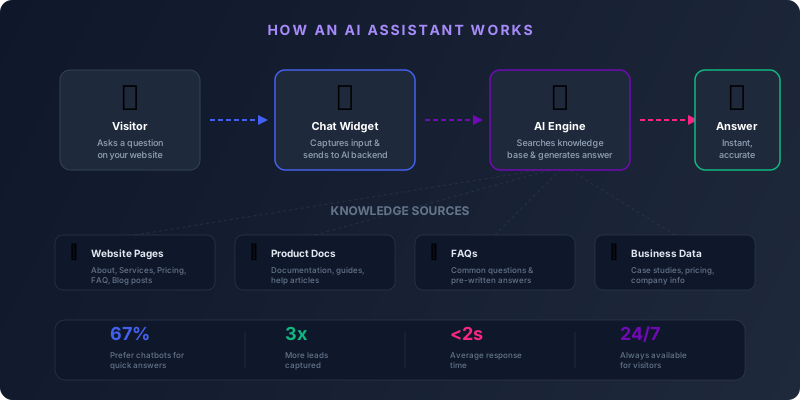
- Your content is indexed. The AI reads and "memorizes" all your website pages, FAQs, service descriptions, blog posts, and any other text you provide.
- A visitor asks a question. They type something like "How much does your consulting service cost?" into the chat widget.
- The AI searches your knowledge base. It finds the most relevant pieces of information from your indexed content, almost like an instant, intelligent search engine.
- It generates a natural response. Using an AI language model (like GPT-4), it composes a human-sounding answer based on your actual content, not generic filler.
- The visitor gets an instant, accurate answer. All within 1–3 seconds.
Key benefit: The AI only answers from YOUR content. It does not make things up or provide random internet information. If it does not know something, it says so honestly and offers to connect the visitor with a human.
Why Your Website Needs an AI Assistant
Every website has the same fundamental problem: visitors arrive, look around, and most of them leave without doing anything. Industry data shows that 96% of first-time visitors are not ready to buy. Most will never come back.
An AI assistant changes that equation by creating a conversation at the exact moment a visitor has a question, turning passive browsing into active engagement.
For Business Owners & Marketers
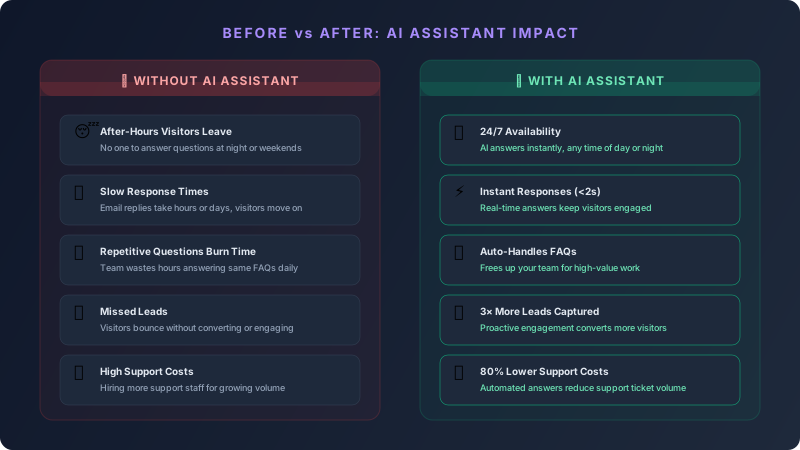
- Capture leads you are currently losing. Visitors who have questions but cannot find answers simply leave. An AI assistant catches them before they bounce.
- Reduce support costs by up to 80%. The AI handles repetitive questions automatically (pricing, features, availability, processes), freeing your team for complex issues.
- Qualify leads automatically. The assistant can ask the right questions and gauge buying intent, so your sales team focuses only on the most promising prospects.
- Available in every timezone. If your customers are global, you need 24/7 coverage. An AI assistant delivers that without hiring night-shift staff.
For Developers & Tech Teams
- Modern RAG architecture. Built on retrieval-augmented generation, combining vector search with large language models for grounded, accurate responses.
- Simple integration. One script tag on your website. No complex backend changes to your existing site.
- Customizable and extensible. Control the knowledge base, adjust the AI personality, add custom actions like form submissions or appointment booking.
- API-first design. Works with any website: static HTML, React, WordPress, Shopify, or any framework.
Key Features Every AI Assistant Should Have
Not all AI assistants are created equal. Here are the features that separate a good assistant from a great one:
Context-Aware Responses
Understands conversation history and provides relevant follow-up answers, not isolated replies.
Real-Time Streaming
Answers appear word-by-word in real time, just like ChatGPT, natural and engaging.
Brand-Matched Design
Colors, fonts, position, and personality match your website. It looks native, not bolted on.
Mobile Responsive
Works perfectly on phones, tablets, and desktops. No zooming, no broken layouts.
Privacy & Security
Conversations are encrypted. No visitor data is shared with third parties. GDPR-friendly.
Smart Suggestions
Pre-loaded quick questions help visitors get started without typing a word.
Session Memory
Remembers the conversation context within a session. Visitors can ask follow-up questions naturally.
Analytics & Insights
See what visitors are asking most. Discover gaps in your content. Understand customer needs.
How an AI Assistant Increases Sales & Leads
This is where the business case gets compelling. An AI assistant does not just answer questions; it actively drives revenue growth through several mechanisms:
1. Reduces Bounce Rate
When visitors can get instant answers, they stay longer. Longer sessions mean more pages viewed, more engagement, and higher conversion probability. Websites with chat widgets see an average 25–40% reduction in bounce rate.
2. Captures After-Hours Leads
Studies show that 35–40% of website traffic happens outside business hours. Without an AI assistant, those visitors leave with unanswered questions. With one, they get help immediately, and many convert right then.
3. Qualifies Leads Automatically
The AI assistant can be trained to ask qualifying questions: "What is the size of your team?" "What is your timeline?" "What is your budget range?" By the time a lead reaches your sales team, it is already pre-qualified.
4. Shortens the Sales Cycle
Instead of waiting days for an email reply, prospects get answers in seconds. This momentum keeps them moving through the buying process faster. Companies using AI chat see 15–30% shorter sales cycles.
5. Increases Average Order Value
An AI assistant can suggest relevant services, upsell features, or recommend complementary products based on the conversation. It is like having a knowledgeable salesperson on every page.
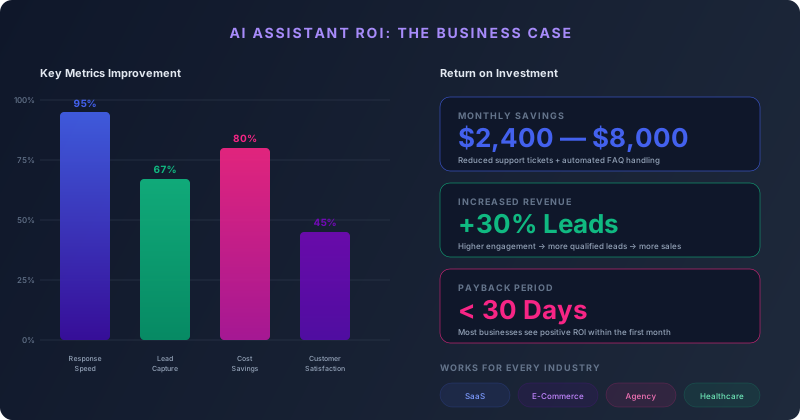
The math is simple: If your website gets 10,000 visitors per month and an AI assistant converts just 1% more of them into leads, that is 100 additional leads per month. At a typical B2B close rate of 20%, that is 20 new customers, from a tool that costs a fraction of one employee's salary.
Traditional Chatbot vs. AI Assistant: What is the Difference?
Many people confuse traditional chatbots with AI assistants. They look similar on the surface but work very differently under the hood:
| Feature | Traditional Chatbot | AI Assistant (RAG) |
|---|---|---|
| Understanding | Keyword matching only | Natural language understanding |
| Responses | Pre-written scripts | Dynamically generated from your content |
| Setup effort | Build every conversation flow manually | Feed it your content, it learns automatically |
| Handling new questions | Fails if not pre-programmed | Handles novel questions about your business |
| Conversation quality | Robotic, menu-driven | Natural, human-like |
| Maintenance | Update scripts for every change | Auto-learns from updated content |
| User experience | "Press 1 for billing" | "Just ask me anything" |
How to Add an AI Assistant to Your Website
Here is the practical part. Setting up an AI assistant is simpler than most people think. Here are the three steps:
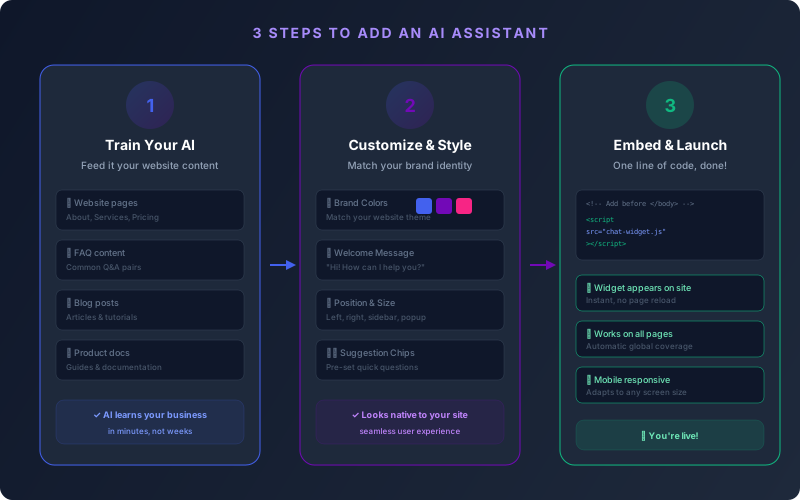
Step 1: Prepare Your Knowledge Base
The AI assistant needs to learn about your business. This means feeding it your content:
- Your website pages (About, Services, Pricing, FAQ)
- Blog posts and articles
- Product documentation
- Any other text that describes your business
The AI reads and indexes this content. It breaks it into small chunks, converts them into mathematical vectors (embeddings), and stores them in a searchable database. This is what makes retrieval fast and accurate.
Non-techie translation: Think of it as giving the AI a training manual about your business. You hand it all your written content, and it memorizes everything in minutes.
Step 2: Customize the Look & Feel
A good AI assistant should feel like a natural part of your website, not a foreign object. You can customize:
- Colors: Match your brand palette
- Position: Left sidebar, right popup, or bottom bar
- Welcome message: Set the first greeting visitors see
- Suggestion chips: Pre-load common questions visitors can click
- Avatar and name: Give your assistant a personality
Step 3: Embed and Launch
Adding the assistant to your website is as simple as pasting one line of code before the closing </body> tag:
<script src="https://your-domain.com/chat-widget.js"></script>That single line loads the entire chat widget: the UI, the connection to the AI backend, and all the styling. It works on any website: static HTML, WordPress, Shopify, React, Next.js, or any other platform.
That is it. One line of code and your AI assistant is live on every page of your website, ready to help visitors 24/7.
Technical Deep Dive (For Developers)
If you are a developer or technical founder, here is what happens under the hood:
Architecture Overview
- Frontend: A self-contained JavaScript widget that injects itself into the page DOM. No build tools needed. Works anywhere a
<script>tag works. - Backend: A lightweight API server (FastAPI, Express, or similar) that handles the AI logic.
- Vector Database: ChromaDB, Pinecone, or Weaviate stores the embedded content chunks for fast semantic search.
- LLM Provider: OpenAI GPT-4o, Anthropic Claude, or any compatible model generates the final responses.
- Streaming: Server-Sent Events (SSE) deliver responses word-by-word for a real-time experience.
RAG Pipeline
1. User sends message via chat widget
2. Backend embeds the query using text-embedding model
3. Vector search finds top-k relevant chunks from knowledge base
4. System prompt + retrieved context + user query → LLM
5. LLM generates grounded response
6. Response streamed back to widget via SSE
Key Technical Decisions
- Chunk size: 500 tokens with 50-token overlap for balanced retrieval accuracy
- Embedding model:
text-embedding-3-smallfor cost-effective, accurate embeddings - Top-k retrieval: Return 5 most relevant chunks per query
- Session management: In-memory session store with 30-minute TTL and last 10 messages for multi-turn conversations
- Rate limiting: 20 requests per minute per IP to prevent abuse
Who Benefits Most from an AI Assistant?
While every website can benefit, some industries see particularly strong results:
SaaS Companies
Answer product questions, explain pricing tiers, and guide users through feature comparisons. Reduce demo no-shows.
E-Commerce
Help shoppers find products, answer sizing questions, explain return policies, and suggest complementary items.
Healthcare
Answer patient questions about services, insurance, appointment availability, and preparation instructions.
Education
Guide prospective students through programs, admission requirements, financial aid, and campus resources.
Professional Services
Law firms, consulting agencies, and accountants can explain service areas and qualify potential clients.
Real Estate
Answer property questions, schedule viewings, explain the buying process, and pre-qualify buyers.
The Bottom Line
Adding an AI assistant to your website is no longer a luxury or a gimmick; it is a practical business tool that pays for itself. It captures leads you are currently losing, answers questions faster than any human team can, and works around the clock without breaks or salary.
The technology is mature. The setup is simple. The ROI is measurable.
Whether you are a solo entrepreneur, a growing startup, or an established enterprise, if you have a website and you want more leads, better customer engagement, and lower support costs, an AI assistant should be your next investment.
"The best time to add an AI assistant to your website was yesterday. The second best time is today."
Ready to see it in action? Look at the bottom-left corner of this page; that is our AI assistant. Ask it anything about SaaSToAgent. See how it feels. Then imagine that same experience on your website.