
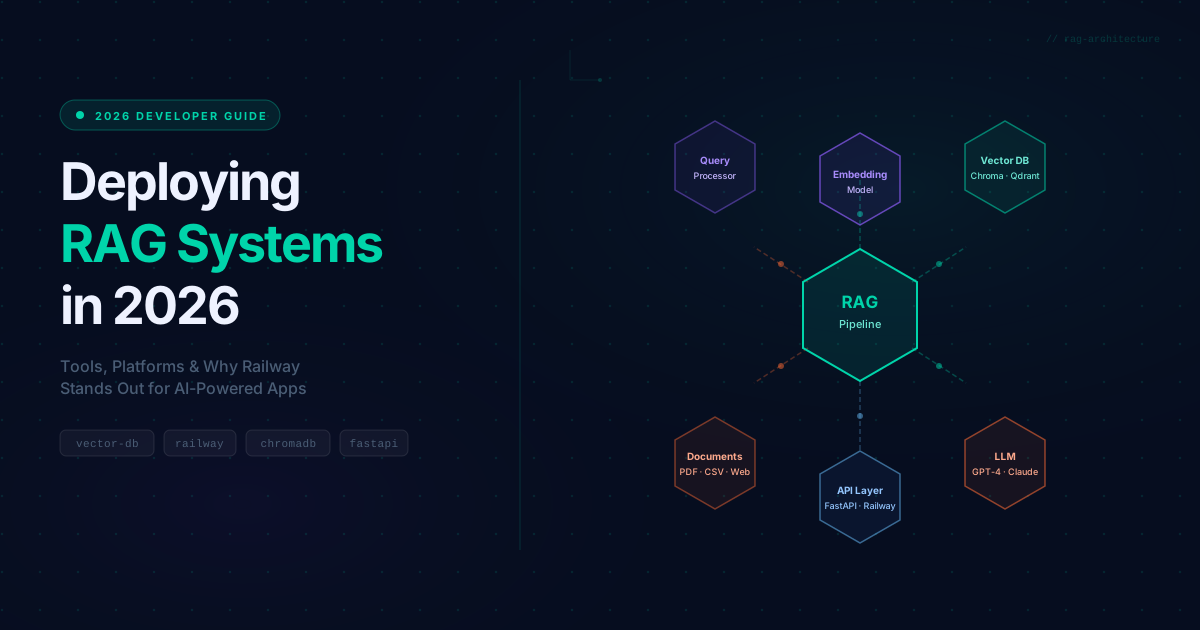
If you've been building AI-powered applications, you've probably come across the term RAG. And for good reason: it's one of the most practical ways to make large language models actually useful in real-world products. But building a RAG system is only half the battle. Deploying it reliably, cost-effectively, and at scale is where most teams struggle.
This guide breaks down what RAG is, why deployment is tricky, which tools and platforms can help, and why Railway has become a compelling choice for developers who want to ship fast without drowning in infrastructure complexity.
What Is RAG, and Why Does It Matter?
RAG (Retrieval-Augmented Generation) is a technique that connects a large language model (LLM) to an external knowledge source. Instead of relying solely on what the model learned during training, RAG retrieves relevant information from a database or document store and passes it to the model as context before generating a response.
Think of it like the difference between asking a question to someone who studied a topic once years ago versus asking someone who can look up the latest information in real time. The second person gives you a much more accurate and useful answer.
Why RAG matters in practice:
- Customer support chatbots: Answer questions based on your actual product documentation, not generic LLM knowledge
- Internal knowledge bases: Let employees search and query company policies, SOPs, and internal wikis through natural language
- Developer tools: Build assistants that understand your codebase or API documentation
- Legal and compliance tools: Query contracts, regulations, and case history with high accuracy
- E-commerce: Answer product-specific questions from catalog and inventory data
Core Advantage: LLMs hallucinate. RAG reduces hallucination by grounding responses in real, retrievable data that you control.
How RAG Works (The Short Version)
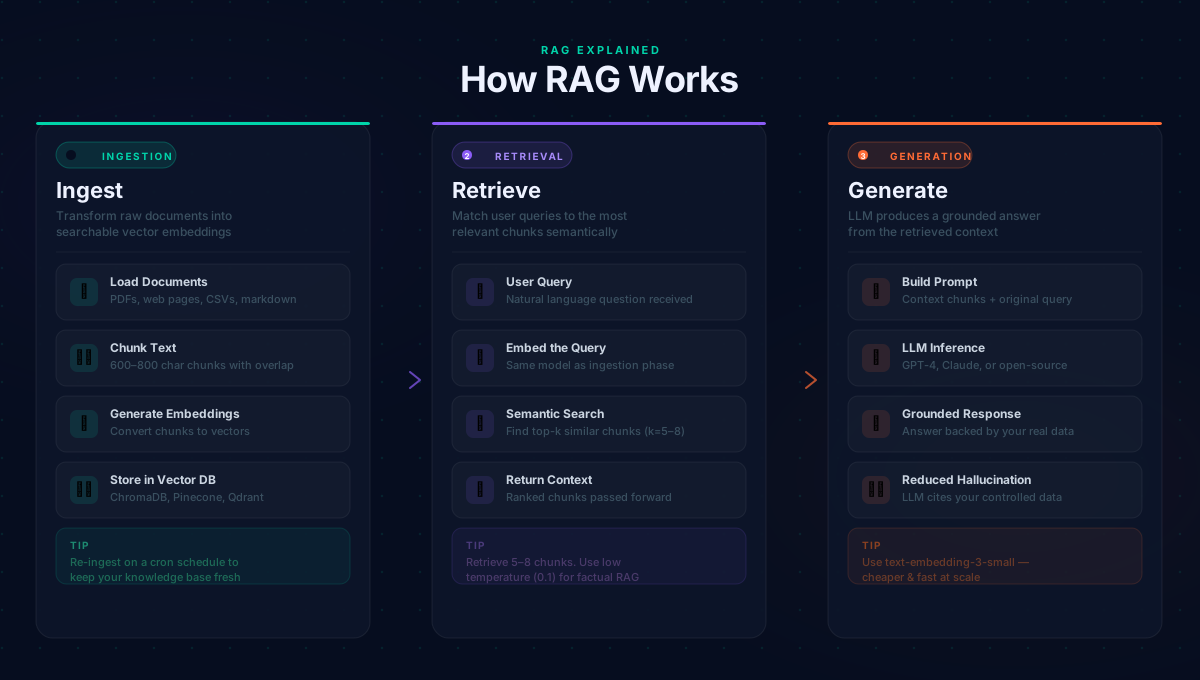
A RAG pipeline has three main stages:
- Ingestion: Your documents (PDFs, web pages, CSVs, etc.) are split into chunks, converted into numerical embeddings, and stored in a vector database
- Retrieval: When a user asks a question, the query is also embedded and the most semantically similar chunks are retrieved from the vector database
- Generation: The retrieved chunks are passed to the LLM as context, and the LLM generates a response grounded in that information
The components you need in production: an embedding model, a vector database, an LLM, and an API layer to connect them. Each of these needs to be hosted somewhere.
Common Challenges When Deploying RAG Systems
Building a RAG prototype locally is relatively straightforward. Deploying it to production is a different story. Here are the challenges teams consistently run into:
Scalability: Vector databases need to handle concurrent queries efficiently. As your document corpus grows from hundreds to millions of chunks, retrieval latency spikes if your infrastructure is not scaled appropriately.
Data freshness: Your knowledge base goes stale. If your website updates or you add new documents, you need a re-ingestion pipeline that rebuilds or updates the vector store without downtime.
Infrastructure complexity: A production RAG system typically involves at least three separate services: the vector database, the backend API, and the frontend. Coordinating these across different hosting providers adds significant operational overhead.
Cost unpredictability: Embedding API calls and LLM inference costs add up quickly, especially at scale. Without proper monitoring and caching strategies, bills can spiral unexpectedly.
Cold start latency: Many hosting platforms shut down services during idle periods. For a chatbot, a 10-second cold start before the first response is a poor user experience.
Vector Database Options for RAG
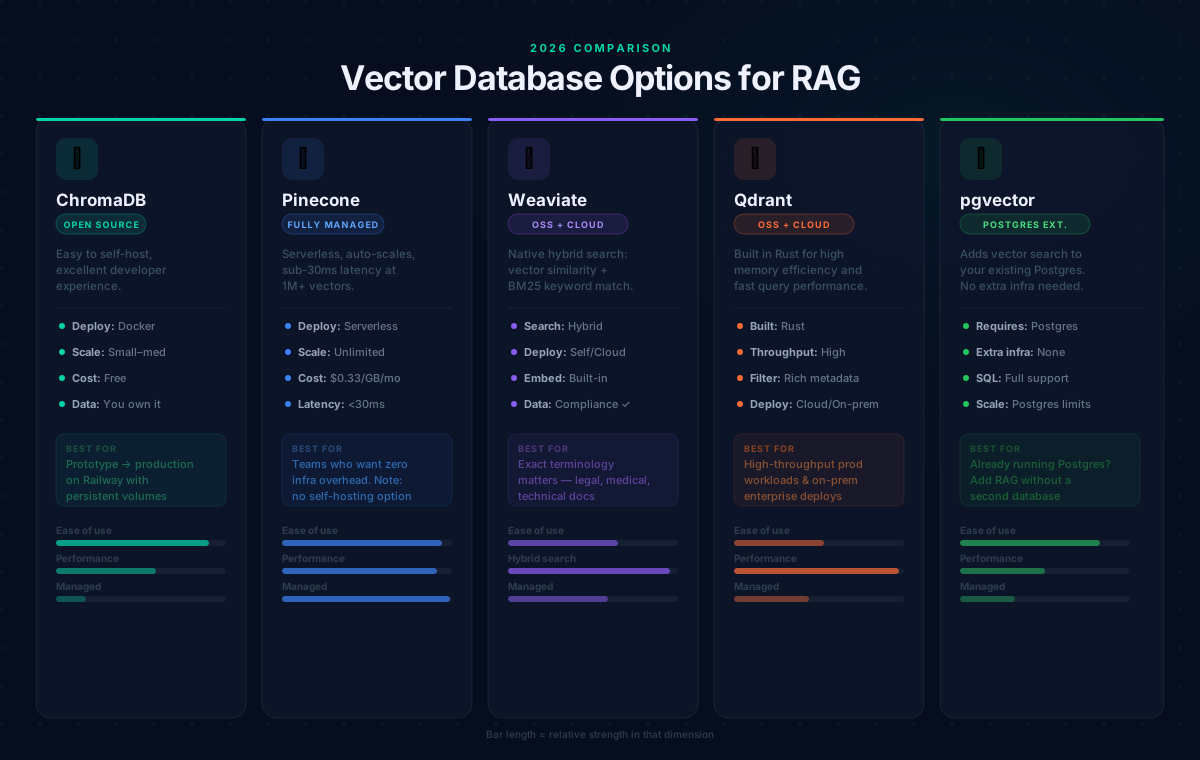
Choosing the right vector database is one of the most consequential decisions in your RAG stack. Here is a practical overview of the main options in 2026:
ChromaDB: Open-source, easy to self-host, excellent for getting started. Deployable as a Docker container. Good for small to medium workloads and the simplest path from zero to a working vector store.
Pinecone: Fully managed and serverless, scaling automatically with query latency under 30ms at 1 million vectors. Pricing is usage-based at $0.33/GB/month for storage. Best for teams that want managed infrastructure without running vector databases themselves. Note: Pinecone cannot be self-hosted; your data lives on their infrastructure, which matters for compliance requirements.
Weaviate: Open-source with a managed cloud offering. Its standout feature is native hybrid search combining vector similarity with BM25 keyword matching, which consistently improves retrieval quality for documents where exact terminology matters. Built-in vectorization modules handle embedding generation automatically. Best for teams needing self-hosted search for compliance or cost control.
Qdrant: Built in Rust for impressive memory efficiency and fast query performance. Excellent metadata filtering for complex query patterns. Available as cloud or self-hosted. Strong for high-throughput, on-premises deployments.
pgvector: Adds vector search directly to your existing PostgreSQL database. No additional infrastructure needed. Perfect for teams already running Postgres who want to add RAG without managing another database.
Deployment Platform Comparison for RAG
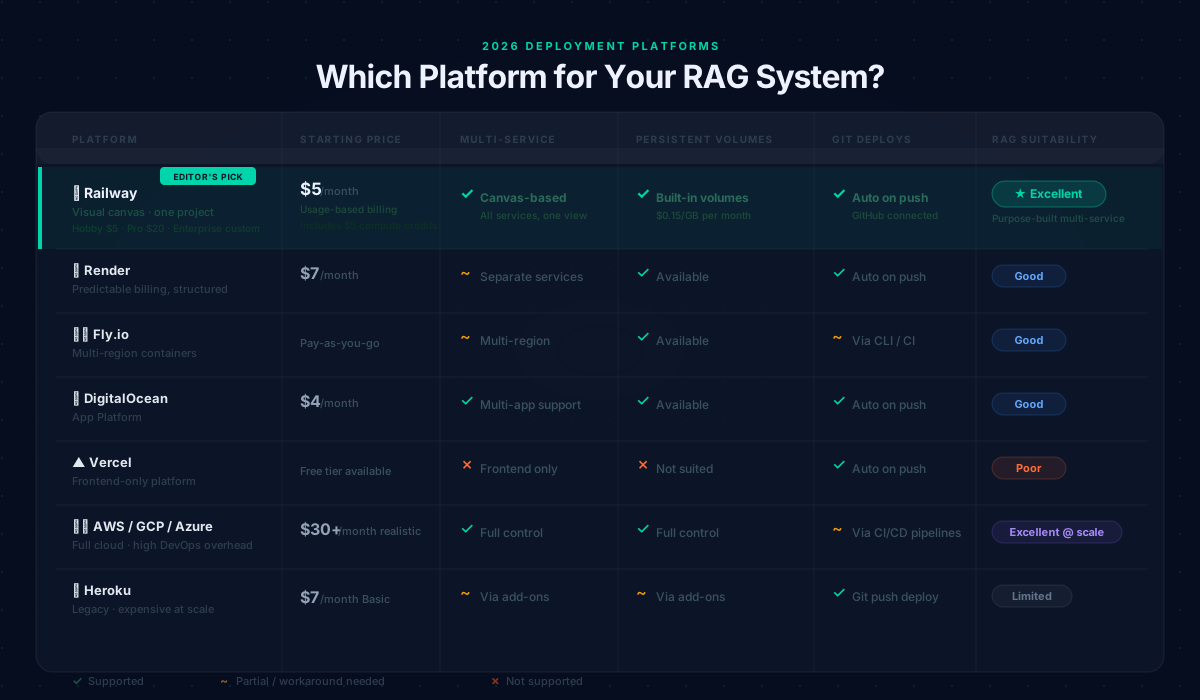
Once your vector database is chosen, you need to host your backend API, frontend, and coordinate all services. Here is how the main platforms compare for RAG workloads in 2026:
| Platform | Starting Price | Multi-Service | Persistent Volumes | Git Deployments | RAG Suitability |
|---|---|---|---|---|---|
| Railway | $5/month (Hobby) | Visual canvas, all services in one project | Built-in volumes | Auto on every push | Excellent; purpose-built for multi-service apps |
| Render | $7/month | Separate service management | Available | Auto on push | Good; predictable billing, structured defaults |
| Fly.io | Pay-as-you-go | Multi-region containers | Available | Via CLI or CI | Good; better for latency-sensitive global apps |
| DigitalOcean App Platform | $4/month | Multiple app support | Available | Auto on push | Good; solid choice for DO ecosystem users |
| Heroku | $7/month (Basic) | Via add-ons | Via add-ons | Git push | Limited; expensive at scale, legacy-focused |
| Vercel | Free tier | Frontend only | Not suited | Auto on push | Poor; frontend-only, not built for backend RAG |
| AWS / GCP / Azure | $30+/month realistic | Full control | Full control | Via CI/CD pipelines | Excellent at scale, though DevOps overhead is significant |
Why Railway Is a Strong Choice for RAG Deployment
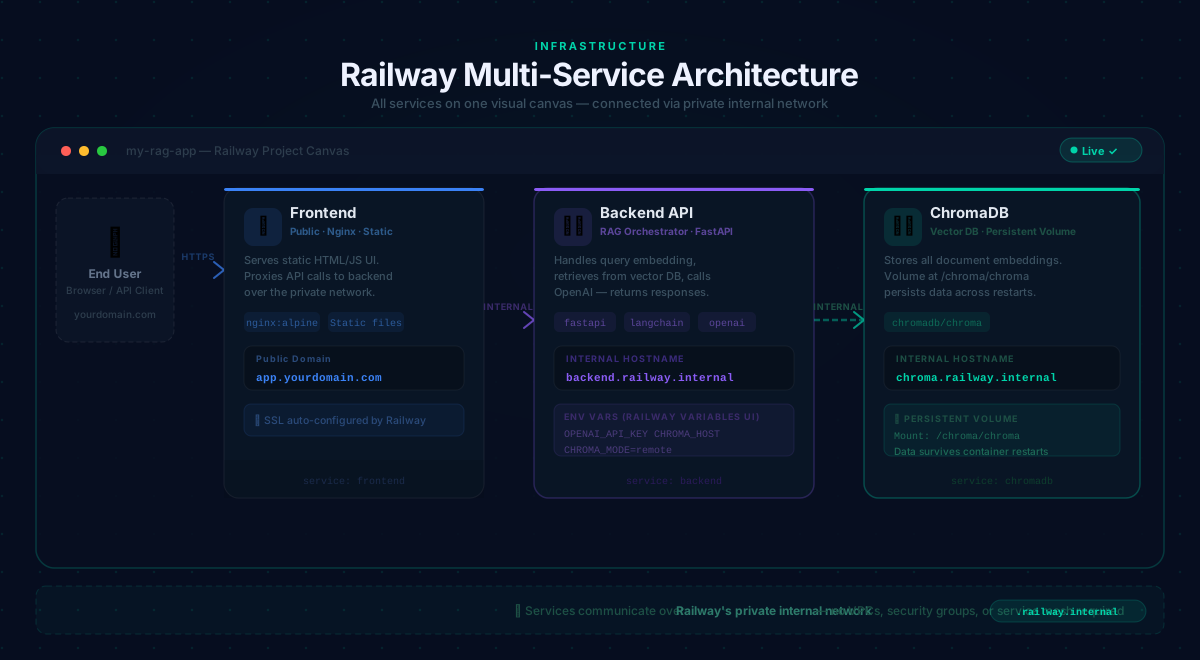
Traditional cloud providers give you maximum control but require significant DevOps expertise. You are configuring VPCs, load balancers, IAM roles, and container orchestration before deploying your first service. For most RAG projects, that overhead is not justified.
Railway sits in a sweet spot: real infrastructure control without the DevOps complexity. Here is why it works particularly well for RAG systems:
Multi-Service Architecture on a Visual Canvas
A production RAG system needs multiple services running together: a vector database, a backend API, and a frontend. On Railway, you deploy all of these within a single project on a visual canvas. They communicate over Railway's private internal network using .railway.internal hostnames with no extra configuration: no VPCs, no security groups, no service mesh.
Git-Based Automatic Deployments
Connect your GitHub repository and every push to your deployment branch triggers an automatic rebuild and redeploy. For a RAG system where you are iterating on prompts, chunking strategy, or API logic, changes go live in minutes.
Persistent Volumes for ChromaDB
Railway supports persistent volumes that survive container restarts and redeployments. Attach a volume to your ChromaDB service at /chroma/chroma and your vector data persists regardless of what happens to the container.
Pricing Plans in 2026
- Free Trial: 30 days, up to 0.5GB RAM and 1 vCPU per service
- Hobby: $5/month, includes $5 in compute credits, up to 8GB RAM and 8 vCPU per service, community support
- Pro: $20/month, includes $20 in compute credits, up to 32GB RAM and 32 vCPU per service, unlimited workspace seats and priority support
- Enterprise: Custom pricing with SSO, HIPAA BAAs, dedicated VMs, and bring-your-own-cloud
Usage rates are $0.000463 per vCPU per minute and $0.000231 per GB of memory per minute, with volume storage at $0.15/GB per month. For a RAG system that does not serve constant traffic, this is significantly more cost-effective than paying for reserved instances around the clock.
Environment Variables and Secrets Management
Railway's Variables UI lets you set API keys and configuration per service with no .env files committed to your repository. Variables are injected at runtime and can be rotated without redeployment.
Security reminder: Never commit API keys to your repository. Use Railway's Variables UI exclusively for secrets like OPENAI_API_KEY. Keep ChromaDB unexposed publicly; communicate only over Railway's internal network.
Custom Domains with Automatic SSL
Railway supports custom domains and handles SSL certificates automatically. Point your DNS records to Railway and HTTPS is configured without any additional steps.
Deploying a RAG System on Railway: Step-by-Step
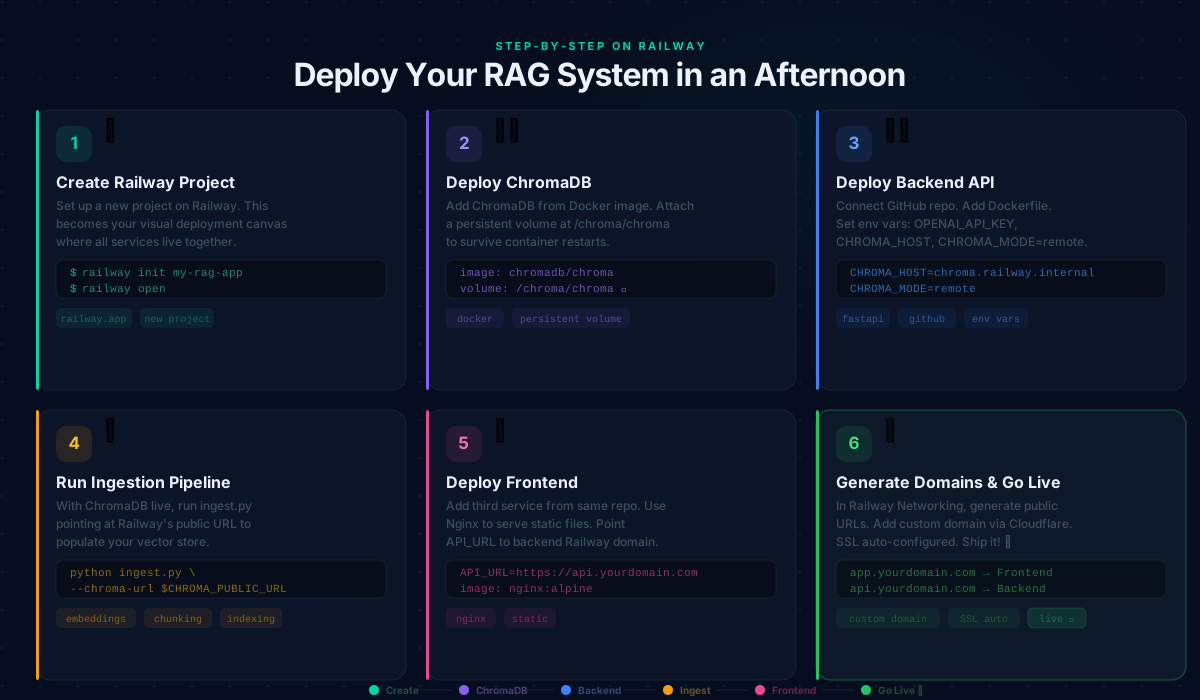
- Create your project: Set up a new project on Railway. This is your deployment workspace where all services live on one visual canvas.
- Deploy ChromaDB: Add a new service using the
chromadb/chromaDocker image. Attach a persistent volume at/chroma/chroma. Railway gives you an internal hostname (chroma.railway.internal) for private service-to-service communication. - Deploy your backend API: Connect your GitHub repository. Set the root directory to your backend folder. Add a
Dockerfilethat installs dependencies and starts your FastAPI server. Set environment variables:OPENAI_API_KEY,CHROMA_HOST,CHROMA_MODE=remote, andALLOWED_ORIGINS. - Run your ingestion pipeline: With ChromaDB and the backend live, run your
ingest.pyscript locally pointing at the Railway ChromaDB public URL. This scrapes your content, creates embeddings, and populates the vector store. - Deploy your frontend: Add a third service from the same repository. Use an Nginx Docker image to serve your static files. Configure your frontend's API URL to point to your backend's Railway domain.
- Generate domains: In Railway's Networking settings, generate public URLs for your frontend and backend. Add your custom domain via Cloudflare or your DNS provider.
Key Considerations and Best Practices
🔒 Security
- Never commit API keys; use Railway's Variables UI exclusively
- Set
ALLOWED_ORIGINSexplicitly; only whitelist domains that should call your API - Keep ChromaDB unexposed publicly; communicate only over Railway's internal network
📈 Cost Management
- Monitor Railway's real-time usage dashboard regularly
- Cache frequent queries to reduce LLM API calls
- Use
text-embedding-3-smallover larger models unless accuracy demands it; it's significantly cheaper at scale
🔄 Data Freshness
- Build re-ingestion into your deployment pipeline whenever content changes
- Use Railway's built-in cron schedule feature to re-ingest content on a regular cadence
⚡ Performance
- Retrieve 5 to 8 chunks per query as a starting range and tune from there
- Keep chunk sizes between 600 and 800 characters with overlap to preserve context
- Use low temperature (0.1) for factual RAG responses to minimize hallucination
Monitoring
Integrate LangSmith for tracing individual RAG requests; it shows exactly which chunks were retrieved and what the model received. Set up a health check endpoint on your backend so Railway automatically catches failed deployments.
Pro Tip: Railway's built-in metrics dashboard gives you real-time CPU, memory, and network usage per service. Pair this with LangSmith tracing to get full visibility from infrastructure to model inference, with no external monitoring stack needed.
Final Thoughts
RAG has moved from research concept to production-ready architecture. The tooling around it (vector databases, embedding APIs, orchestration frameworks) has matured enough that small teams can build and deploy sophisticated knowledge retrieval systems in days, not months.
Railway removes the infrastructure barrier that used to slow this process down. For developers who want to focus on the quality of their RAG pipeline rather than Kubernetes configurations and cloud networking, it is a genuinely practical choice. The combination of multi-service support, persistent volumes, git-based deployments, and usage-based pricing makes it well-suited for exactly this type of application.
"Start with the free trial, deploy your three services (vector database, backend, and frontend), run your ingestion pipeline, and you have a production RAG system live in an afternoon."