
Artificial intelligence is becoming a core part of modern products — especially with AI Agents that can reason, plan, and take actions. But as usage grows, so do costs and latency.
Every time a user interacts with an AI-powered feature, tokens are consumed and an API call is made. When a product scales from hundreds of users to tens of thousands, those costs grow linearly — and quickly become a budget concern that puts the entire AI roadmap at risk.
One powerful and surprisingly straightforward optimization technique can change that equation: prompt caching. It is not a complex infrastructure project. It is a deliberate architectural decision that, implemented correctly, can reduce AI costs by 20 to 60 percent while simultaneously making responses faster and performance more predictable.
Core Principle: Don't pay twice for the same AI thinking. If the same prompt or reasoning pattern will be needed again, store the result and serve it instantly instead of generating it fresh every time.
What Is Prompt Caching?
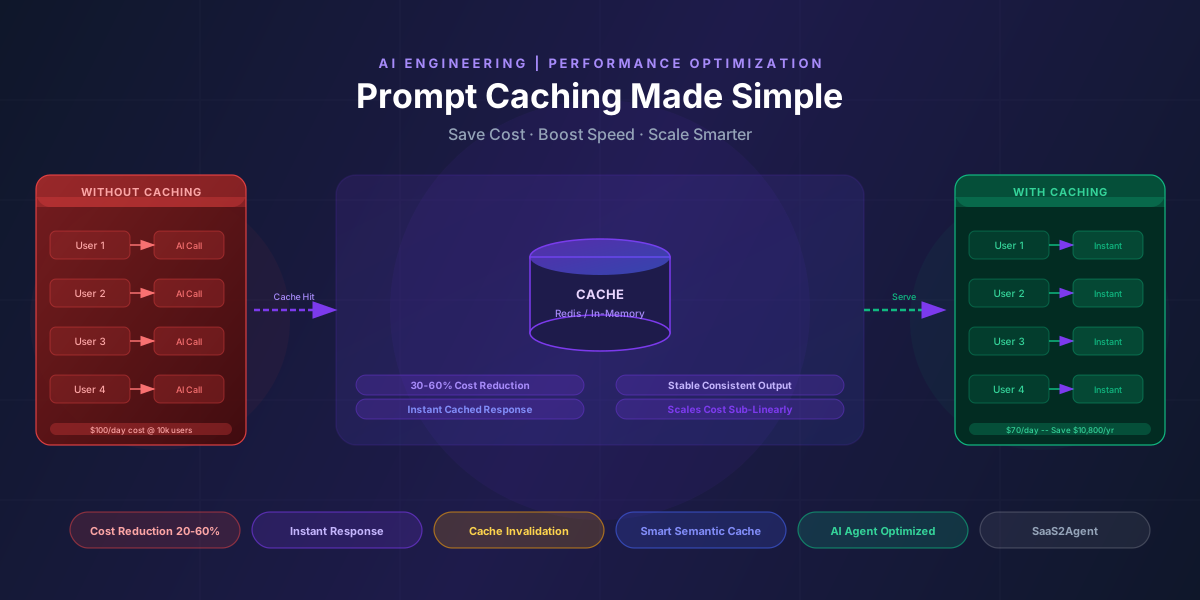
Prompt caching means: if you send the same or very similar prompt to an AI model multiple times, you store the response and reuse it instead of asking the model again.
Think of it the same way a browser caches web pages to load them faster:
- The first time a question is asked, it goes to the AI model and generates a fresh response.
- That response is stored in a cache layer.
- The next time the same (or equivalent) question arrives, the cached response is returned instantly — no AI call, no token cost, no wait.
A Simple Example
Imagine a SaaS product with an AI assistant. Users frequently ask questions like:
- "Explain our refund policy"
- "Summarize our pricing plans"
- "What integrations do you support?"
These are stable questions with stable answers. Without caching, every one of those requests fires a new AI API call. With caching:
- The first request is sent to the AI model and the response is stored in the cache.
- The next 1,000 users asking the same question receive the cached response immediately.
No extra AI calls. No extra cost. Much faster response for every user after the first.
What Happens Without Prompt Caching?
Without a caching layer in place, every user request generates a new AI API call. Every API call consumes input tokens and output tokens. More tokens means higher cost. At small scale, this is manageable. At product scale, this grows into a serious financial problem.
- Every user request = new AI API call
- Every AI call = tokens consumed
- More tokens = higher cost per day
- Linear cost growth directly tied to user growth
For products experiencing hockey-stick growth, this pattern can make AI features economically unsustainable before the business has time to optimize.
Prompt Caching in an AI Agent Feature
AI Agents are more complex than simple chatbots. A single agent interaction might analyze a document, perform multi-step reasoning, call external tools, and generate a structured report. That creates many prompts — and many repeated patterns across different users running similar workflows.
This is where caching provides compounding value. There are four primary places within an AI Agent architecture where caching applies directly:
1. System Prompts
Agents use large system prompts to establish their role, context, and behavioral constraints. A typical system prompt might look like: "You are an intelligent assistant that helps users analyze documents, generate structured reports, and answer questions about our platform." That instruction is identical for every single user session. Instead of re-sending the full context on every API call, system prompts can be cached at the infrastructure layer — a practice now supported natively by providers including Anthropic (Claude) and OpenAI.
2. Knowledge Base Queries
When multiple users ask similar questions about the same content — "Summarize this policy," "What are the key risks in this document?" — the intermediate reasoning steps can be cached. The AI processes the document once; subsequent users with equivalent queries receive cached analytical output.
3. Tool Call Results
If an agent fetches structured data such as pricing tables, configuration values, or product specifications, the AI explanation layer built on top of that data can be cached. The underlying data may change infrequently enough that a cached explanation with a defined time-to-live (TTL) is safe and accurate.
4. Multi-Step Reasoning Templates
Agents in production often repeat the same reasoning patterns: Plan, then Execute, then Summarize. Those repeated templates — the structural scaffolding of the agent's workflow — can be cached, leaving only the unique per-user inputs to be processed fresh by the model.
The Four Benefits of Prompt Caching
Cost Reduction
Caching reduces repeated input tokens, repeated output tokens, and total API calls. For AI-heavy SaaS products, the impact ranges from 20% to 60% cost reduction depending on how repetitive the usage patterns are.
Faster Response Time
Cached responses are returned instantly — no model processing, no network round-trip to the AI provider. This directly improves user experience, agent responsiveness, and the performance of real-time workflows.
Better Scalability
Without caching, costs grow linearly with users. With caching, costs grow slower than user growth. This makes AI features financially sustainable as the product scales, turning AI from an experiment into a production capability.
Predictable Performance
AI models can generate slightly different outputs for similar prompts. Caching ensures consistent responses, stable outputs for compliance-sensitive content, and reduced hallucination variance across sessions.
The Cost Math: A Concrete Example
Assume a product with 10,000 users per day. Each AI request costs $0.01. Usage analysis shows that 30% of prompts are functionally repeated — same question, same context, same answer.
= $3,000/month
= $36,500/year
= $2,100/month
Saving $10,800/year
At 100,000 users per day, those savings grow by 10x. At a 50% cache hit rate, the savings grow further. Products with highly repetitive AI usage patterns — FAQ assistants, document summarizers, report generators — routinely see cache hit rates above 40%, making the cost impact substantial at any meaningful scale.
Where Prompt Caching Should Not Be Used
Caching is a powerful tool, but it is not universally appropriate. Applying it indiscriminately creates correctness and privacy risks that outweigh the cost savings.
Do not cache responses for:
- Personalized responses — any output that depends on the specific user's account data, history, or preferences
- Real-time data queries — responses that depend on live information such as inventory levels, live prices, or current system status
- Sensitive user-specific outputs — anything containing personal data, authentication context, or account-specific information
- Dynamic context-heavy reasoning — agent responses that depend on unique inputs that vary significantly between users
Rule of thumb: Only cache a response when (1) the input is identical or logically equivalent across users, and (2) the output is safe, accurate, and appropriate for any user who would ask the same question.
Advanced Strategy: Smart Caching
Basic caching works on exact string matches — the same prompt stored and retrieved by its exact text. But exact-match caching misses a large portion of caching opportunities, because users phrase equivalent questions differently.
Advanced caching implementations use:
- Semantic similarity detection — compare the meaning of incoming prompts against cached prompts using embedding vectors. If two prompts are semantically equivalent above a defined threshold, serve the cached response.
- Template-based caching — identify structural prompt patterns and cache at the template level, substituting only the variable elements per request.
- Partial prompt caching — cache the static elements of a prompt (system instruction + knowledge base context) while processing only the dynamic user query element live. This is particularly effective for AI Agents with large, stable system prompts.
Implementation Considerations
1. Cache Invalidation
Cached responses become stale when the underlying information changes. A cached explanation of the refund policy becomes incorrect the moment that policy is updated. Building a reliable invalidation mechanism is as important as the caching itself.
Invalidation triggers to implement:
- Content update events (policy changes, pricing updates, compliance text revisions)
- Time-based expiration (TTL) for content that changes on a known schedule
- Manual purge capability for emergency corrections
2. Storage Strategy
The right storage approach depends on the scale and access patterns of the product:
| Storage Option | Best For | Trade-offs |
|---|---|---|
| In-Memory (Redis) | High-frequency, low-latency cache hits | Higher cost, data evicted on restart without persistence |
| Database Storage | Persistent cache with search capability | Higher read latency vs in-memory |
| Edge Caching | Geographically distributed users | More complex invalidation logic |
| Hybrid Approach | Production AI products at scale | Requires more infrastructure management |
3. TTL (Time to Live)
Every cached response should carry a defined expiration time based on how dynamic the underlying information is:
- 1 hour — for content that may change intraday (live pricing, stock levels)
- 24 hours — for content updated daily (reports, dashboards)
- 7 days or longer — for stable content (product documentation, FAQs, policy summaries)
4. Security
What must never be cached:
- Personal user data of any kind
- Authentication tokens or session identifiers
- Sensitive private information — financial records, health data, legal documents tied to specific users
Security Check: Before any response is written to cache, verify it contains no user-specific identifiers, account data, or information that would be inappropriate to serve to a different user. This check should be automatic and part of the cache write path, not a manual review step.
Prompt Caching + AI Agents = Strategic Advantage
The combination of prompt caching with an AI Agent feature changes the economics and risk profile of AI product development fundamentally.
Without caching, adding an AI Agent to a product introduces compounding cost pressure. As users grow, AI costs grow at the same rate. Finance teams start questioning whether the AI feature is sustainable. Scaling decisions get delayed. Product roadmaps get constrained by cost forecasts.
With caching, the relationship between user growth and AI cost is no longer linear. Cache hit rates improve as usage patterns stabilize. The cost per user decreases as the product scales. AI features move from being expensive experiments to being financially predictable product capabilities.
The practical result:
- Controlled AI spending — predictable cost curves that finance teams can plan against
- Faster performance — cached responses feel instantaneous to users
- Better user satisfaction — consistency and speed reinforce trust in the AI feature
- Sustainable AI adoption — the ability to scale without disproportionate cost growth
Conclusion
Prompt caching is simple in concept: don't pay twice for the same AI thinking.
For product builders adding AI Agent features, it is not purely an engineering optimization. It is a cost control strategy, a performance booster, and a scaling enabler rolled into one architectural decision. Applied correctly — with appropriate invalidation, security controls, and a smart matching strategy — prompt caching makes the difference between an AI feature that strains the budget at scale and one that becomes more economically efficient as the product grows.
As AI becomes deeply embedded into products, the winners will not simply be those who use AI. They will be the ones who use it efficiently. Prompt caching belongs in the architecture from day one — not as an afterthought when the first large invoice arrives.
"If you're building AI into your product, prompt caching should be part of your architecture from day one."