
Context Rot happens when you keep adding more and more into a prompt like logs, files, tickets, docs, or long chat history and the AI actually becomes less reliable. It feels logical to think that giving it everything will help it understand better, but in reality the extra noise can overwhelm the model and make it confused while still sounding confident. And it's not always a bad model issue, a lot of the time it's simply a too much of a context issue.
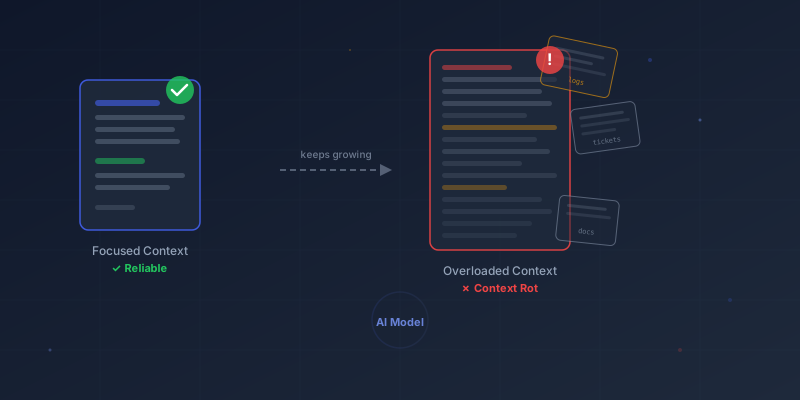
What context rot looks like in real coding
In real coding work, context rot shows up in a few predictable ways. The assistant might edit the wrong file because it finds another file that looks similar and grabs the wrong context. It can also forget an important constraint you mentioned earlier, like "don't change the API contracts," and then suggest changes that quietly break compatibility. Sometimes it brings back an approach you already discussed and rejected, almost as if that decision never happened. In the worst cases, the responses start to feel like they belong to a completely different project, with assumptions and structure that do not match what you are building. And as the prompt keeps getting longer, everything slows down and costs more, because the model has to process more tokens each time before it can even start answering.
Why it happens
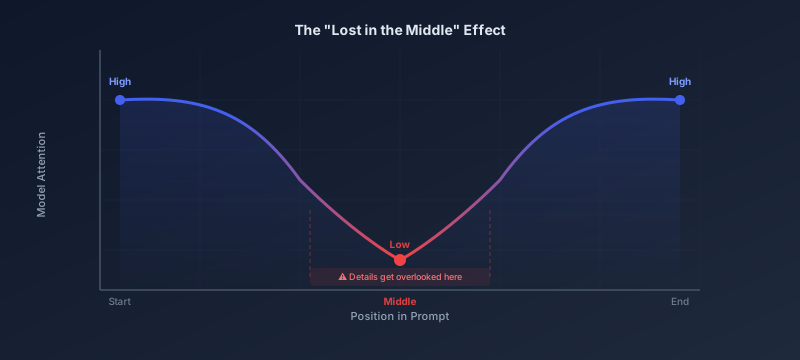
Context rot usually happens for a few simple reasons. First, there's the "lost in the middle" effect. AI models tend to pay the most attention to what's near the start and the end of what you send, so if the key detail is buried in the middle of a huge prompt, it can get overlooked even though it's technically there. Second, extra information is not harmless. Irrelevant details add noise, and that noise can actively push the model toward the wrong interpretation. It's like trying to debug while a room full of people are shouting different stack traces at you, even if some of them are real, the chaos makes it harder to think clearly. Third, the useful context is often smaller than the maximum context window. Even if a model can accept a very large prompt, it usually stays sharp only within a smaller "effective" range. So yes, you can paste a lot, but that doesn't mean you should.
The biggest SDLC cause
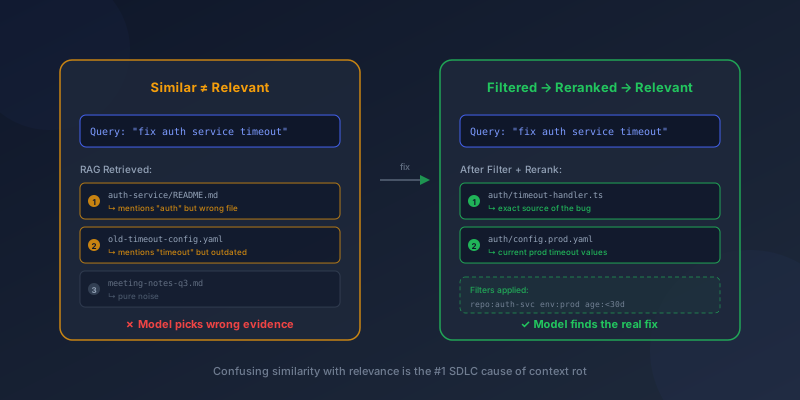
One of the biggest causes of context rot in the SDLC is confusing similarity with relevance. A lot of developer workflows run into trouble when retrieval systems like RAG pull documents that are only loosely connected to the problem, so the model sees "related-looking" text but not the right source of truth. The same thing happens when you paste massive tool outputs like CI logs, kubectl describe, or a Terraform plan, because the important signal is buried inside a lot of noise. It also builds up when you keep adding old chat history "just in case," which increases the amount of context without improving clarity.
The end result is that the model is handed a huge pile of plausible text. With so many options that sound reasonable, it can easily latch onto the wrong detail, pick the wrong evidence, and confidently take the conversation in the wrong direction.
The fix is not "less context." It's "better context."
The fix isn't "use less context." The fix is "use better context." Teams that want agents running in production without constant surprises usually follow a simple playbook that keeps the model focused, predictable, and safe.
Set a context budget
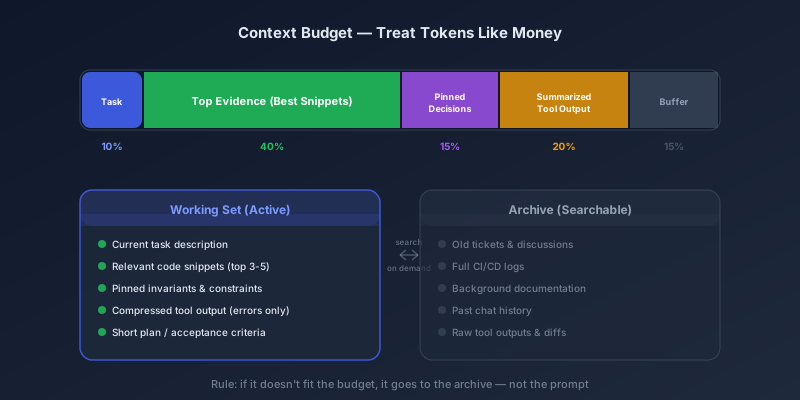
First, they set a context budget and treat tokens like money. Instead of pasting everything, they decide what deserves space in the prompt. A practical split looks like this: a small portion for the task and constraints, a larger chunk for the most relevant evidence (only the best snippets from docs or code), some space for pinned decisions that must not change, a smaller portion for summarized tool outputs, and then a buffer. The key rule is ruthless: if it doesn't fit, it doesn't go in. Anything extra goes into an archive that can be searched later.
Split memory into two layers
Next, they split memory into two layers: a working set and an archive. The working set is small and curated, containing only what the AI needs right now to do the task correctly. The archive holds everything else such as old tickets, long logs, past discussions, and background docs. This structure prevents the model from drowning in history while still keeping information accessible when needed.
Pin invariants like adults
They also pin invariants like adults. This means creating a short block that always travels with the request, listing the non-negotiables. It typically includes security rules (like never leaking secrets or running risky commands), API contracts that must not break, key architecture decisions and why they were made, and known pitfalls that previously caused bugs or wasted time. This one block is often enough to prevent "decision amnesia," where the model confidently ignores what you already agreed on.
Filter first, rerank second, then prompt
For teams using retrieval (RAG), the rule is simple: filter first, rerank second, then prompt. Instead of grabbing the top chunks from embeddings and dumping them into the prompt, they narrow the search using metadata like repo path, service name, environment, time window, or owner. Then they rerank to keep only the pieces that are truly relevant. Only then do they add the results into the prompt. This approach cuts noise hard and is one of the fastest upgrades you can make.
Compress aggressively
They also compress aggressively, especially logs and tool output. Raw CI logs, massive stack traces across services, full lint output, or giant package-lock diffs usually make the model worse. Better practice is to summarize, keep only the error lines and a small surrounding window, and include only the sections you are actually going to act on right now. A clean rule to follow is: if you won't act on it in this turn, don't include it.
Hierarchical retrieval
Another technique that works well is hierarchical retrieval. Instead of fetching 30 random chunks and creating "fragment soup," teams first retrieve a small number of parent sections like the most relevant files, modules, or doc chapters. Then they pull a handful of smaller child snippets from within those parents. This keeps context coherent and makes it much easier for the model to reason accurately.
Avoid one overloaded mega-agent
They also avoid one overloaded mega-agent. When a single agent has 50 things in context, it becomes easy to derail. A more stable pattern is to split responsibilities across smaller agents: one agent focuses on understanding and planning, another implements, another writes tests, and another verifies by checking diffs or running commands. Each agent sees a smaller, cleaner context, which usually leads to higher reliability.
Guardrails for tool-using agents
If your agent can run tools in the real world, guardrails become non-negotiable. The moment an agent can deploy, migrate a database, run shell commands, or call cloud APIs, new risks appear such as tool poisoning, prompt injection through docs and logs, or accidental secret leakage. The baseline mitigations are straightforward: apply least-privilege access, allowlist safe commands, run in a sandbox, keep an audit log of every tool call, and never allow unrestricted freeform shell access in production.
Test for context rot explicitly
Strong teams also test for context rot explicitly. They don't just ask, "Did it answer?" They ask, "Does it stay correct under long context?" That means running needle-in-a-haystack tests, long-context reasoning checks, and measuring how accuracy changes as prompt length grows. The goal is to find where quality starts degrading, then design the system to operate safely below that threshold.
Watch early warning signals
Finally, they watch early warning signals in production. Two simple metrics often catch context rot before it becomes obvious: prompt length trends (tokens per run) and latency trends (seconds per run). If both are steadily climbing, it's a strong sign that the system is drifting toward overload and quality is likely to drop next.
A practical "anti-rot" pipeline you can copy
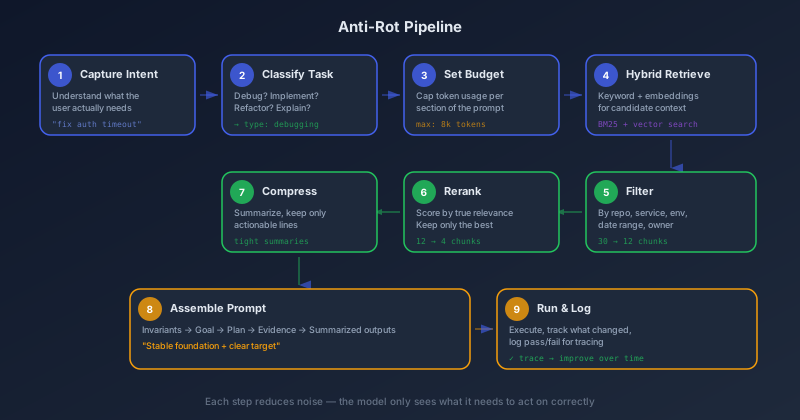
Here's a practical anti-rot pipeline you can copy and implement without turning your workflow into a rigid process. Start by capturing the user's intent clearly, then classify the task so you know what kind of help you actually need, whether that's debugging, implementing, refactoring, or explaining. Once the task is clear, set a context budget so the prompt does not grow endlessly and stays focused on what matters. Then retrieve candidate context using a hybrid approach: keyword search for precision and embeddings for semantic matches. After that, filter the results based on what's relevant to your situation, such as the specific repo or service, the date range, and the environment. Next, rerank the remaining items so you keep only the strongest, most useful pieces of context instead of dumping everything into the prompt. Then compress what you kept by turning it into tight summaries and retaining only the actionable lines that directly support the task.
When you assemble the prompt, structure it so the model has a stable foundation and a clear target. Start with pinned invariants, meaning the rules that must not be violated. Follow that with the goal and acceptance criteria so success is unambiguous. Add a short plan so the model stays organized, then include a small set of top evidence that actually matters. Finally, include summarized tool outputs instead of raw logs. Run the task, and then log what was retrieved, what changed, and whether the result passed or failed, so you can trace decisions and improve the pipeline over time.
Quick win: If you only make two upgrades, prioritize reranking your retrieval results and compressing tool output. Those two changes alone usually make the biggest difference, because they cut noise, reduce confusion, and keep the model focused on the most relevant information.
Closing thought
Bigger context windows are definitely useful, but they don't automatically fix context rot. What actually works is context engineering: intentionally curating what matters, pulling in the right evidence when it's needed, and keeping the active working set clean so the model stays focused and reliable.