
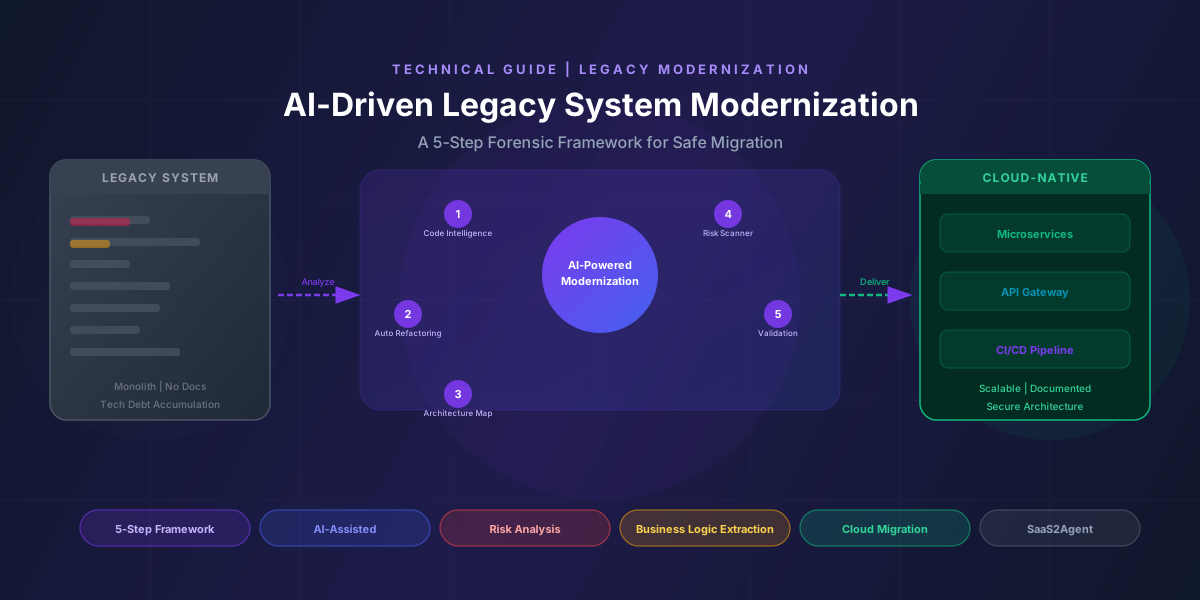
Legacy system migration is one of the most complex engineering challenges a team will face. The code is old, the documentation is missing or outdated, and the people who understood the original design may have left years ago. Yet the system is still running — it is serving customers, processing transactions, enforcing business rules nobody has ever formally written down.
The most common mistake is treating this as a simple code translation exercise — "just rewrite it in a modern stack." That mindset leads to failed migrations, data corruption, and systems that technically run but miss half the business logic of their predecessors.
The right approach is forensic engineering. Before writing a single line of new code, the team must deeply understand what the old system actually does today. Not what the original spec said. Not what the documentation claims. What it does in production, right now, for real users.
This guide presents a structured 5-step framework for legacy analysis — and explains how AI changes the speed, accuracy, and depth of every single step.
Core Principle: The goal is not to clone the old system. The goal is to understand its intent, extract the business truth it holds, and rebuild that truth in a clean, modern architecture — while avoiding every trap the original developers left behind.
The 5-Step Forensic Framework
The framework works in sequence. Each step builds on the last. Skipping steps creates gaps in understanding that will surface as bugs, missing features, or data loss during migration.
Walk the Floor
Start with the user interface and map every feature that is actively used. Treat the UI as a contract — if a button exists and users click it, it represents a promise the system must fulfill. Your job in this step is to understand what the system actually does today, not what anyone assumed it does.
This means going through every screen, every form, every report, and every user-facing action. Create a feature inventory. For each item, ask: Is this used in production? Who uses it? How often? What does it trigger downstream?
Many legacy systems accumulate features that were built but never adopted, or workflows that were replaced but never removed. Identifying actively used functionality versus dead weight upfront prevents teams from over-scoping the migration. You do not need to rebuild what nobody uses.
- Screenshot or record every UI screen in the live production system
- Map every action (button clicks, form submissions, navigation paths) to a downstream effect
- Flag features with low usage for explicit stakeholder sign-off before including them in scope
- Document which user roles interact with which parts of the system
Follow the Paper Trail
For each user action identified in Step 1, trace the full execution path from the frontend, through the API layer, through middleware and services, all the way to the database. The goal is to connect every user interaction to the code that handles it.
This step is where technical debt becomes visible. Legacy systems often have inconsistent entry points, duplicated logic spread across multiple layers, and undocumented API contracts that evolved over years without formal versioning.
Mapping the paper trail typically reveals:
- API endpoints that feed the same UI component in different environments
- Business logic embedded in stored procedures deep in the database layer
- Middleware transformations that alter data before it reaches or leaves the database
- Legacy service calls that no longer match current data models but still run successfully
The output of this step is a complete technical map: User Action A triggers API Call B, which invokes Service C, which queries Table D and runs Stored Procedure E. Every path documented, no surprises left in production.
Read the Files
Analyze the data that flows back to users — not just the raw tables that exist in the database. The data a user sees is the source of truth for what the new schema needs to preserve. Design the clean, modern data model from what users actually consume, not from what happens to be stored.
Legacy databases are rarely clean. They carry decades of schema patches, nullable columns added to avoid migration work, lookup tables that duplicated across multiple services, and data formats tied to frameworks long since abandoned.
The approach here is to work backwards from the output. If the reporting screen shows a customer's total annual revenue broken down by product category, the new schema must be able to reproduce that exact calculation from the same source data. That calculation may depend on three separate tables, a specific JOIN condition, and a rounding rule buried in a stored procedure.
Document every transformation between raw storage and displayed data. Those transformations are often where the real business logic lives — hidden in SELECT statements nobody has read in years.
Find the Rulebook
Scan all conditional logic, validation rules, calculation formulas, and stored procedures to extract an explicit business rulebook. Every if-then branch, every validation check, every formula is a business rule that the organization depends on — even if nobody remembers writing it or why.
This is the most underestimated step in legacy migration. Business rules are scattered everywhere in old systems: in controller validation methods, in service-layer logic, in client-side JavaScript, in database triggers, and in stored procedures. Many of these rules were never documented because the developers expected the code itself to serve as documentation.
Examples of hidden business rules to look for:
- Discount calculations that apply differently based on customer tier and invoice date
- Status transitions that are only valid in specific sequences
- Approval workflows with different paths based on amount thresholds
- Tax calculations that vary by region, product type, or customer classification
- Data masking rules applied differently for different user roles
The output of Step 4 is a living document — the Rulebook — written in plain language, reviewed by business stakeholders, and used as the authoritative specification for what the new system must replicate exactly.
Check the Foundation
Identify all third-party dependencies, payment gateways, external service integrations, and libraries. Surface the ones that are deprecated, unsupported, or incompatible with modern infrastructure. These are the hidden risks in every legacy migration, and finding them early is the difference between a planned risk and an emergency.
Legacy systems commonly contain:
- Payment gateway integrations using deprecated API versions that vendors have scheduled for sunset
- Libraries with known CVEs that cannot be easily upgraded due to tight coupling
- Third-party services that have been acquired, renamed, or discontinued
- Internal services that other teams depend on but that are not documented in any architecture diagram
- Custom cryptographic implementations written before modern security libraries existed
Every dependency identified here needs an explicit migration decision: replace, upgrade, re-wrap, or eliminate. Making those decisions before the migration starts prevents them from blocking delivery at the worst possible moment.
The Three Biggest Migration Risks
Even with a complete framework, three risks consistently derail legacy migrations. Understanding them upfront is the strongest form of prevention.
Risk 1: Hidden Business Logic in Database Triggers and Stored Procedures
This is the most dangerous category. Stored procedures and database triggers are invisible during most code reviews. They run silently on data events, and teams migrating to a new system often forget to audit them entirely. The result is a migration that appears complete until a specific workflow is tested — and then the numbers are wrong, or a status transition fails, or a cascade of updates that were supposed to happen automatically does not.
Red Flag: If the old system has more than a few stored procedures, assume that some critical business logic lives in them. Build specific test cases around each procedure before migration begins, not after.
Risk 2: Scope Creep — Clone First, Improve Later
The most common project failure mode in legacy migration is trying to modernize and optimize at the same time as replication. Business stakeholders see the migration as an opportunity to fix long-standing UX problems, restructure the data model, and add new features simultaneously. That combination reliably blows timelines and budgets.
The disciplined approach is a clean separation of phases. Phase one replicates everything the old system does, exactly, with full test coverage. Phase two introduces improvements with a stable baseline to compare against. This approach also makes it much easier to detect regressions — if something breaks in phase two, you know exactly which change caused it.
Risk 3: Data Corruption Without Validation Scripts
Migrating data between schemas without a rigorous validation layer is a guarantee of silent data loss. Records that were valid in the old schema may fail constraints in the new one. Null values that were acceptable before may violate required fields in the migration target. Encoding differences between systems can corrupt text data at scale.
Before any data migration runs, write validation scripts that compare record counts, spot-check transformed values, verify referential integrity, and confirm that computed values in the new schema match their equivalents in the old one. Run these scripts after each migration batch, not just at the end.
How AI Accelerates Every Step
The 5-step framework is a manual process without AI — methodical but slow. A large legacy codebase can take months to analyze by hand. AI changes this equation fundamentally, not by replacing the framework but by accelerating each step by orders of magnitude.
Modern large-context AI models can ingest entire repositories, trace cross-service dependencies, generate architecture diagrams from code, and extract business rules from thousands of conditional branches — work that would take a senior engineer weeks of focused effort.
The Archaeologist
Analyzes the entire codebase to build a system-wide understanding map. Traces component relationships, identifies dead code, and produces a dependency graph that would take weeks to build manually.
The Translator
Converts code safely from legacy stacks to modern equivalents while preserving logic fidelity. Handles syntax differences, library substitutions, and framework idioms with generated test coverage.
The Artist
Generates architecture diagrams, data flow maps, and entity relationship diagrams directly from code analysis. Produces living documentation that stays current as the migration progresses.
The Security Guard
Reviews the legacy codebase for known vulnerabilities, deprecated cryptography, SQL injection vectors, and compliance issues. Produces a prioritized remediation list before migration begins.
Can AI Extract Business Rules from Legacy Code?
Yes — and this capability is one of the highest-value applications of AI in a legacy migration project. Business rules are consistently the most difficult and most important artifact to extract from old systems, and AI models excel at this task.
Given a codebase, a well-prompted AI model can:
- Detect all conditional logic — identify every if-then branch, switch statement, guard clause, and validation check across the entire codebase
- Map validation rules — extract what inputs are accepted, rejected, and transformed at each layer of the system
- Identify calculation dependencies — trace what data points feed each formula and flag where rounding, precision, or currency handling may differ between systems
- Generate plain-language summaries — convert complex nested logic into human-readable rule descriptions that business stakeholders can review and approve
Practical Tip: Feed the AI model the raw stored procedure code and ask it to produce a numbered list of every business rule the procedure enforces. Then have a domain expert review the list for completeness. This combined approach catches both what the AI extracts and what the expert adds from institutional knowledge.
Can AI Analyze Large, Undocumented Codebases?
The largest context window models available today can ingest repositories of hundreds of thousands of lines of code in a single session. This is a genuine breakthrough for legacy analysis work, because the most valuable insights come from cross-service patterns — behaviors that are only visible when you can observe the entire codebase at once, not just individual files.
Specifically, large-context models can:
- Trace how a single field changes as it flows from the database through the API layer to the UI
- Identify all the places where a specific calculation is performed and flag inconsistencies between implementations
- Find all usages of a deprecated library or function across the entire project at once
- Detect patterns of copy-paste code that diverged over time, creating hidden behavioral differences between modules
The practical limitation is not context size but the quality of prompting. Vague prompts produce vague analysis. The example prompts in the next section show the difference between prompts that generate useful forensic output and prompts that generate generic responses.
Traditional vs AI-Assisted Migration
| Activity | Traditional Approach | AI-Assisted Approach |
|---|---|---|
| Codebase Analysis | Manual reading by senior engineers, weeks of effort | Automated ingestion and structural mapping in hours |
| Business Rule Extraction | Interviews with stakeholders, grep searches, manual tracing | AI-generated rule inventory with plain-language summaries, reviewed by experts |
| Documentation | Slow, often skipped, quickly becomes outdated | AI-generated and regenerated on demand from current code |
| Architecture Diagrams | Created by hand, rarely updated after initial migration sprint | Auto-generated from code analysis, updated programmatically |
| Security Review | Reactive, typically after testing reveals issues | Proactive scanning of the full legacy codebase before migration begins |
| Dependency Audit | Manual inventory, often incomplete | Comprehensive automated scan with version and CVE analysis |
| Code Conversion | Developer rewrites each module by hand | AI translations with human review, dramatically faster per module |
Example AI Prompts for Legacy Analysis
The quality of AI analysis in a legacy migration project is directly proportional to the quality of the prompts. The following examples are adapted from real migration work and consistently produce actionable output.
"Here is the source code for [feature name]. Trace the complete execution path from the point the user triggers this feature through the API, service layer, and database layer. List every function called, every table accessed, and every conditional branch encountered. Format the output as a numbered trace log."
"Analyze this stored procedure and extract every business rule it enforces. For each rule, provide: (1) the rule stated in plain English, (2) the code section that implements it, (3) any edge cases or exceptions the rule handles, and (4) any data dependencies the rule relies on."
"Convert the following [language/framework] code to [target language/framework]. Preserve all business logic exactly. Where the old library has no direct equivalent in the target stack, explain the substitution you chose and why. Flag any logic that could behave differently due to language or framework differences."
"Review the following codebase for security vulnerabilities. Focus on: SQL injection risks, hardcoded credentials or API keys, deprecated cryptographic algorithms, insecure direct object references, and input validation gaps. Provide a prioritized list of findings with remediation recommendations for each."
Frequently Asked Questions
How reliable is AI-generated business rule extraction?
AI models are highly accurate at detecting and summarizing conditional logic in code. The main gap is domain knowledge — the AI can describe what the code does but cannot always explain why, or flag when a rule no longer reflects current business policy. The best approach is to use AI to generate a complete first-pass inventory, then have domain experts review for accuracy and completeness. This hybrid approach consistently outperforms either method alone.
Will AI speed up the migration timeline significantly?
For the analysis and documentation phases, AI provides the most dramatic acceleration — work that takes weeks by hand can be produced in days. For code conversion, the speedup depends heavily on the codebase. Clean, well-structured legacy code converts faster than tangled, deeply coupled code. The analysis steps described in this framework also directly accelerate the conversion phase by reducing the number of surprises the engineering team encounters during implementation.
Should we rewrite or refactor the legacy system?
The decision depends on scope, risk tolerance, and how much technical debt exists in the underlying architecture. A refactor makes sense when the core data model and service architecture are sound but the implementation details need modernization. A rewrite is appropriate when the architecture itself is incompatible with modern requirements — typically when migrating from a monolith to a microservice model, or when the underlying data model cannot be extended to meet new compliance or scalability requirements. The forensic framework in this guide applies to both scenarios; the outputs differ in how they are consumed.
Conclusion
Legacy system migration is fundamentally an act of understanding, not just translation. The technical work of rewriting code is the final step in a longer process of forensic discovery — identifying what the system actually does, extracting the business truth it holds, mapping the dependencies that could derail delivery, and building a validated baseline before the first line of new code is written.
The 5-step framework gives teams a structured path through that discovery process. Walk the Floor builds the complete feature inventory. Follow the Paper Trail connects user actions to backend code. Read the Files designs the new data model from real usage. Find the Rulebook documents every business constraint. Check the Foundation surfaces every hidden risk.
AI does not replace this framework — it executes it faster and at greater depth than any team can by hand. The combination of structured forensic methodology and large-context AI analysis produces the clearest understanding of a legacy system achievable before migration begins. That clarity is what separates migrations that deliver on time from migrations that become multi-year, budget-breaking crises.
"The cost of understanding a legacy system upfront is always less than the cost of discovering what you missed after go-live."