
Key Takeaways
- Long-running agents should operate from explicit workflow state, not an ever-growing chat transcript.
- Pause and resume is a core product capability for SaaS workflows that depend on approvals, delays, and system events.
- Persistent sessions, transactional tool calls, normalized events, and approval gates are the control layer behind reliable execution.
- The safest adoption path is one workflow at a time, backed by resumability tests and workflow-level observability.
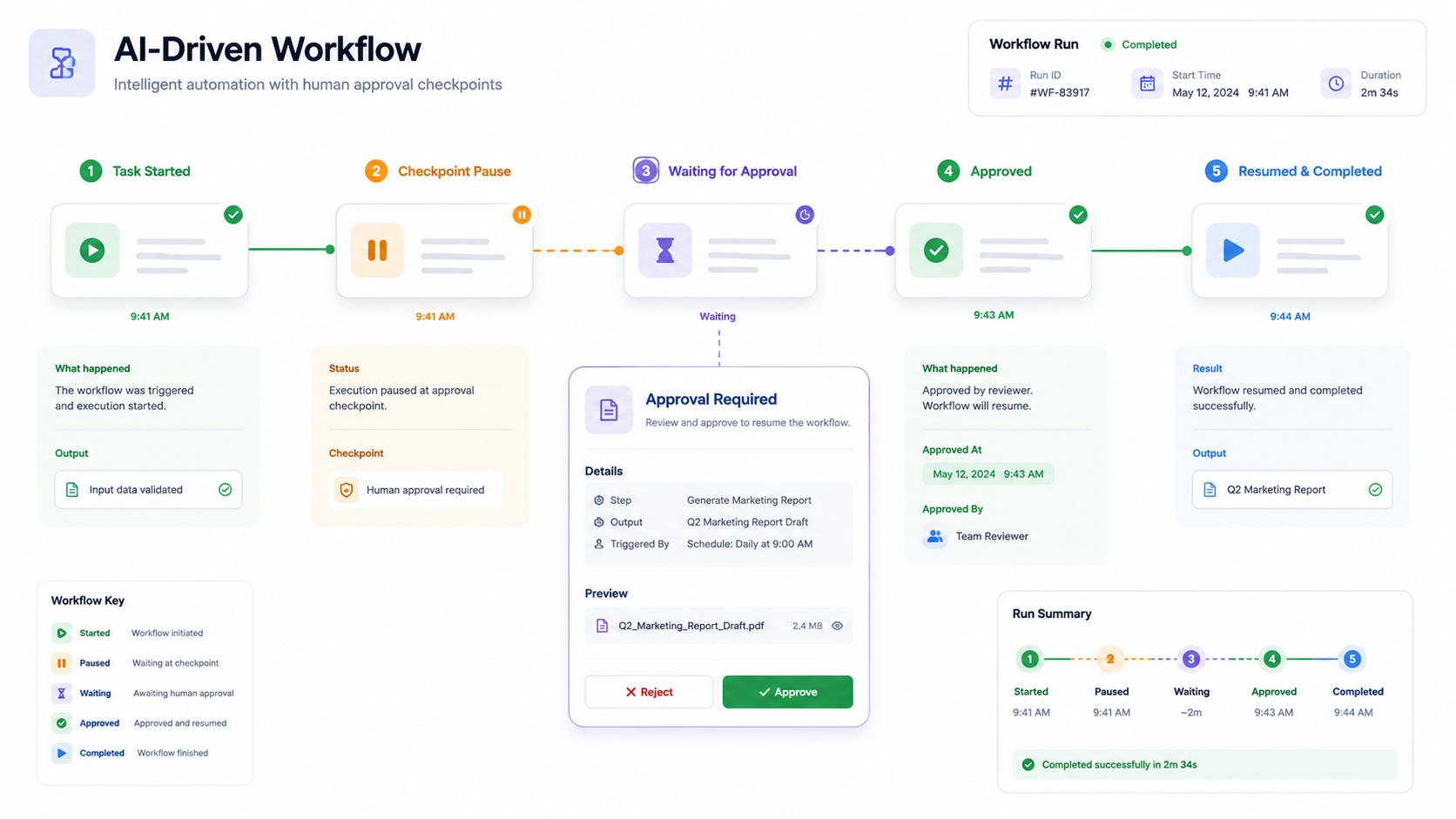
Most AI agents still behave like short-session assistants. They respond, call a tool, return an answer, and stop. That works for simple support queries or one-step automations, but it does not match how SaaS workflows actually run.
A customer onboarding flow may take five days. A vendor approval may wait on finance. A CRM follow-up may pause until the next response. A healthcare intake may require human review before the next action. These workflows are not continuous conversations. They are business processes with gaps, events, approvals, and handoffs.
That is why long-running agents are becoming important for agentic SaaS development. Recent work around platforms such as Google's Agent Development Kit makes the shift clear: production agents need durable state, persistent sessions, event-driven wake-ups, and controlled delegation instead of relying on a growing chat history.
The Core Shift: From Chat Memory to Workflow State
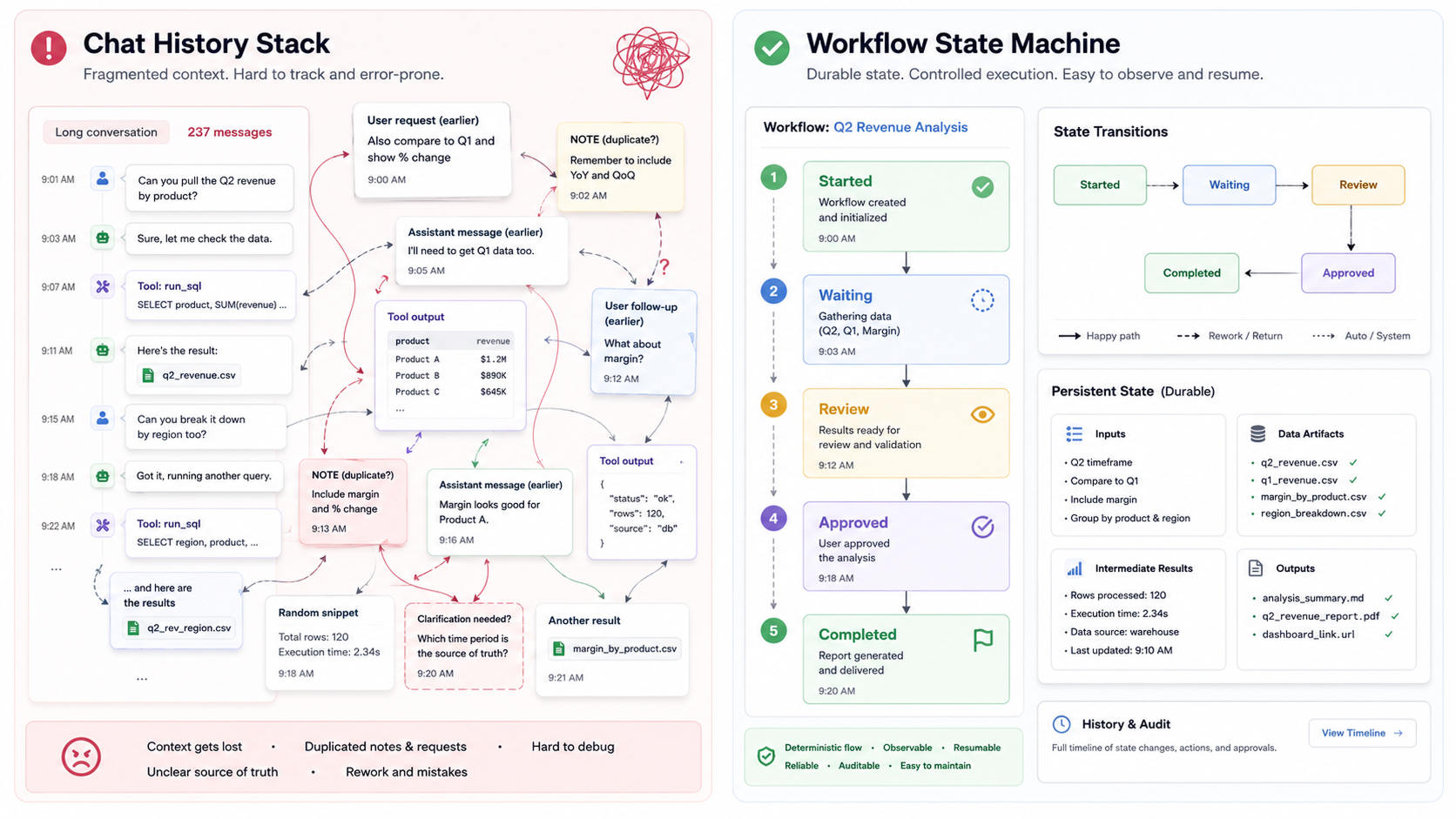
The first mistake startups make is treating memory as a long chat log. A chat log can help the model remember what was said, but it is not a reliable source of truth for business execution. After many turns, old messages, duplicated instructions, partial tool outputs, and user corrections start to pollute the context.
A long-running agent needs a different architecture. It should know where the workflow is because the system stores its current state, not because the model infers it from past messages.
For a SaaS workflow, this means every process should be broken into clear states. A customer onboarding agent, for example, may move through account created, documents pending, review approved, workspace configured, and handoff completed. The agent should only act based on the current state and the allowed transition.
Implementation rule: design the workflow state machine before you design the prompt. The prompt should read from state. It should not replace state.
Build Around Pauses, Not Just Actions
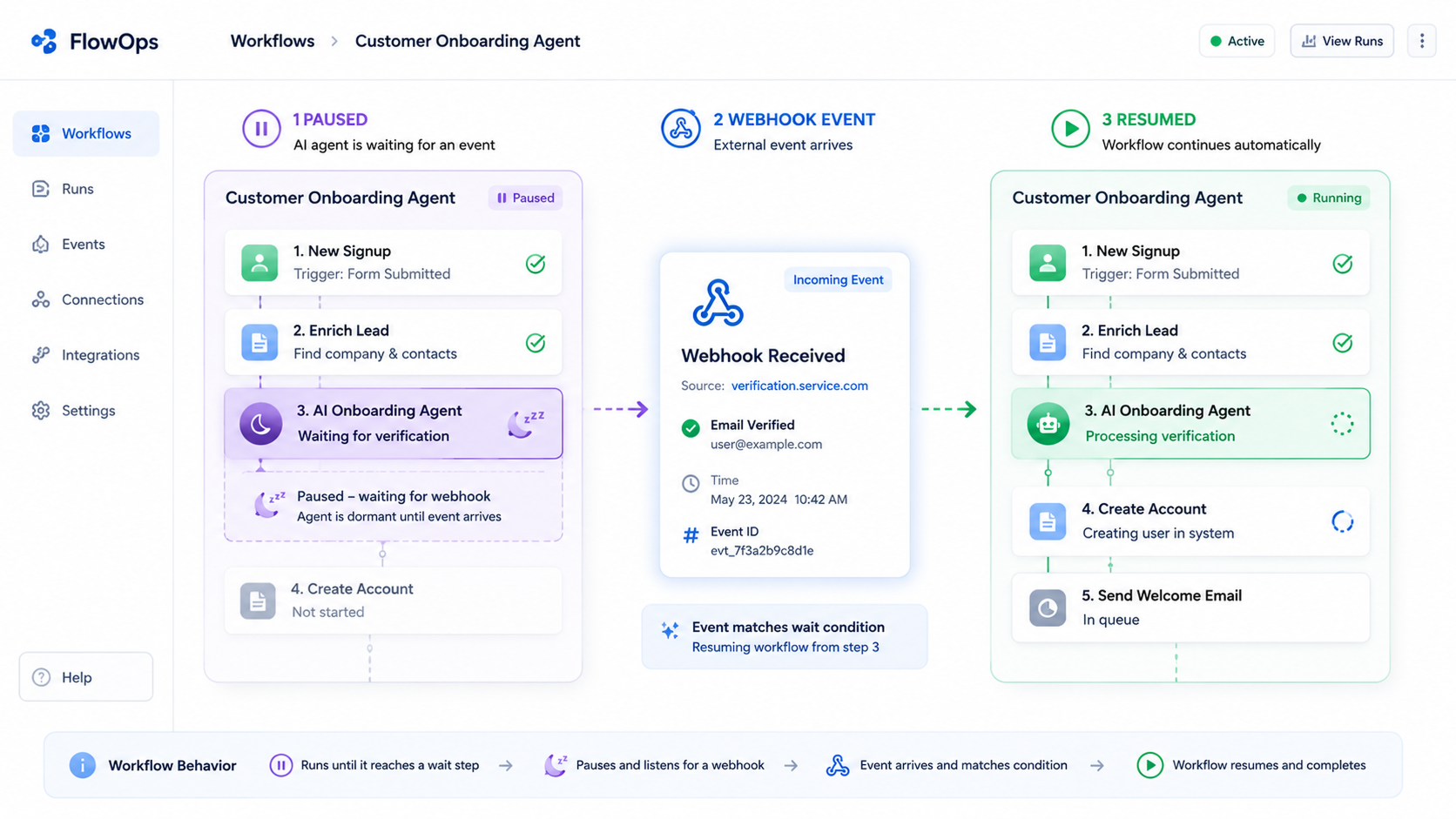
Most real SaaS workflows spend more time waiting than executing. Waiting for a signed contract, waiting for payment confirmation, waiting for manager approval, waiting for an external update, or waiting for the customer to reply is normal.
A short-running agent tries to complete everything immediately. A long-running agent accepts that idle time is part of the workflow.
Technically, this means the agent should not keep a thread open or poll every few minutes. It should pause, persist its state, and wake up only when an event arrives. That event could come from a webhook, queue message, scheduled job, CRM update, payment status change, support ticket update, or user action.
Do not build agents that keep thinking in the background. Build agents that stop safely, store their checkpoint, and resume when the business system gives them a valid reason to continue.
Use Persistent Sessions as the Execution Backbone
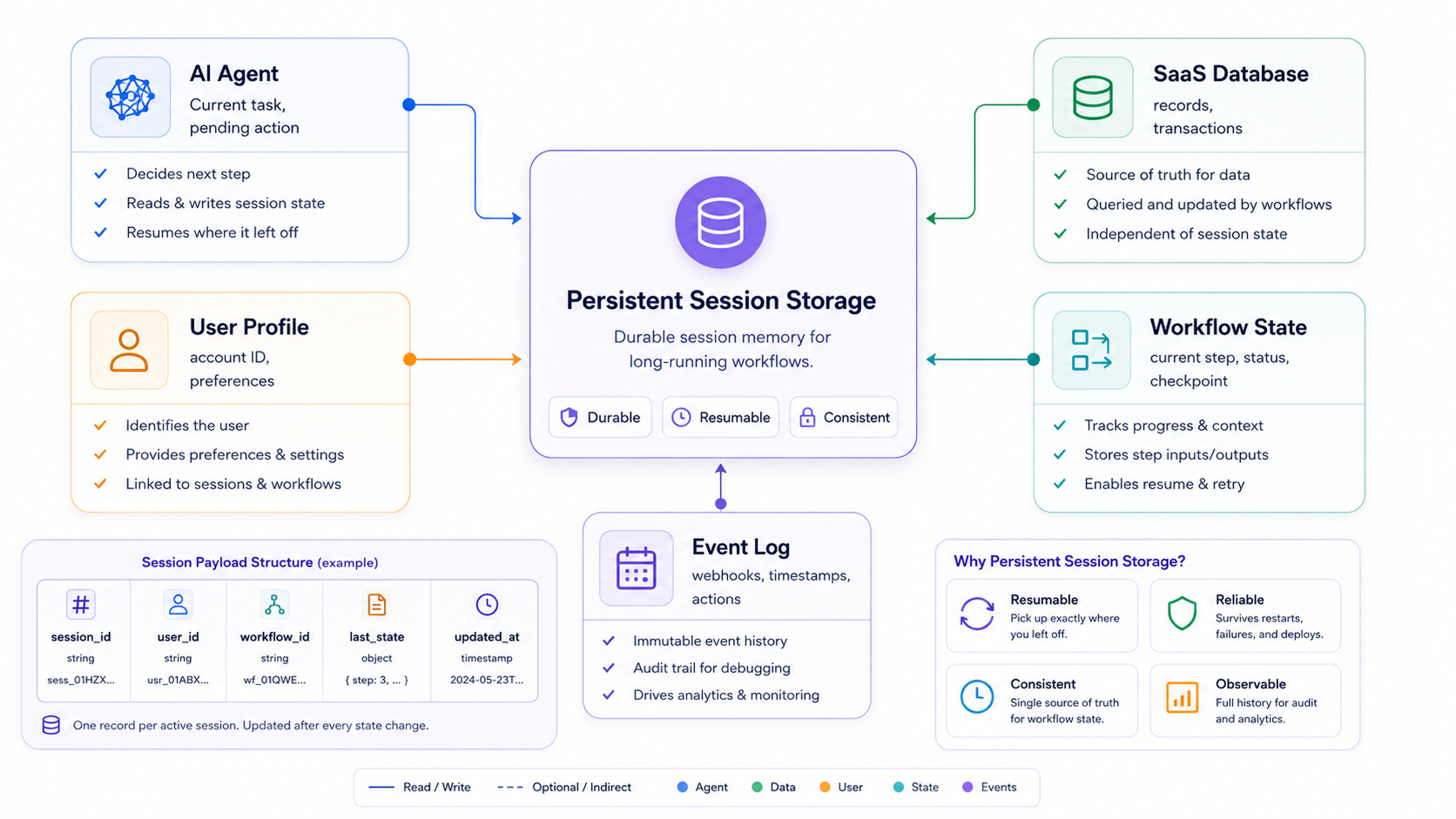
A long-running agent is only useful if it survives restarts, deployments, crashes, and idle periods. If the agent stores progress only in memory, every active workflow is at risk.
The session layer should persist the current workflow state, user or account identifiers, pending actions, last completed tool call, required approvals, and key business data. This does not need to be complex at the start. A startup can begin with a relational database table for agent sessions and workflow runs.
The critical point is separation. Conversation history, workflow state, tool results, audit logs, and long-term memory should not be stored as one mixed blob. Each has a different purpose. Workflow state tells the agent what step it is on. Tool results show what happened. Audit logs explain why it happened. Memory may personalize future decisions, but it should not become the only control mechanism.
A practical first version can use PostgreSQL for workflow state, Redis or a queue for short-lived events, and object storage for larger artifacts. The stack matters less than the discipline: every important step must be written before the agent moves forward.
Make Every Tool Call a Checkpoint
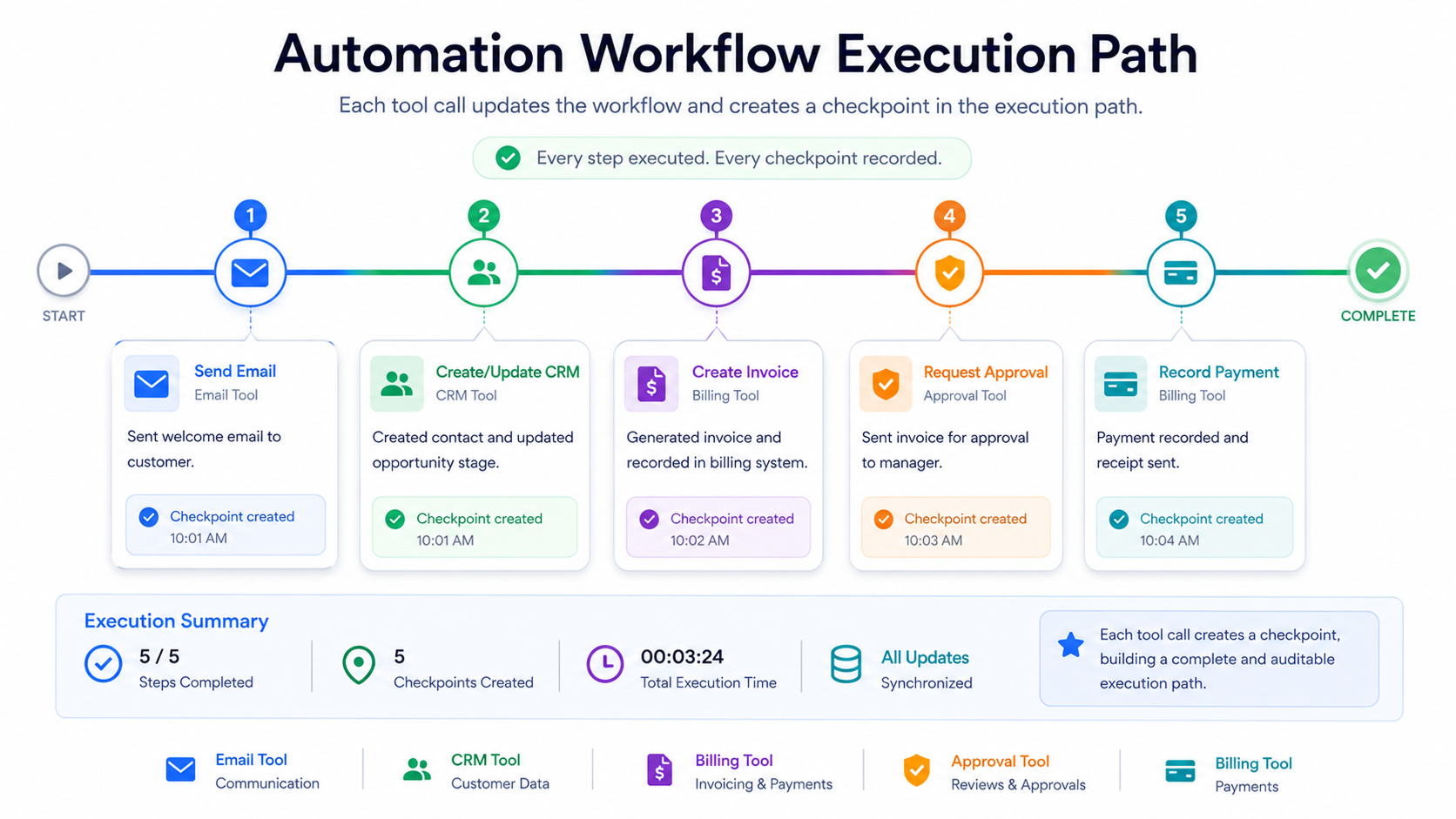
In long-running workflows, tool calls are not just actions. They are state transitions.
When an agent sends an onboarding email, creates a CRM task, updates a billing record, or triggers a document request, the system should immediately store what changed. If the server crashes after the action but before the state is saved, the agent may repeat the action later. That creates duplicate emails, duplicate tickets, or worse, duplicate financial operations.
The safer pattern is to treat tools as transactional steps. A tool should validate input, execute the action, write the result, update the workflow state, and return a structured response. The agent should not be allowed to assume the state changed unless the tool confirms it.
For SaaS startups, this is where agentic development becomes backend engineering. Every write action needs idempotency keys, retries, clear success and failure states, and logs. Without this, the agent may look intelligent in a demo but become unreliable in production.
Resume Through Events, Not Guesswork
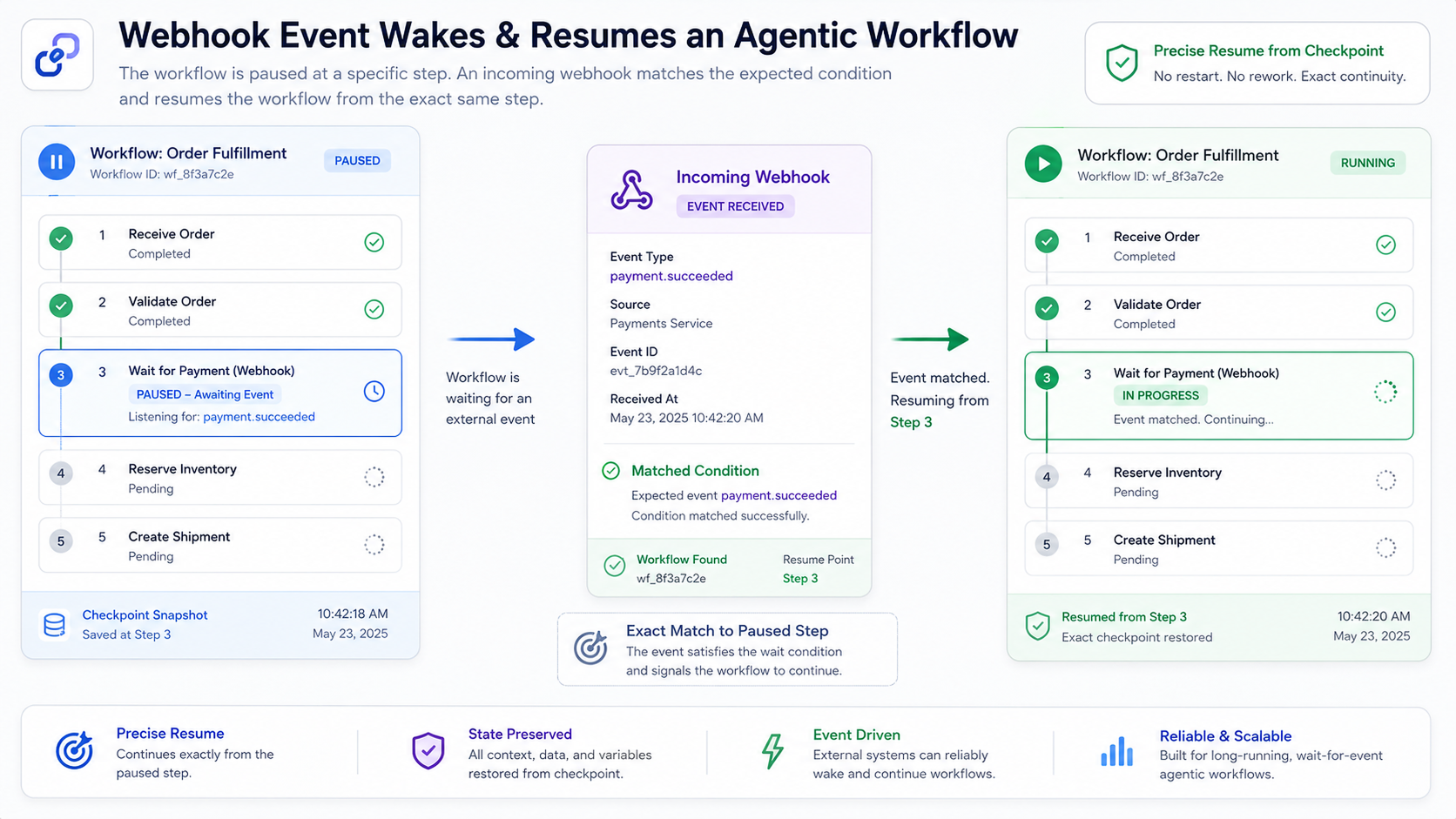
A paused agent should not resume by reading the full conversation and guessing what happened. It should resume because a trusted event updates the state.
When a customer signs a document, for example, the e-signature platform can send a webhook. The webhook handler verifies the event, loads the correct agent session, updates the workflow state to documents signed, and then invokes the agent with the new state. The agent now has a clear next step.
This pattern is useful across SaaS categories. In HR SaaS, the trigger may be a signed offer letter. In fintech SaaS, it may be a payment settlement event. In project management SaaS, it may be task approval. In healthcare SaaS, it may be human review completion. In customer success SaaS, it may be a renewal risk signal.
Implementation rule: normalize external events before they reach the agent. The model should receive a clean business signal, not raw webhook noise.
Add Human Approval Gates Where Risk Increases
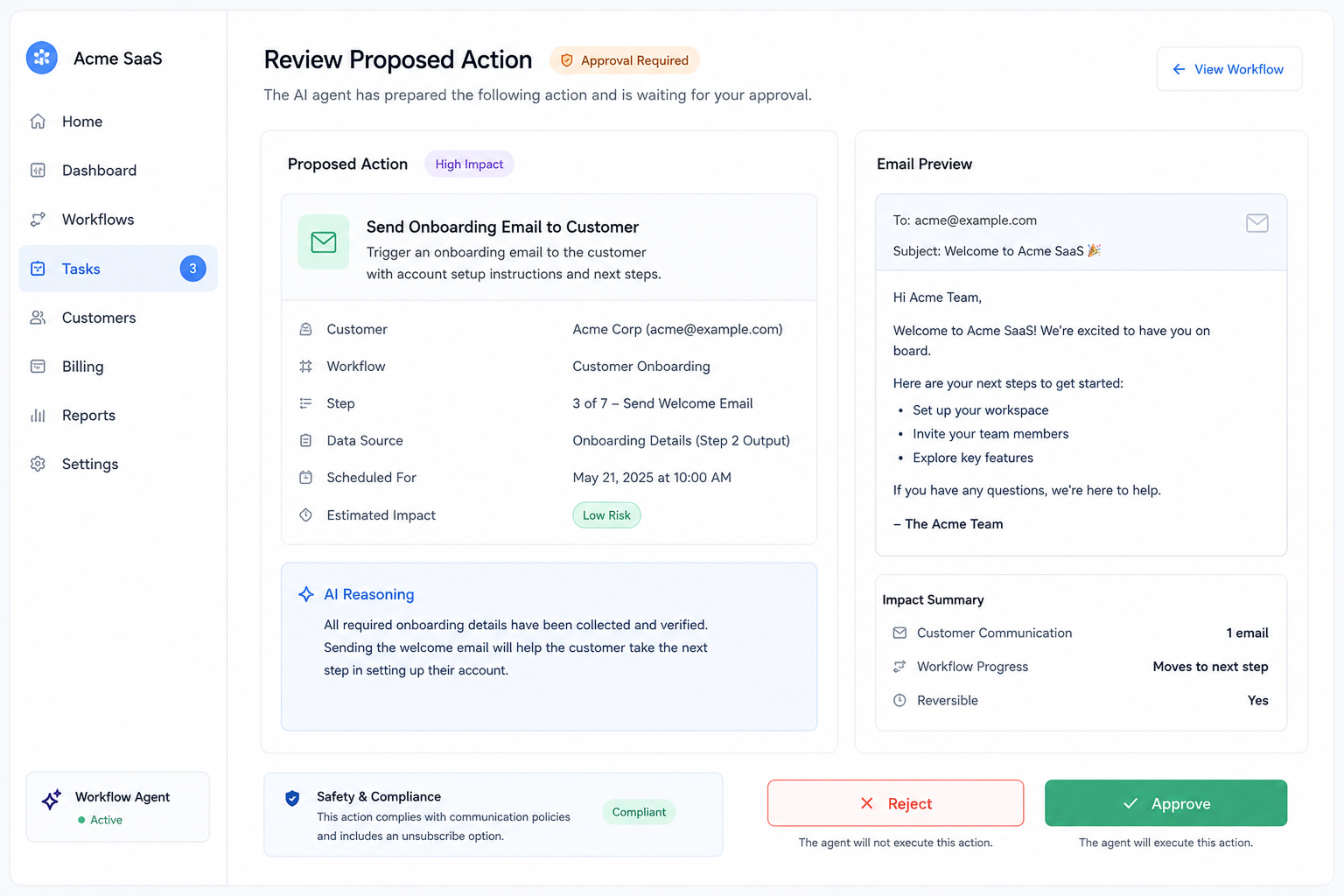
Long-running agents often touch sensitive workflows because they operate over time and across systems. That makes approval gates essential.
A startup should classify actions into low-risk and high-risk categories. Low-risk actions may include drafting a message, summarizing a ticket, or checking a status. High-risk actions may include sending a customer-facing email, changing billing data, deleting records, updating legal documents, or escalating a healthcare-related workflow.
The agent should be allowed to prepare high-risk actions, but not always execute them. Before execution, the system should present the proposed action, the reason, the affected record, the expected result, and the rollback path if available.
This is not just a compliance feature. It improves product trust. Users are more likely to adopt agentic workflows when they can see what the agent plans to do before it does it.
Keep Agents Narrow and Delegate Specialized Work
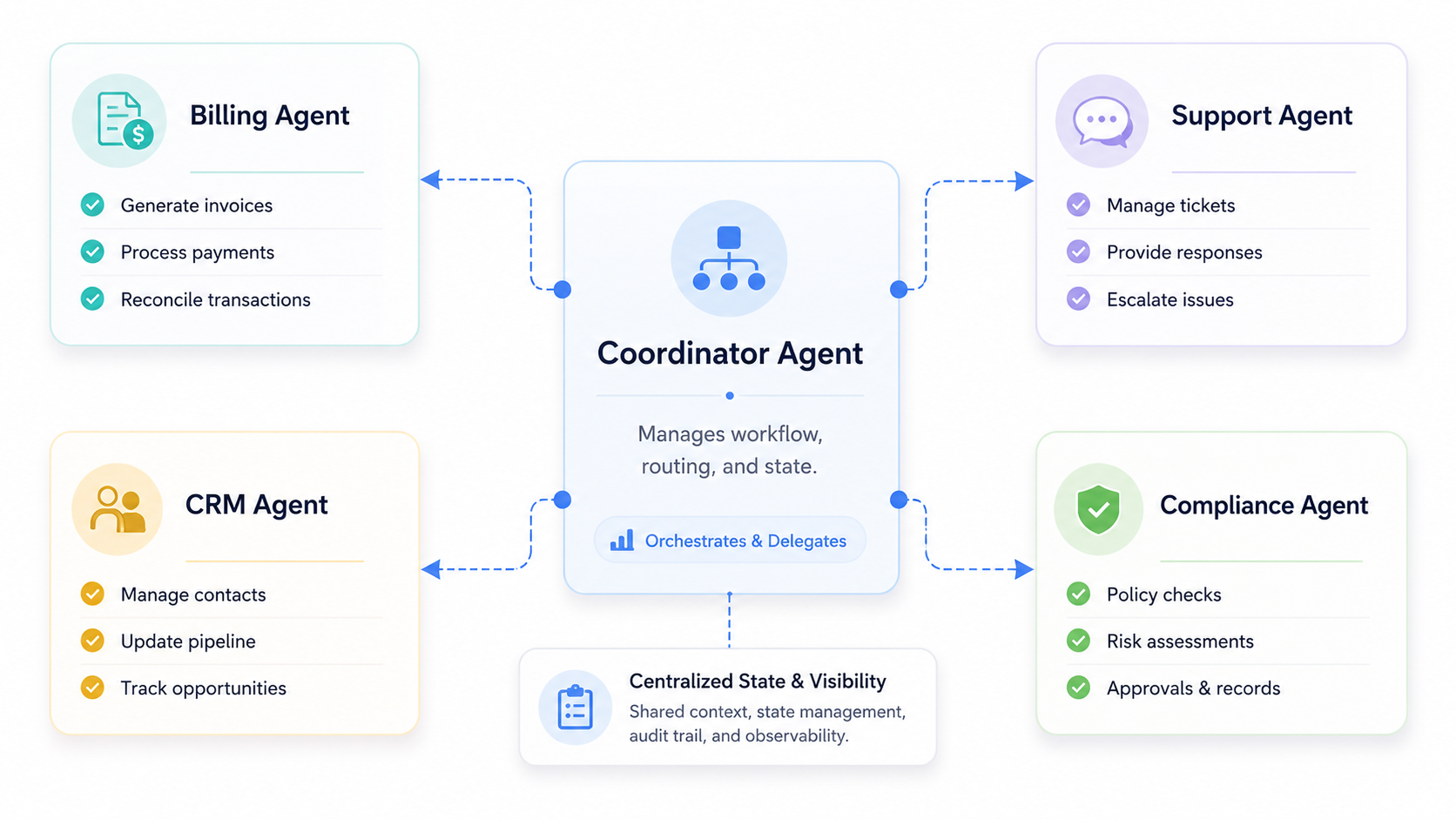
Long-running workflows become difficult when one agent owns every tool, every policy, and every decision. The prompt grows. The context grows. The risk of wrong tool selection increases.
A better pattern is to use a coordinator agent with specialist agents or specialist tools. The coordinator manages the workflow state and decides what should happen next. Specialist agents handle narrow tasks such as billing checks, CRM updates, document review, or support ticket analysis.
This structure is useful for SaaS startups because it matches how teams already operate. A customer onboarding workflow may need sales, finance, support, and success inputs. The agent architecture should reflect those boundaries.
The technical guideline is to keep the coordinator responsible for state and sequencing. Keep specialist agents responsible for domain-specific execution. Do not let every agent update every part of the workflow state.
Test Time Gaps Before Production
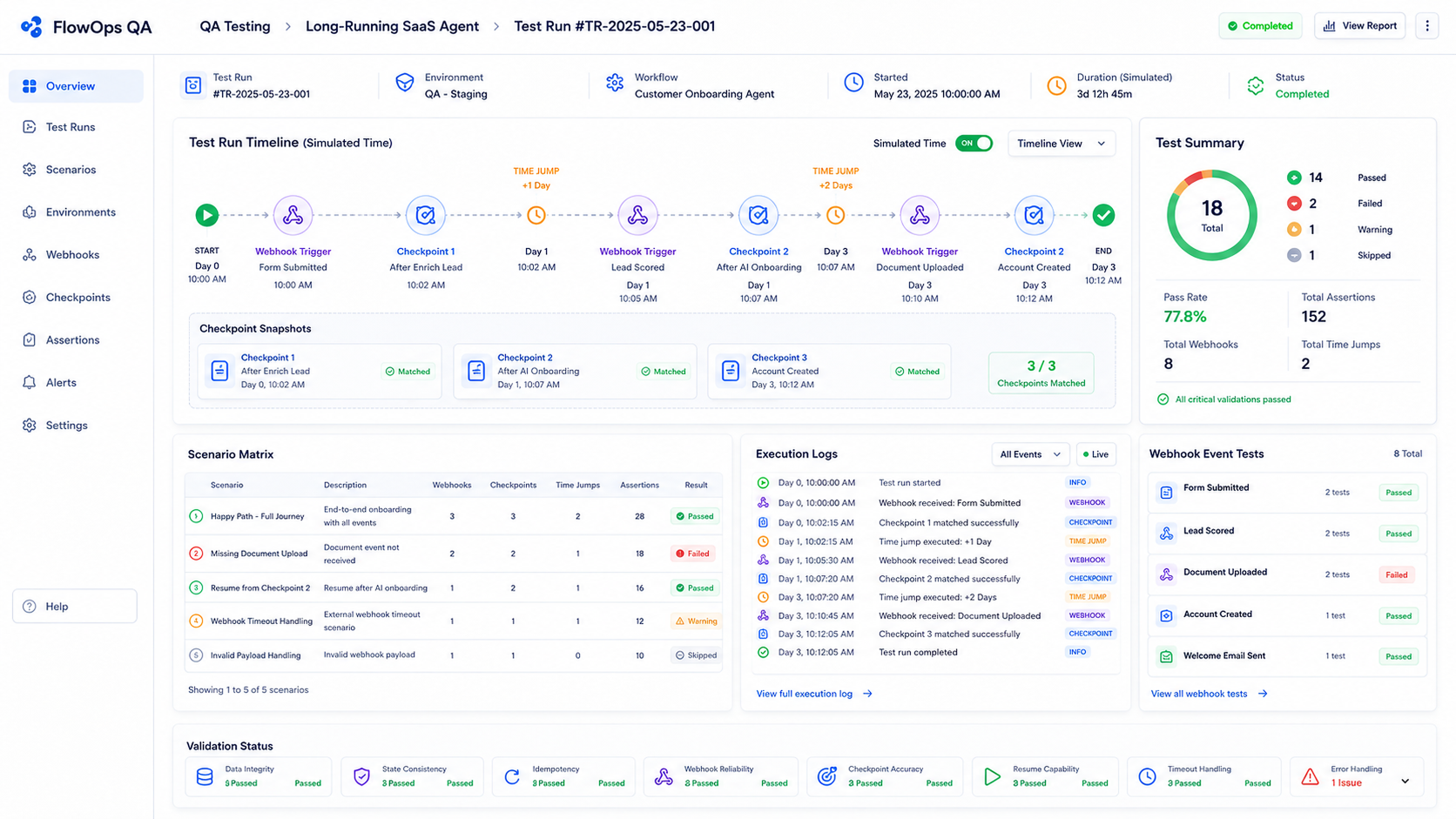
Long-running agents cannot be tested only through live usage. No startup should wait seven days to discover that the agent forgot what happened on day one.
The better approach is to simulate time. Preload the session with a known state, trigger the next event, and test whether the agent resumes correctly. The test should verify that the agent does not skip required steps, does not repeat completed actions, and does not execute tools while waiting for approval.
This should become part of CI/CD. Every change to the prompt, tool schema, workflow state, or event handler should run against golden workflow tests. These tests should include normal paths, delayed paths, rejected approvals, failed webhooks, duplicate events, and missing data.
For startups, this creates a practical quality bar. The agent is not production-ready because it answered correctly once. It is production-ready when it handles interruption, delay, failure, and resumption consistently.
Instrument the Agent Like a Workflow System
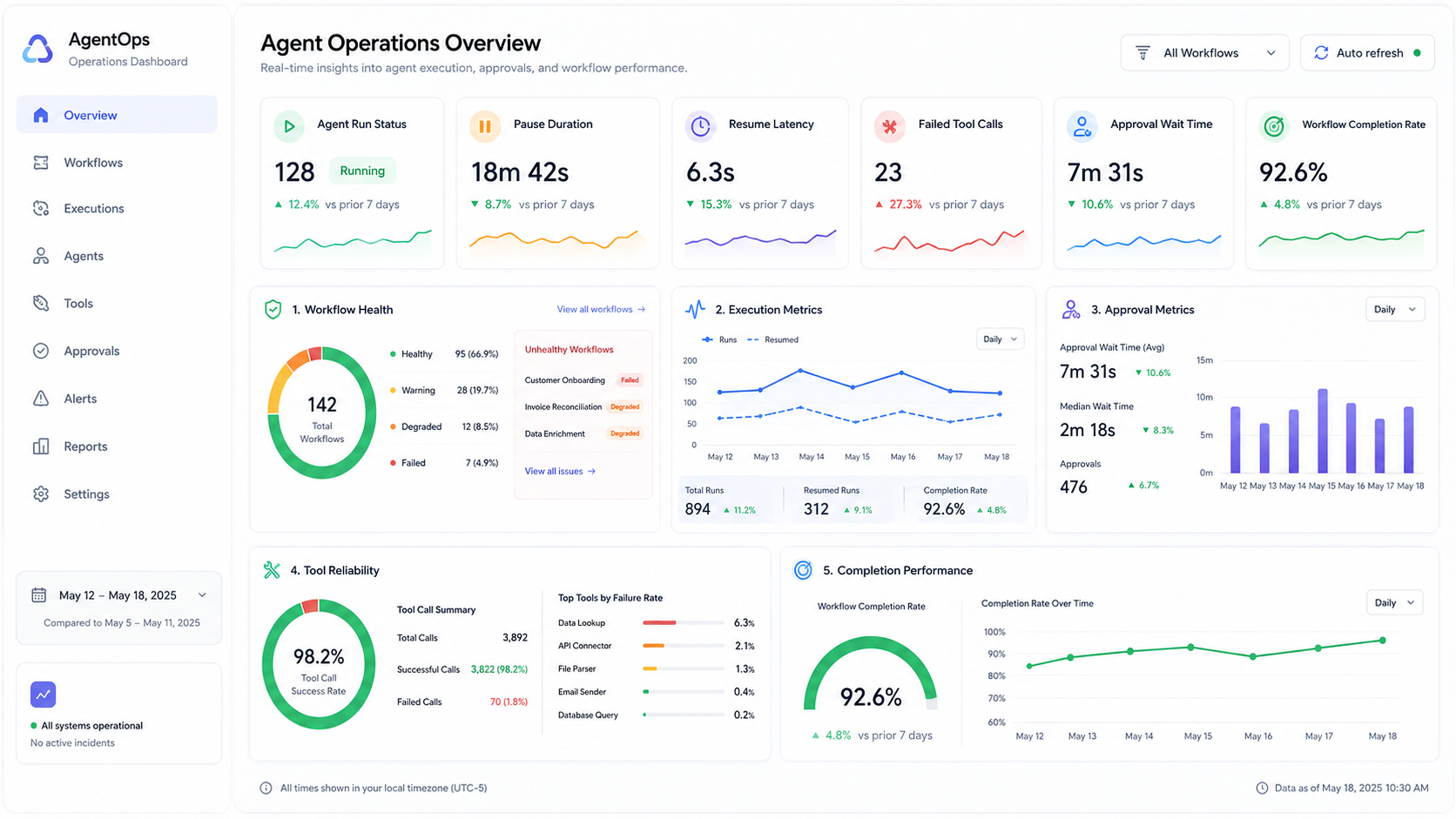
A long-running agent should be observable. Teams need to know where workflows are paused, why they are waiting, how often they fail, and which steps require human intervention.
The most useful metrics are not only model latency or token cost. For SaaS workflows, teams should track completion rate, average pause duration, resume latency, duplicate event rate, approval rejection rate, tool failure rate, and manual takeover frequency.
Logs should show the state before and after each tool call. Traces should connect the user request, agent decision, tool execution, state transition, and external event. Without this visibility, debugging becomes guesswork.
For business leaders, this also turns agentic development into an operational system. The agent is not a black box. It becomes a measurable workflow layer that can be improved over time.
Start With One Workflow, Not the Whole Product
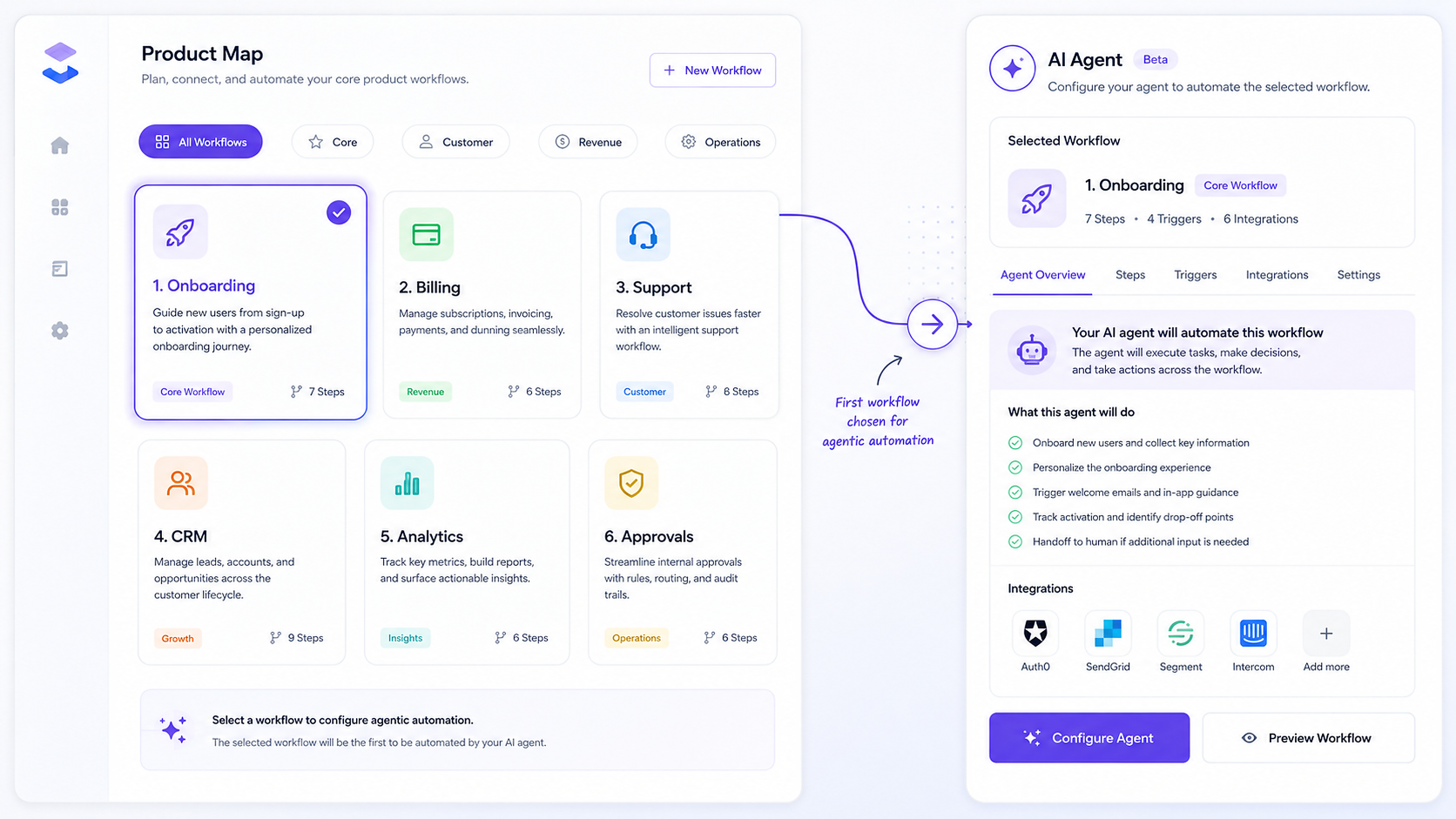
The right way to adopt long-running agents is not to rebuild the entire SaaS product around agents. Start with one workflow where time gaps, handoffs, and repeated coordination create real friction.
Good candidates include customer onboarding, sales follow-up, invoice dispute resolution, support escalation, compliance review, procurement approval, and renewal management. These workflows have clear states, business value, and measurable outcomes.
The first implementation should be narrow. Define the workflow. Define the states. Connect only the required tools. Add persistence. Add events. Add approval gates. Add evaluations. Then expand.
This approach gives startups a practical path. Instead of pitching an abstract AI agent platform, they can ship a reliable workflow agent that saves time, reduces missed steps, and gives users confidence.
Conclusion
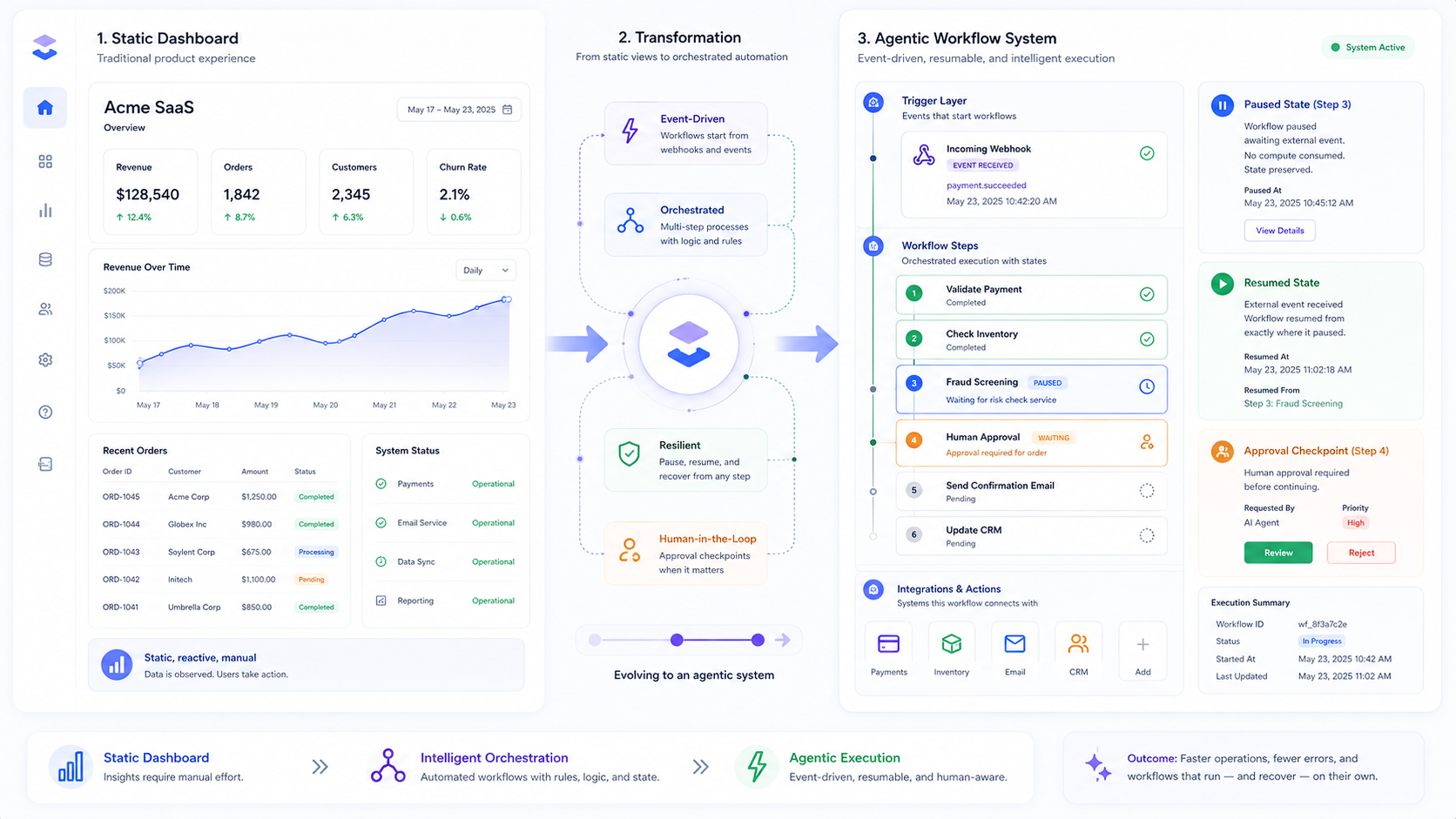
Long-running agents are not just chatbots with more memory. They are workflow systems that can pause, resume, and continue across real business timelines.
For SaaS startups, the opportunity is clear. The next generation of AI-enabled products will not only answer questions inside the app. They will coordinate work across systems, wait for the right signal, ask for approval when needed, and continue from the exact point where they stopped.
The architecture behind that shift is already visible: explicit state machines, persistent sessions, event-driven resumption, transactional tool calls, human approval gates, specialist delegation, workflow testing, and observability.
SaaS teams that build these foundations early will be better positioned to turn their products from systems of record into systems of action. This is also where services like SaaSToAgent become relevant: helping SaaS companies convert existing workflows, APIs, and business logic into controlled agentic experiences that can run safely beyond a single chat session.