
Why Agentic Products Need a New QA Approach
There is a growing challenge in AI product development that many business teams feel, even if they do not describe it in technical terms: as your AI agent becomes more capable, it also becomes harder to know whether it is consistently doing the right thing.
At first, everything may seem fine. You test a few conversations, the responses look good, and the feature goes live. Then a customer reports that the agent gave the wrong answer, skipped an important question, or got stuck in a workflow that should have been simple. By that point, the issue is no longer just technical. It affects trust, support load, user experience, and business credibility.
That is why traditional QA methods are no longer enough for agentic products. Older software could be tested screen by screen and button by button. AI agents work differently. They respond across conversations, handle multiple turns, and behave differently depending on what the user says next. That makes manual testing slow, inconsistent, and difficult to scale.
What businesses need is a system that can test the AI agent continuously, the same way a real user would.
The Core Idea: An LLM Judge in a Loop
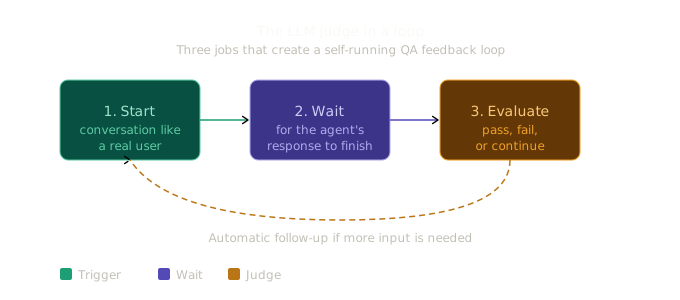
A QA agent for agentic systems performs three essential jobs:
- It starts a conversation with your AI agent the way a real user would.
- It waits for the response to complete.
- It evaluates whether the response is good enough, whether the task is finished, or whether another follow-up is needed.
This third step is where the real business value begins.
Instead of asking a human tester to manually decide what should happen next, the QA agent uses an LLM-based evaluator to review the conversation and compare it against predefined success criteria. If the response is good, it can mark the interaction as passed. If the response is weak, incomplete, or incorrect, it can fail the run. If the agent needs more input, it can generate the next message and continue the test automatically.
In simple terms, this creates a self-running feedback loop for your product.
That matters because it removes the need for your team to spend hours testing scenarios by hand. More importantly, it means your business can identify issues before users do. Instead of worrying whether the product will break in live usage, you gain a repeatable way to validate quality at scale.
Architecture: Don't Build a Parallel Universe
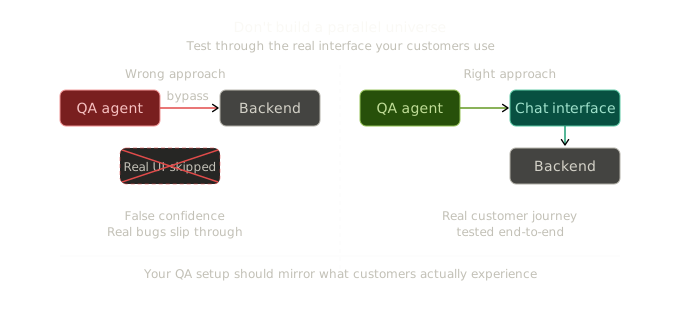
One of the biggest mistakes teams make when building evaluation systems is testing the agent in a way that real customers never experience.
It may feel easier to connect the QA layer directly to the backend, skip the user interface, and test only the internal logic. On paper, that sounds efficient. In reality, it creates false confidence.
Your customers do not use a hidden testing route. They use the actual product interface. They experience delays, streaming responses, approvals, state changes, and front-end behavior. If your QA setup ignores those realities, then you are not testing the real experience. You are testing a simplified version of it.
The better approach is to let the QA agent operate through the same chat interface your users already use. That way, it validates the actual customer-facing journey rather than a clean technical shortcut.
From a business perspective, this is critical. It means your evaluation process is aligned with the product you are actually selling. It protects you from launching features that appear stable in internal tests but fail in real-world usage. It also gives leadership more confidence that what is being measured reflects what customers will actually see.
The Backend: A Stateless LLM Judge
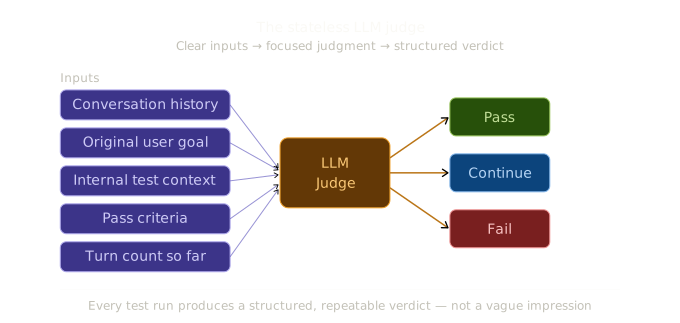
The evaluation service behind the QA agent should stay focused and lightweight. Its role is not to run your entire product. Its role is to assess each conversation turn clearly and consistently.
For every evaluation step, it looks at the conversation history, the original user goal, any internal context needed for testing, the pass criteria, and the number of turns taken so far. It then returns a simple judgment: pass, fail, or continue.
That simplicity is important.
For business teams, this means every test run can produce a clear outcome instead of vague impressions. You do not get "it looked okay" as your standard. You get structured decisions and repeatable evidence.
A few design choices also matter here:
- The evaluation should be consistent, not overly creative. This is why the judge should be tuned for reliability rather than imagination.
- Internal context can be kept private from the product itself. That allows the QA system to test realistic scenarios without exposing hidden setup details to the agent.
- Turn limits should be flexible. A rigid cutoff can make a healthy interaction look like a failure, even when the agent is actually progressing well.
For non-technical stakeholders, the takeaway is simple: this backend design turns AI quality from guesswork into something measurable. It helps reduce the business risk of releasing features that look promising in demos but behave unpredictably under real customer conditions.
The Frontend: Three React Patterns That Actually Matter
On the surface, the frontend implementation may sound like an engineering detail. In practice, it directly affects whether your QA system is dependable enough to support the business.
The orchestration layer needs to know when a response has finished, when an evaluation should happen, and when the next follow-up should be sent. If that control layer is unreliable, the whole testing process becomes noisy and hard to trust.
Three implementation patterns matter most:
1. Refs for Everything in Async Callbacks
Because the QA loop runs across many interaction cycles, it needs access to the most current data at all times. If it reads outdated values, the system can behave inconsistently or stop after the first turn.
For the business, this matters because broken QA automation leads to false signals. Teams may think the product is being validated when in reality the testing loop is incomplete or unstable.
2. Detect the Streaming Transition, Not the Streaming State
The evaluation should run only when the agent has actually finished responding, not just whenever the system notices that streaming is off.
This sounds technical, but the business meaning is straightforward: your QA process should react at the right moment, not too early and not too late. Timing errors in evaluation can create inaccurate results and wasted debugging effort.
3. Dual Phase Tracking
The QA process should clearly track what stage it is in, such as idle, waiting, evaluating, or done.
This helps both the interface and the control logic stay synchronized. From a product and operations perspective, that means fewer race conditions, fewer confusing failures, and a much more dependable testing workflow.
The larger point is that these patterns are not only code-level improvements. They are the difference between a QA system your team can trust and one that creates more confusion than clarity.
Handling the Approval Problem
Many production AI agents are designed with approval gates for sensitive or high-impact actions. That is the right thing to do. If an agent is about to trigger a write action, make a change, or execute something important, a human should often have the ability to approve or reject it.
But this creates a problem during automated testing. If the QA system reaches one of these approval points and no one responds, the run can stall indefinitely.
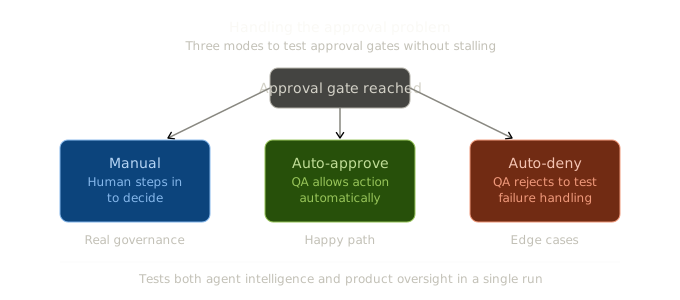
The solution is to support three approval modes:
- Manual, where a human steps in and decides.
- Auto-approve, where the QA system allows the action automatically.
- Auto-deny, where the QA system rejects the action automatically to test failure-handling behavior.
This is more than a testing convenience. It is a way to simulate the real governance conditions your product will operate under.
For business leaders, this matters because AI quality is not just about whether the agent can answer correctly. It is also about whether it behaves safely, responsibly, and predictably when decisions require control. A QA agent that can test approval flows gives your team confidence not only in product intelligence, but also in product oversight.
What the Panel Looks Like
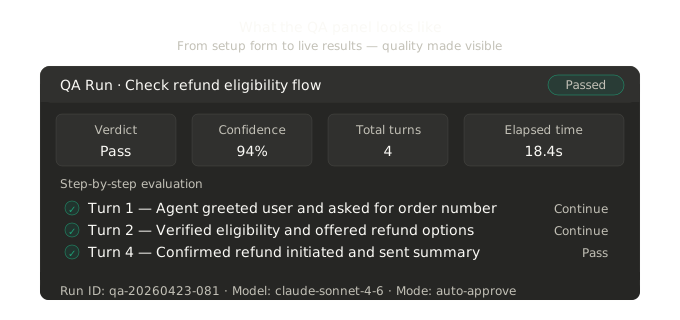
The QA panel should be simple enough for teams to use quickly, but detailed enough to provide meaningful visibility into what happened during a run.
Before the test begins, it can act as a setup form where the user defines the query, adds supporting context, enters pass criteria, and adjusts settings such as time limits, turn limits, and approval mode.
Once the test is running or complete, the panel becomes a live results view. Each evaluation step can show a verdict, the reasoning behind it, and any follow-up message that was sent. At the end, the panel can summarize the overall result with the final verdict, confidence score, total turns, and elapsed time.
This structure matters because it turns testing into something operationally usable.
Instead of hiding evaluation deep inside logs or engineering workflows, it gives product, operations, and leadership teams a more visible way to understand performance. It becomes easier to review failures, explain outcomes, and align technical work with customer experience goals.
In other words, the panel is not just a developer tool. It can become a quality dashboard for the business.
Common Failure Modes
Every new QA system will run into issues during its first implementation. Knowing the likely failure points upfront can save time and reduce frustration.
A few common problems include:
- The run stops after the first turn because the system is reading outdated state.
- The evaluation endpoint fails because the model client is not properly configured.
- The test hangs when the agent reaches an approval step that has not been handled.
- The panel resets after an error instead of clearly showing what went wrong.
- The system forces a failure too early because the turn limit is too rigid.
These may sound like technical edge cases, but they have a real business impact.
When QA tooling is unreliable, teams lose confidence in the product signals they are receiving. That slows releases, increases rework, and makes it harder for non-technical stakeholders to know whether the product is actually improving.
Calling out these failure modes early helps set better expectations. It also reinforces an important point: building a QA agent is not only about automation. It is about building trustworthy automation that helps your team move faster without losing control.
Why This Is Worth Building
A QA agent is valuable because it changes how your business can manage AI quality.
Without one, testing is limited by time, people, and patience. A team may manually run a handful of scenarios before launch and hope that covers the important cases. That approach breaks down quickly as your AI product becomes more complex.
With a QA agent, you can run many more scenarios with far less manual effort. You can test edge cases, approval paths, failure conditions, and regression risks in a more systematic way. You can connect those tests to release workflows and catch problems before they reach production.
But the deeper value is strategic.
A QA agent reduces the amount of technical uncertainty your business has to carry. It gives teams a clearer picture of what the AI product is actually doing, how consistently it performs, and where the risks are. That means product leaders can spend less time worrying about hidden technical issues and more time focusing on adoption, growth, customer experience, and operational scale.
In short, a QA agent helps the business stay focused on scaling the product while the system works in the background to protect quality, reduce surprises, and strengthen trust.
Your AI agent is only as dependable as your ability to verify it. A QA agent gives you that verification layer. And for businesses building agentic products, that can become a major competitive advantage.